An encrypted browser app is a web-based messaging tool that performs end-to-end AES-256-GCM encryption entirely in your browser before any data touches a server, allowing identity-free, ephemeral conversations without installing an app. Ciphar applies this model to one-time channels that expire after 60 minutes, with no account or phone number required.
You need to contact someone about sensitive information tonight. A journalist may have a source who can't safely share a phone number. A lawyer may need to discuss a case with a client on a borrowed laptop. A security researcher may want to coordinate a vulnerability disclosure without creating another permanent account or message archive.
The usual options create friction or leave a lasting trail. Signal and WhatsApp are designed around durable contacts and ongoing relationships. Email creates records in multiple inboxes. A disposable note service may handle one message but not a live conversation. An encrypted browser app takes a different approach: open a channel, share an access key through a separate route, talk briefly, then let the channel disappear.
That distinction matters. Encryption protects the content of a conversation, while identity-free access reduces the information needed to begin one. Ephemerality limits how long the service retains the session. These controls address different risks, and combining them can be useful when the conversation matters more than the relationship history.

The browser isn't automatically a secure enclave. It becomes part of a defensible design only when the application uses secure transport, careful key handling, browser cryptography, strict content controls, and a server that can't decrypt what it relays. That broader perspective also connects with practical guidance on security for internal tools, where access, data handling, and operational controls must work together.
Ciphar's secure web messaging guide is useful background for readers who want to distinguish a temporary encrypted workflow from an ordinary chat page with a padlock icon.
Why Encrypted Browser Apps Matter Right Now
A source reaches a journalist through an unfamiliar channel and asks for a conversation before the end of the day. The journalist doesn't want to demand a phone number, and the source doesn't want to install software on a device that may be monitored. They need a shared space that works in a browser, verifies the right access key, and doesn't accidentally turn a short conversation into a permanent contact record.
A browser-based encrypted chat channel can meet that need with a link and a separately shared secret. The browser creates the encryption keys locally, while the service relays data that should be unreadable without the participant's key. No app-store approval, account registration, email address, or phone-number exchange has to stand between the two people.
Practical rule: A private conversation needs more than encrypted transport. Ask who can decrypt the content, what identifies the participants, how long data survives, and what happens after a failed access attempt.
This represents a distinct approach to privacy rather than just applying encryption to a standard messaging app. Most native messengers are built to maintain continuity. They retain contact lists, sync conversation history, accommodate ongoing discussions, and allow users to easily resume previous threads. While these capabilities are useful, they also establish deeper, more enduring connections between identities and data.
An encrypted browser app optimizes for a narrower workflow. It works well when the participants need a temporary room rather than a permanent social graph.
Removing three sources of friction
The model addresses three common compromises:
- Identity collection: Participants can communicate without creating accounts or exchanging phone numbers.
- Installation pressure: A modern browser can provide the application surface, so there's no required download or app ecosystem.
- Persistent archives: A hard expiration policy can make the absence of long-term history part of the design rather than a setting users must remember to enable.
The trade-off is equally important. A temporary channel won't replace a long-term messenger for family, team, or community communication. It also won't protect a participant whose device is already compromised, whose screen is photographed, or who deliberately copies the conversation elsewhere.
The right question isn't “Is browser chat secure?” It's “Does this architecture match the threat and the task?” A journalist making first contact, a lawyer arranging a sensitive call, and a family maintaining an ongoing relationship have different requirements. The next issue is the cryptographic boundary, because the answer depends on where encryption happens and where the keys exist.
How Client-Side Encryption Works
A reporter needs to send a sensitive message from a borrowed laptop. There is no phone number to exchange, no account to create, and no application to install. The browser can still protect the message if encryption happens before the server receives it. The relay handles ciphertext, while the material required to recover readable text remains with the participants.
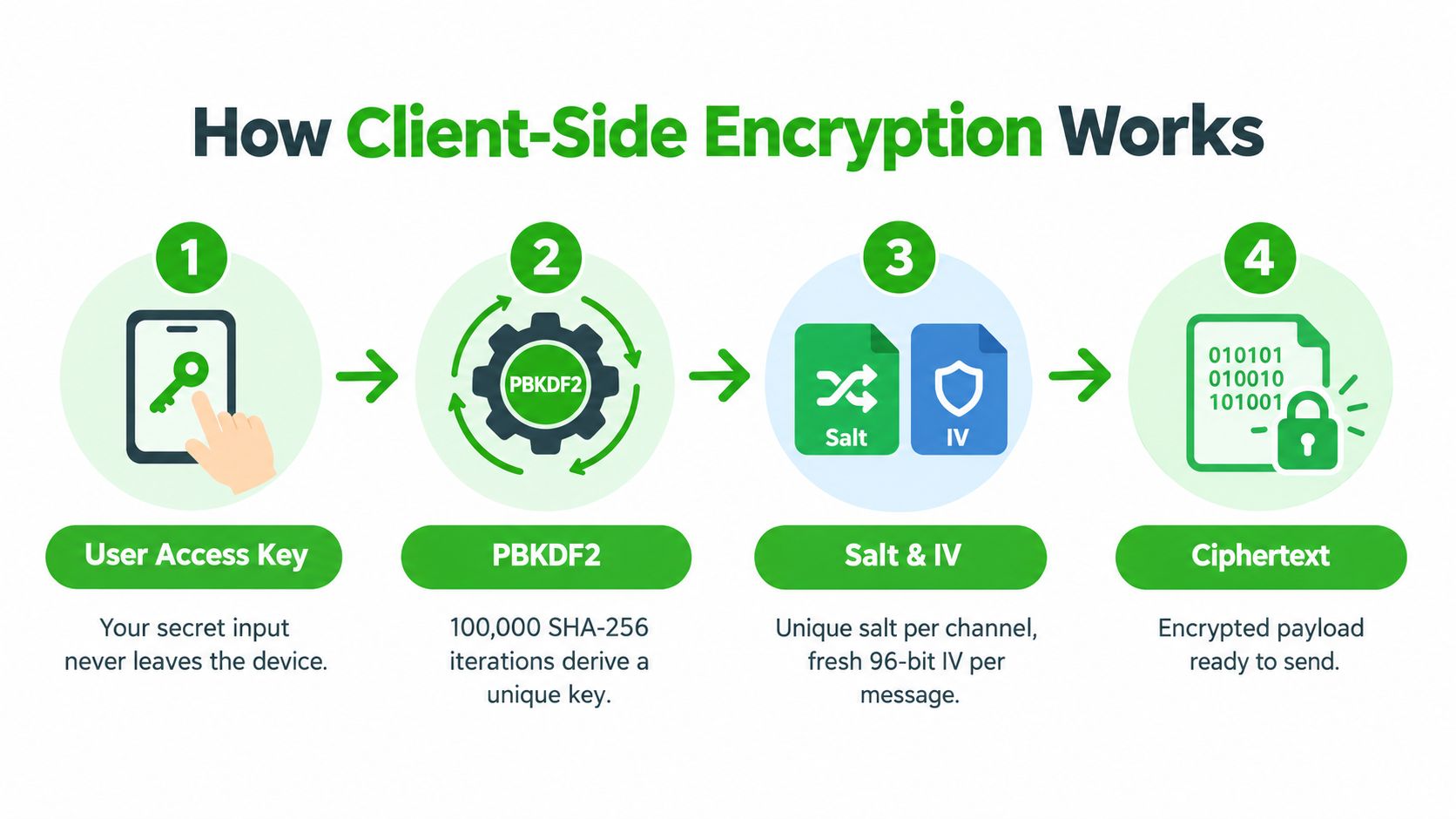
Ciphar's design makes the browser the cryptographic boundary. Its four-stage pipeline connects a human-shared secret to key derivation, authenticated encryption, and browser-side decryption. The client-side encryption guide explains the full model in more detail.
Starting with a human secret
The participant enters an access key into the browser. That input does not become an AES key directly, because human-created secrets may be short, predictable, or uneven in quality. The browser passes it through PBKDF2, a password-based key derivation function that repeats computational work before producing a cryptographic key.
Ciphar's documented pattern uses 100,000 SHA-256 iterations. This setting is an implementation detail, not a promise that a weak access key becomes strong. PBKDF2 makes repeated guessing more expensive, while the participants still need to share a sufficiently difficult secret through a separate channel.
Each channel also receives a unique salt. The salt is not secret. It prevents the same access key from producing the same derived result in every channel, reducing the value of precomputed comparisons and keeping each channel's cryptographic context separate.
Encrypting the payload
The derived key works with AES-256-GCM, which provides confidentiality and integrity together. It hides the message and helps the receiving browser detect alteration. For every encryption operation, the browser generates a fresh 96-bit IV, then sends the IV beside the ciphertext and authentication data.
The IV can be public, but it must be handled correctly. Reusing an IV with the same AES-GCM key can weaken the scheme's security guarantees. The mechanism resembles a lock whose internal starting position changes for every message. The lock remains the same, but repeating its starting position can expose patterns an attacker may exploit. The Web Crypto guidance on AES-GCM describes this browser-side confidentiality and integrity model.
The server can store the envelope without owning the key. The IV, salt, ciphertext, and authentication tag help the intended browser verify and decrypt the content. They do not reveal the plaintext to the relay by themselves.
Keeping the key in the browser
The native Web Crypto API, accessed through crypto.subtle, performs the cryptographic operations in the browser. The API requires a secure context, such as HTTPS or localhost. That requirement helps ensure the cryptographic code runs under the browser's protected delivery conditions, though HTTPS alone does not prove that every application script is trustworthy.
This distinction matters in real threat scenarios. A compromised endpoint, malicious code delivered to the browser, a screenshot, copied text, or an exposed access key can still defeat the intended protection. Browser encryption narrows the server's access; it does not turn an unsafe device into a safe one.
Network controls address a different boundary. Guidance on understanding VPN for development can clarify what a tunnel protects, but a VPN does not replace client-side encryption. It may protect traffic between a device and a network service, while the service can still read plaintext that the application sends after decryption.
The sequence is:
- The user enters an access key.
- PBKDF2 combines it with the channel salt and derives a key.
- The browser creates a fresh IV and encrypts the message with AES-256-GCM.
- The browser sends ciphertext and related cryptographic metadata to the relay.
- The receiving browser uses the shared secret, salt, IV, and authentication data to verify and decrypt the content.
Because the relay never receives the derived key, ordinary server-side decryption is unavailable. That boundary supports Ciphar's identity-free model, while its broader security design also depends on how channels expire and how intrusion signals are handled. Encryption protects the message in transit and storage. The threat model must still account for the browser, the device, and the secret used to open the channel.
The Zero-Knowledge Relay and Self-Destruct Mechanism
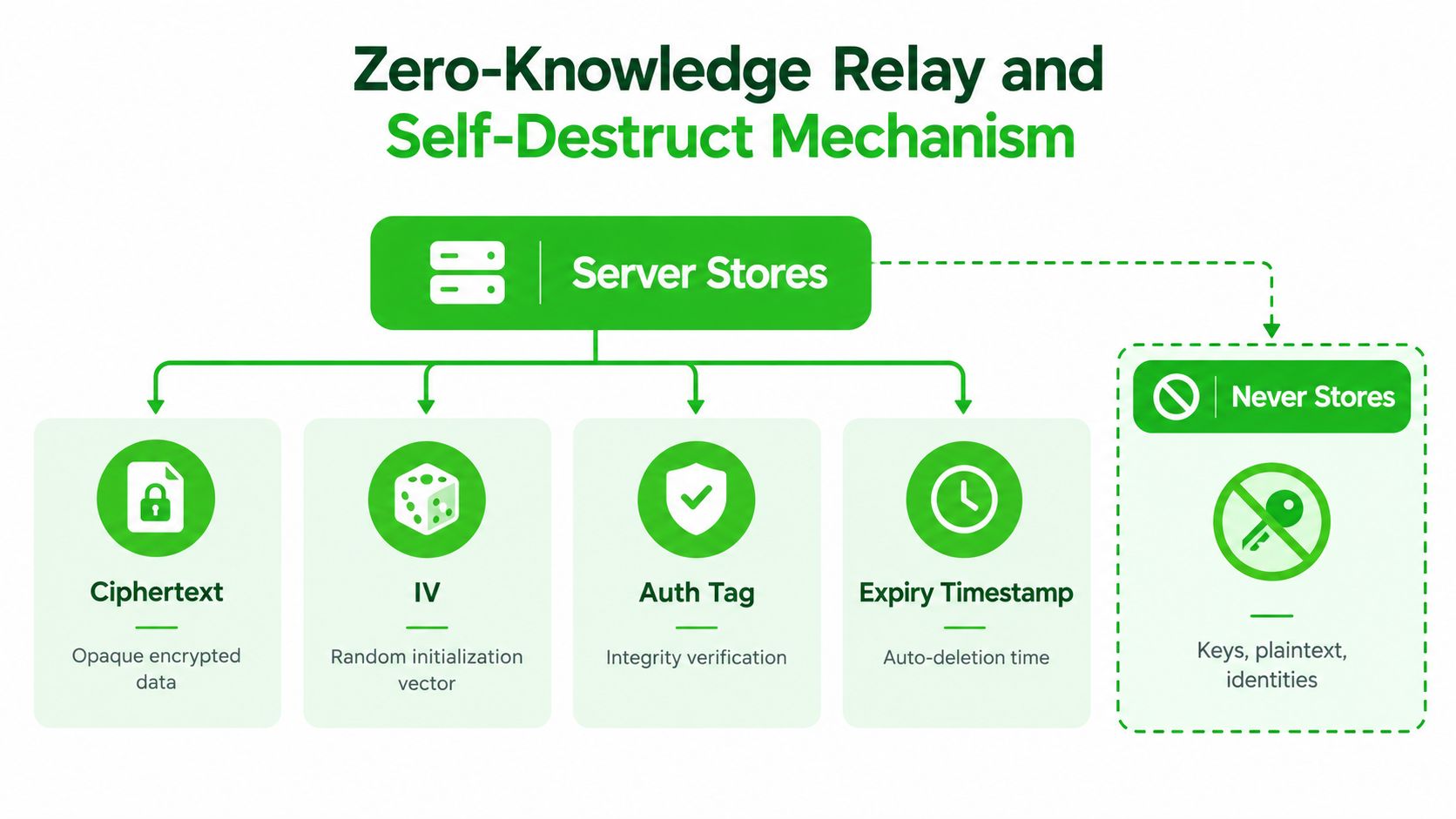
A zero-knowledge relay has a deliberately narrow job. It accepts encrypted material, routes it to the other participant, and enforces channel expiry. It doesn't need to understand the message in order to deliver it.
For Ciphar, the relay stores only the encrypted envelope and the information required to process its lifetime. That includes opaque ciphertext, IVs, authentication tags, the channel salt, and expiry timestamps. It doesn't store decryption keys, readable messages, or participant identities as part of the channel's content model.
Blind by architecture, not by promise
There's a meaningful difference between “the provider promises not to read messages” and “the provider lacks the key needed to read them.” The first is a policy statement. The second is an architectural limitation, although it still depends on correct client code, safe delivery, and honest implementation.
The server can still observe operational information needed to relay a session. It may also face abuse, denial-of-service attempts, compromised infrastructure, or legal demands. Client-side encryption narrows what a server breach can reveal, but it doesn't erase every possible metadata risk.
The channel's 60-minute lifetime is enforced server-side. There are no extensions, premium exceptions, or historical recovery paths. Once the lifetime ends, the service is designed to remove the channel rather than preserve it for later retrieval.
That constraint changes user behavior. Participants can't treat the room as a notebook, postpone cleanup indefinitely, or assume a forgotten conversation will remain available. The channel is a temporary workspace, and its disappearance is part of the security boundary.
Manual burn and intrusion alerts
Automatic expiry handles normal completion. The manual burn control handles an active incident. If a participant suspects that a key has been exposed, sees an unexpected participant, or just wants to end the session immediately, burning the channel provides a direct termination action instead of waiting for the timer.
Failed access attempts produce system notices in the channel, and guessing is rate-limited. These controls don't identify the attacker or make guessing impossible. They create visibility and time to end the session when someone is trying keys that don't belong to them.
The access check uses an encrypted test blob so that the system can distinguish a correct key from an incorrect one without requiring the relay to read the conversation. A participant who enters the wrong secret shouldn't be admitted merely because they have the channel link.
Ephemerality is an active control. It limits the window in which an exposed channel remains available, while the burn action lets participants respond to a suspected intrusion before normal expiry.
The relay model is explained in more detail in how a relay server handles encrypted traffic. Readers should still avoid overstating the protection. A server can be blind to plaintext and still be unavailable, misconfigured, targeted, or capable of exposing traffic patterns. Zero knowledge reduces one category of access. It doesn't turn the entire system into an invisible tunnel.
Encrypted Browser Apps Compared to Native Messengers
Different messengers solve different problems. A tool built for persistent relationships will usually outperform a temporary browser channel for contact discovery, message history, multi-device continuity, and everyday convenience. A one-time encrypted browser app earns its place by removing those assumptions.
The comparison below focuses on high-sensitivity, short-lived conversations rather than general popularity or feature volume.
| Capability | Ciphar | Signal | Telegram | Privnote | |
|---|---|---|---|---|---|
| Account required | No | Yes | Yes | Yes | No |
| Phone number collection | Not required | Required for typical registration | Required for typical registration | Required for typical registration | Not required |
| Installation | Browser access | Native app | Native app | Native app | Browser access |
| Default end-to-end encryption | Client-side encrypted channels | Designed for end-to-end encrypted messaging | End-to-end encryption for supported chats | Cloud chats aren't end-to-end encrypted by default | Single-note delivery model |
| Self-destruct model | Hard 60-minute channel lifetime and manual burn | User-configured disappearing messages | User-configured disappearing messages | Optional self-destruct in selected chat modes | Note disappears after access |
| Live conversation | Text, files, replies, edits, and voice frames | Yes | Yes | Yes | No ongoing room |
| Voice rooms | Yes, without call recordings or transcripts | Voice and video calls | Voice and video calls | Voice and video calls | No |
| File handling | Temporary encrypted channel exchange | Ongoing chat attachments | Ongoing chat attachments | Cloud-oriented storage model by default | Single note content |
| Retained logs and history | No channel archive | Persistent account and conversation workflow | Persistent account and conversation workflow | Cloud history in standard chats | No conversation history |
| Best fit | One-off, identity-free coordination | Ongoing private relationships | Ongoing personal and group communication | Broad messaging with cloud convenience | One-time text delivery |
Signal is a strong choice when two people need to remain in contact. Its account model supports a durable relationship, contact recognition, and continued conversations. That same durability makes it a less direct fit for someone who needs first contact without exchanging a phone number or creating a lasting identity record.
WhatsApp offers a similar strength in continuity and reach. It works well when participants already use it, but its phone-centered onboarding and persistent account relationships create a different privacy trade-off from an identity-free browser channel.
Telegram requires careful distinction between chat modes. Its standard cloud-chat experience emphasizes synchronization and availability, while end-to-end encrypted conversations use a different workflow. A user who assumes every Telegram conversation has the same encryption properties can misunderstand the protection being applied.
Privnote is narrower. It can be appropriate when one person needs to deliver a single disposable note, but it doesn't provide the shared live room needed for replies, file exchange, or a real-time voice conversation.
The encrypted browser app model fills the gap between a disposable note and a permanent messenger. It isn't trying to win on contact graphs, archives, or group scale. It addresses the case where the participants need a temporary encrypted workspace and don't want the service to become part of their long-term identity infrastructure.
Real-World Use Cases for Identity-Free Encrypted Chat
The value of identity-free chat becomes clearer when the person initiating the conversation has a reason not to create a durable relationship record. The same architecture can serve several audiences, but each audience should still assess its own legal, operational, and device risks.
Journalists and confidential sources
A journalist can create a temporary channel and send the access key through a separate route. The source doesn't need to reveal a phone number, and neither person has to join the other's contact list. Client-side encryption limits the relay's ability to read the content, while automatic expiry reduces the period during which the channel remains available.
The weak points are familiar. The journalist's device may be monitored, the source may reuse an exposed access key, and the conversation may be copied outside the channel. For sustained source protection, a specialist whistleblower platform with a broader operational-security model may be more appropriate.
Lawyers and clients
A lawyer traveling between offices may need to discuss a case with a client using an unfamiliar device. A temporary browser room can reduce onboarding friction and avoid turning a short consultation into another persistent chat thread.
That doesn't make the channel a universal replacement for a firm's approved document-management or communications system. Legal teams must consider retention duties, discovery obligations, client consent, device management, and organizational policy. A deliberately short-lived channel may be unsuitable when the firm must preserve a record.
Healthcare coordination
Healthcare professionals sometimes need rapid coordination around a sensitive case. A temporary encrypted room can reduce casual exposure through ordinary messaging and can help participants avoid creating unnecessary chat history.
Healthcare organizations shouldn't infer compliance from encryption alone. Regulated communication often requires access controls, auditability, retention rules, identity verification, and contractual assurances that a minimal ephemeral service may intentionally avoid.
Security research and incident response
Researchers can use a short-lived room to coordinate a vulnerability disclosure, compare observations, or discuss an incident while keeping the working session separate from their permanent accounts. Intrusion notices and rate limiting give participants a signal if someone is trying to enter with an incorrect key.
The workflow is less suitable for evidence preservation, formal ticketing, or a long-running response team. Incident responders may need an approved case system that records actions and supports later review. The point of an ephemeral room is to reduce retained history, which can conflict with forensic requirements.
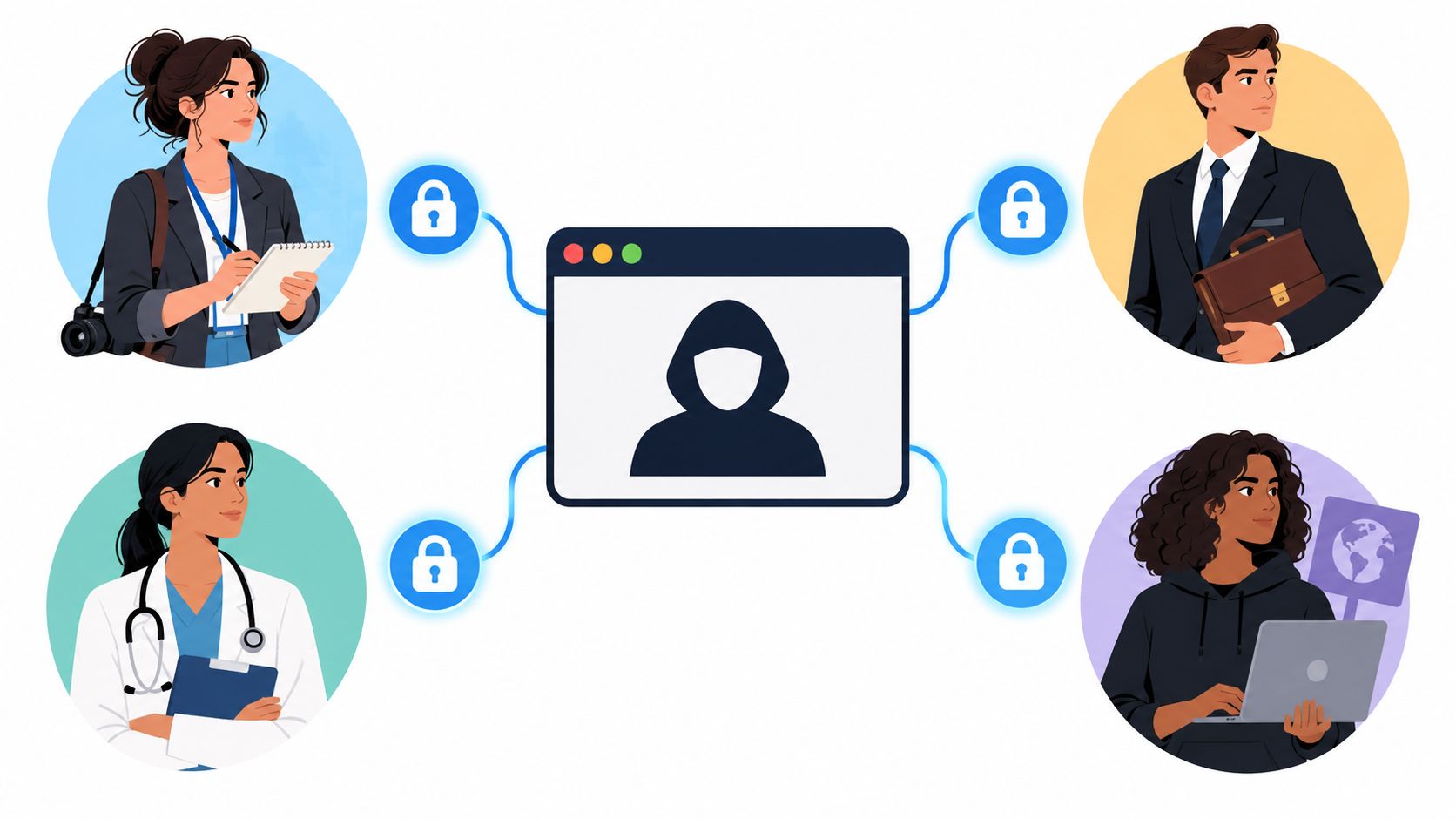
Across all four examples, the same decision rule applies: use a temporary browser channel when low coordination cost, limited identity exposure, and controlled disappearance matter more than history and administrative continuity.
Common Misconceptions and Honest Trade-Offs
“Encrypted” doesn't mean “nothing leaks.” Independent testing of privacy-focused browsers found that six browsers sent sensitive data to vendor servers, including full URLs and other browsing activity, as documented by the Open Technology Fund report on surveillance and browser privacy. Encryption can protect message content while the surrounding browser, analytics code, SDKs, or page resources expose identity, destination, or usage patterns.
A browser-based secure system also depends on its runtime. Strong CSP and HSTS configuration, safe JavaScript delivery, correct Web Crypto usage, and protection against script injection all matter. Readers who want a practical introduction to one browser-side failure mode can review understanding reflected cross-site scripting. A vulnerable page can weaken the environment before the cryptographic API ever processes a message.
Browser encryption doesn't protect a compromised endpoint. It can't stop a participant from photographing the screen, copying plaintext after decryption, sharing the access key, or using an unsafe device. It also isn't designed for long-term messaging, large groups, durable file storage, or regulated communications that require retention and audit trails.
The hard 60-minute limit should be understood as a security constraint, not a missing convenience feature. It reduces persistence by design, but it also means participants must finish their work within the channel's lifetime and cannot rely on recovery later.
The honest summary is narrow and useful: this model can protect message content from a relay that lacks the decryption key, reduce identity and installation friction, expose failed access attempts, and limit channel lifetime. It doesn't provide anonymity from every observer, secure an infected browser, or replace a full communications and compliance program.
Ciphar offers browser-based, zero-knowledge channels for short, identity-free conversations, with client-side AES-256-GCM encryption, intrusion alerts, manual burn controls, and enforced expiry. If that workflow matches your need for temporary communication without an account or phone number, visit Ciphar to learn how the channel model works.