Most advice about secure messaging stops too early. If a platform encrypts the content, people assume the conversation is private. In practice, the bigger risks often sit around identity, metadata, and retention, which means a tool can hide the words in a message and still expose who spoke, when they spoke, and how long the record remains available.
A digital communications platform is any internet-based system for sending messages, files, or voice between endpoints. The privacy question is not just whether it uses encryption, but what it asks people to disclose before the first message, what the relay can observe, and what survives after the session ends. That distinction matters for journalists, lawyers, researchers, and anyone who needs a fast first contact without turning a sensitive exchange into a permanent record.
What a Digital Communications Platform Actually Does
A digital communications platform moves information across the internet, but its privacy profile depends on four choices: how people identify themselves, where encryption happens, what the server can observe, and how long any record remains. That sounds abstract until you map it to a real workflow. A platform that asks for a phone number, stores chat history, and keeps a profile is solving a different problem from a browser-only relay built for temporary contact.
Encryption is only one layer
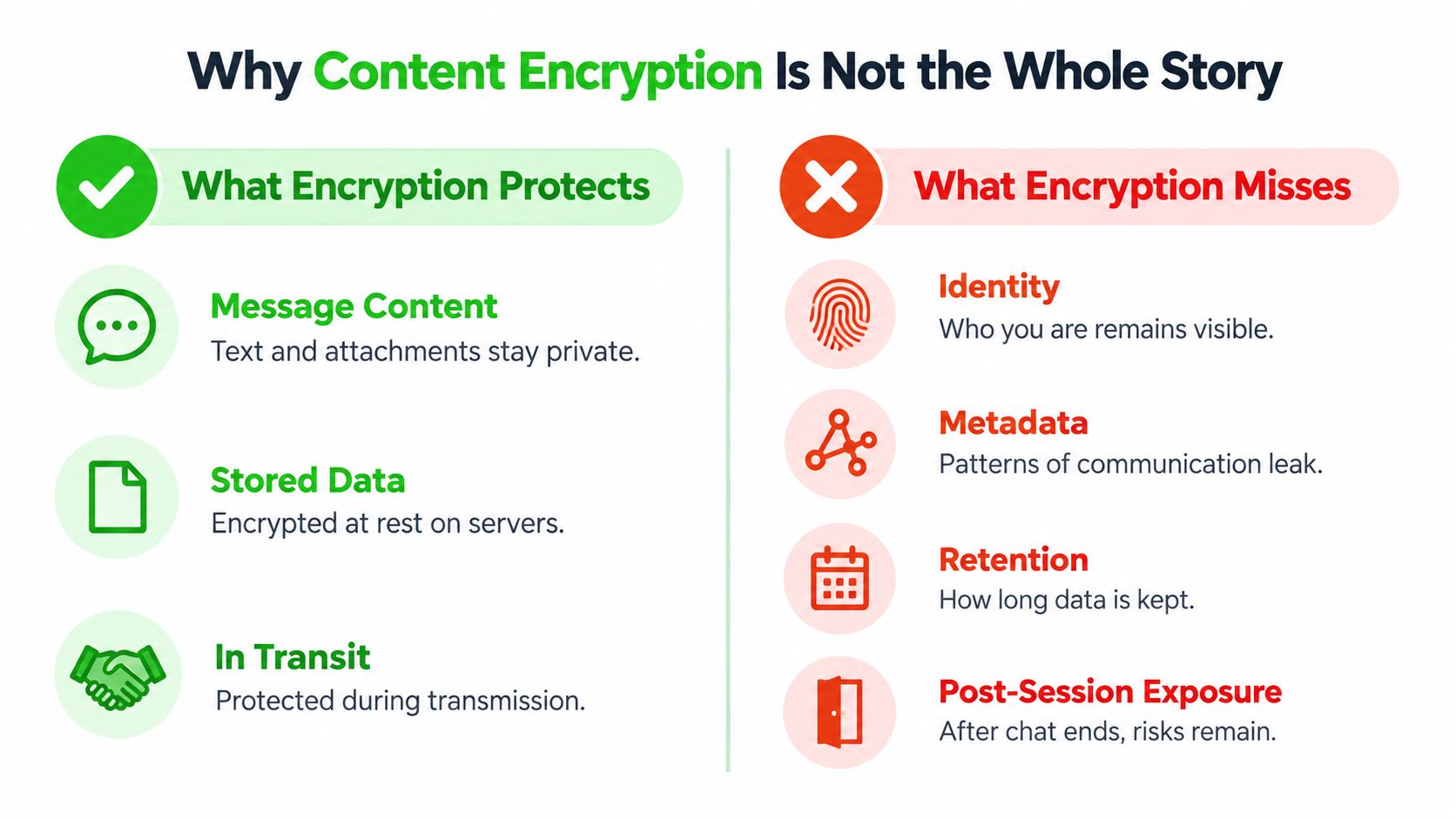
Encryption protects message content, but it does not hide the surrounding facts. If a platform reveals account identity, message timing, device fingerprints, or retention behavior, the conversation can still be sensitive even when the text itself is unreadable. A service can therefore be private in one respect and exposed in another.
Practical rule: if the service wants identity up front, it is already collecting part of the privacy budget before the conversation starts.
The four privacy decisions
A quick way to evaluate a tool is to ask four questions.
- Who has to identify themselves? Some tools bind you to a phone number or email address, while others let you enter through a link or room key.
- Where does encryption happen? Client-side encryption keeps plaintext off the server, while server-side handling widens trust.
- What does the relay retain? A relay may store ciphertext only, or it may also keep archives, logs, and recovery data.
- What happens after the session? Ephemeral rooms, permanent messengers, and federated systems all handle endings differently.
That framework is useful for first contact because the privacy boundary is broader than content encryption alone. Metadata, identity checks, and retention rules shape what an outsider, an operator, or a future search can reconstruct. A browser-based system may reduce install friction, but it still depends on the relay design and on what the operator can see at each step.
The Main Types and Architectures You Should Know
Digital communications platforms usually fall into four architectures, and each one places the privacy boundary in a different place. Some center identity, some split trust across servers, some limit how long data survives, and some try to keep first contact as light as possible. The practical question is not which label sounds modern, but what the platform does by default when no one is actively managing it.
Identity-bound messengers
These are the tools tied to a phone number or email, such as the messaging apps preinstalled on most phones. Their default failure mode is identity accumulation, because the system is designed to remember who you are and who you talk to. That makes sign-up and contact discovery familiar, but it also means the account itself becomes part of the record.
Federated networks
Federated systems run across independent servers that can interoperate. That setup can support resilience and organizational autonomy, but it also spreads trust across multiple operators. The weak point is often not encryption itself, but the uneven policy, moderation, and retention rules from one server to the next.
Ephemeral rooms
Ephemeral rooms are built to disappear after a short period or when the session ends. They are attractive for sensitive coordination because they leave a smaller archive footprint. The trade-off is practical: if joining or verifying the room is too awkward, users often fall back to a less secure tool.
Browser-based relays
Browser-based relays reduce install friction. A participant opens a link, enters the session key, and communicates without creating a persistent account. That design can work well for first contact, but it depends on careful handling of key exchange, expiry, and relay behavior. The relay server model is described in Ciphar's relay server overview.
| Architecture | Account Required | Install Required | Default Retention | Typical Use Case |
|---|---|---|---|---|
| Identity-bound messenger | Yes | Usually yes | Persistent by design | Everyday personal or team chat |
| Federated network | Often yes | Often yes | Varies by server | Community and organization communication |
| Ephemeral room | Sometimes | Sometimes | Short-lived or session-based | Temporary sensitive discussion |
| Browser-based relay | No | No | Minimal, time-limited | First contact and short confidential exchange |
A browser-based relay is the closest fit to minimum-friction security because it removes two common barriers at once, installation and account creation. That makes it useful when the goal is to start a private exchange without asking for more identity than necessary.
Encryption, Keys, and the Zero-Knowledge Relay
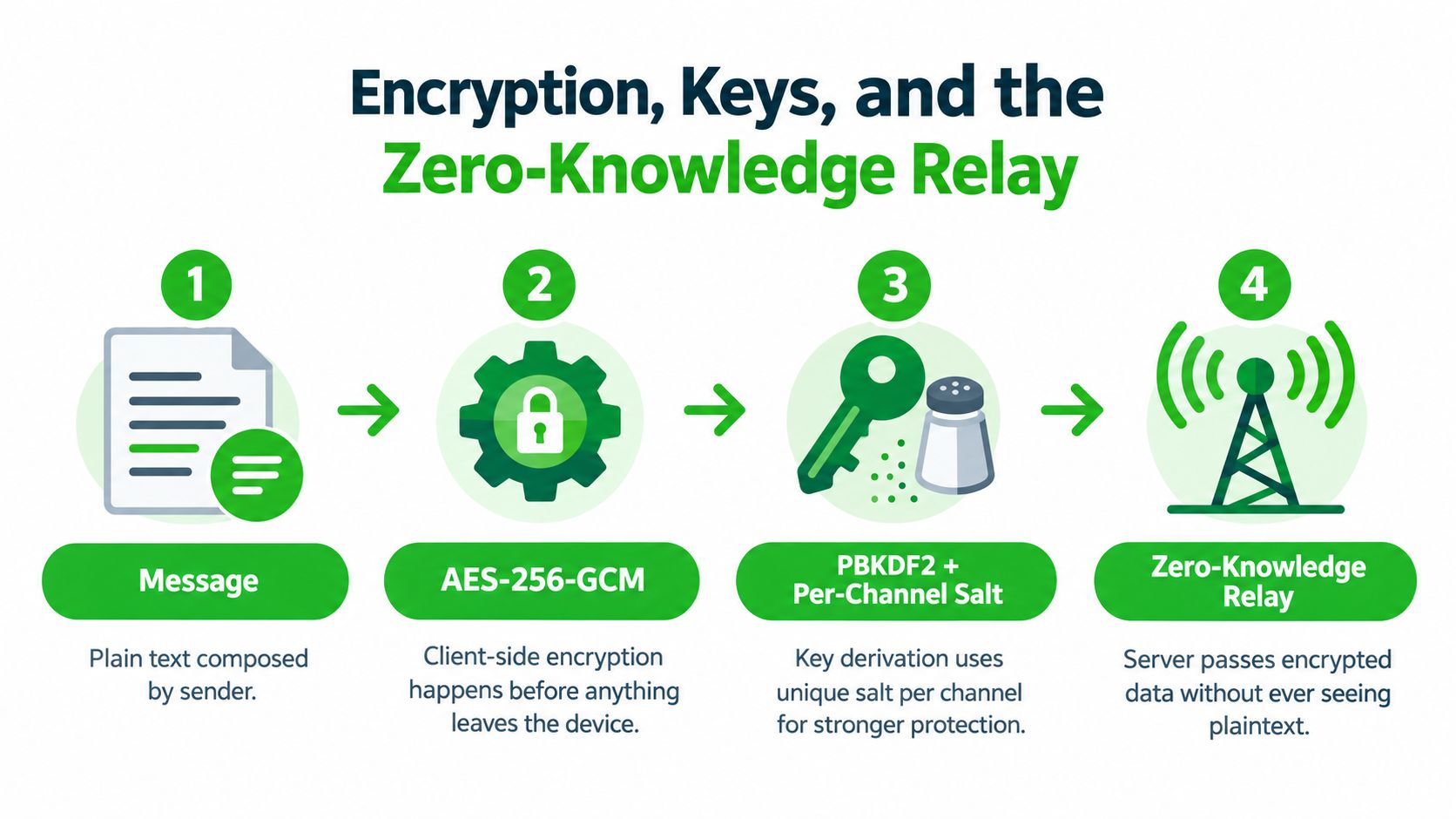
A good mental model is a locked box with a courier. You write the message, lock it on your device, and send the box through a relay that can move it but can't open it. If the relay only handles sealed boxes, the operator can route traffic without learning the plaintext.
How the pieces fit together
With AES-256-GCM, the message is encrypted on the client before it leaves the browser. That matters because the server never sees the plain text in the first place. In a design like Ciphar's, the browser also derives the key locally with PBKDF2 and a per-channel salt, so the key doesn't travel to the relay.
GCM also creates an authentication tag. That tag helps the recipient detect tampering, so a modified message or corrupted metadata can be rejected rather than accepted. The relay may store opaque ciphertext, IVs, tags, and expiry timestamps, but those records are not enough to read the conversation.
For a more detailed walkthrough of the model, Ciphar's zero-knowledge encryption guide is the right technical companion.
Why nonce uniqueness matters
GCM has a strict rule. A nonce must never be reused with the same key. If the browser reuses a nonce, confidentiality and authentication can both weaken, even if the key itself stays secret. That's why the client has to generate a unique nonce for every message, file chunk, reply, edit, and voice frame, and why the system should reject duplicate or malformed nonce-tag combinations.
Technical takeaway: a zero-knowledge relay is only as strong as the client's discipline. If the browser mismanages nonces, the relay's innocence doesn't save the channel.
Short-lived channels help because they reduce the window in which misuse can matter. They don't excuse bad cryptography, but they do narrow the time in which a mistake can be exploited.
Why Content Encryption Is Not the Whole Story
Encryption protects the words in a message. It does not automatically protect the relationship around the message, the timing of the exchange, or the traces left after the chat is over. That distinction is the part many product pages blur, because “end-to-end encrypted” sounds like a complete answer even when it isn't.
What metadata can still reveal
Metadata can include social graphs, timing patterns, device information, location clues, and session identifiers. If someone can see when a conversation starts, how often people reconnect, or which device joined, they may learn a great deal without reading a single sentence. Aggregated metadata can still expose sensitive relationships.
A useful way to think about this is the difference between a sealed envelope and the postal history attached to it. The letter stays unreadable, but the path can still tell a story. That's why privacy analysis increasingly separates content confidentiality from participant anonymity and metadata minimization.
Retention changes the harm profile
Retention is its own privacy layer. A platform that keeps archives creates a larger breach surface and a larger discovery footprint. A platform that deliberately avoids archives reduces those risks, but it also gives up recovery, audit trails, and regulated recordkeeping.
If you need a parallel from another workflow, the problem is similar to the way teams sometimes think an access token alone solves security. In reality, obtaining an Isolate Audio token is only one control in a broader system, not the whole protection model. The same logic applies here. Identity exchange, metadata exposure, retention, and post-session access all need their own answer.
For a deeper technical comparison of the transport layer, Ciphar's messaging layer security overview helps separate what the relay protects from what the client still has to handle.
Matching Platforms to Privacy-Sensitive Use Cases
The right platform depends on the conversation, not the slogan. A journalist, a lawyer, and a security researcher all care about privacy, but they don't need the same balance of anonymity, verification, retention, and recovery. The table below turns that into a practical filter.
What each role needs most
| Platform Property | Journalist and Source | Lawyer and Client | Security Researcher |
|---|---|---|---|
| No account required | Crucial for first contact | Useful, but less critical if intake is controlled | Often important for quick coordination |
| No phone number or email required | Very important | Important for reducing casual linkage | Useful for off-the-record discussion |
| Short-lived access | Strongly preferred | Helpful for initial intake, but not always enough on its own | Useful for temporary disclosure |
| Identity verification | Needed to prevent impostors | Needed to confirm client identity | Needed when trust is limited |
| Archive-free design | Often desirable | Sometimes undesirable if recordkeeping is required | Usually desirable for sensitive disclosures |
| Easy browser access | Very important | Important for low-friction intake | Very important in mixed-device environments |
| Recovery or audit trail | Usually not the goal | Often required in regulated practice | Usually not needed |
| Low onboarding friction | Essential under stress | Important for client cooperation | Important when the conversation is urgent |
A platform built for first contact should make it easy to enter, verify, speak, and leave. That's why browser access and short-lived channels often matter more than a long checklist of familiar chat features. The safer choice is the one the other person can use under pressure, not the one with the most settings.
For readers weighing how privacy controls affect trust and workflow, AI privacy insights offer a useful adjacent frame, especially around how sensitive information can move through systems that feel private on the surface.
A First-Contact Workflow That Actually Works
The first exchange is where secure tools tend to fail, because stress makes ordinary steps harder. A source may be on a shared device, a client may be nervous, or a researcher may need to share information before the window closes. The workflow has to stay simple enough to survive that moment.
The minimum-friction sequence
- Create the channel in the browser. The sender opens a fresh room or link without installing anything or creating an account.
- Share the access key out of band. The key travels through a separate path, such as a phone call, a face-to-face handoff, or a different trusted channel.
- Verify who joined. The participant confirms an expected detail, an agreed phrase, or another access check before sensitive content starts flowing.
- Handle intrusion quickly. If a wrong participant appears or a guessing attempt triggers an alert, the channel should be burned immediately.
- Let expiry do the cleanup. When the conversation ends, the channel should disappear on schedule without leaving a reusable archive.
That workflow aligns with the usability gap researchers keep seeing in journalism settings. A 2025 global journalism study found that 31% of journalists said their sources face high personal risk at least somewhat often, yet only 15% reported encrypted peer-to-peer messaging as their primary communication method, according to the Center for News, Technology & Innovation survey on safety technology. The lesson is blunt, strong security doesn't matter if people won't use it when the pressure is real.
A secure workflow has to feel almost boring in use. If the process gets clever, people abandon it.
That's why minimum-friction security is a behavioral control as much as a technical one. It lowers the cost of doing the right thing at the exact moment people are most tempted to improvise.
Picking the Right Platform for Your Threat Model
Start with five questions. Who needs to know your identity, what has to stay hidden, how long can anything remain recoverable, how will you verify the other side, and what happens if the session goes wrong? The answers usually point to one architecture more clearly than any feature checklist does.
Long-term messengers are good when continuity matters more than disappearance. Ephemeral rooms fit short, sensitive exchanges where the archive should stay tiny. Federated systems can work when governance and control need to be distributed, but they demand more trust in server operators and policy consistency.
The central insight is simple. The right digital communications platform is the one whose identity model, retention boundary, and recovery story match the conversation you're about to have. If those three don't fit, the encryption label won't save the workflow.
Ciphar gives you a browser-based, zero-knowledge encrypted chat flow for short, identity-free conversations, with one-time channels that self-destruct after sixty minutes. If you need a private first contact without accounts, installs, or persistent chat history, visit Ciphar and review how the platform handles encrypted messaging, voice, and ephemeral access.