The most common advice on how to prevent unauthorized access is stale: pick a strong password, turn on MFA, and call it done. That was decent advice when attackers needed to crack logins manually. It's weak advice now, because stolen credentials, session theft, device compromise, and sloppy sharing routes can still let an intruder walk straight in.
The right answer is layered control. You need identity hardening, device hardening, session protection, alerting, and a way to share access that doesn't leave persistent openings behind.
Why Passwords Alone No Longer Prevent Unauthorized Access
A password is still useful. It just isn't enough to protect anything sensitive on its own.
Attackers don't need to defeat every layer when the first layer is already leaking. Credential theft remains a dominant access path, with stolen credentials showing up as an initial access vector in major breach reporting, and password reuse still giving intruders a cheap way to turn one leak into many logins (Verizon and related credential abuse summary). The bigger point is simple, once a password is out in the wild, the attacker can pair it with phishing, session replay, MFA fatigue, token theft, or a compromised device.
The four things defenders keep missing
A single stolen password can fuel four different attack goals. Account takeover is the obvious one. Session replay is quieter, because the attacker rides an already authenticated browser session. Lateral movement happens when one compromised login opens a path to more systems. Silent persistence is the hardest to spot, because an intruder keeps access through recovery channels, OAuth grants, or stale tokens long after the first password is changed.
That's why “stronger passwords” is the wrong frame. The question is whether the password can still be used after it's stolen. In most cases, the answer is yes unless you've built controls around identity, device trust, and session integrity.
Practical rule: assume any credential you type into a browser can be captured later, then design the rest of the workflow so that stolen login material alone can't finish the job.
Lock Down Identity With MFA and Access Keys
MFA is the first control you should harden, but not all MFA is equal. Microsoft's reporting shows how much damage it can prevent, with MFA cutting compromise risk dramatically and keeping the vast majority of MFA-enabled accounts secure during the study window (Microsoft research on MFA effectiveness). That's the baseline, not the finish line.
Choose factors that survive phishing
SMS and push approvals are better than nothing, but they're not where sensitive teams should stop. For high-risk users, move to FIDO2 hardware keys or platform passkeys where possible, because they bind approval to the device instead of a reusable secret. One-tap push approvals are the weakest common pattern, because people approve prompts under pressure.
If you want a concise buyer's guide for your team, the resource on multi-factor authentication for your business is worth skimming alongside your own rollout plan. Use it to compare the operational side, then default to phishing-resistant factors for administrators, finance, legal, and anyone with sensitive inbox access.
| MFA Method | Phishing Resistant | Resists SIM Swap | Replay Protection |
|---|---|---|---|
| SMS code | No | No | Weak |
| Push approval | No | N/A | Weak |
| Number matching push | Partial | N/A | Better than one-tap |
| FIDO2 hardware key | Yes | Yes | Strong |
| Platform passkey | Yes | Yes | Strong |
Treat access keys like live ammunition
Access keys, recovery codes, and OAuth grants need the same discipline. Rotate them after role changes. Revoke stale tokens. Scope keys to the smallest set of resources possible. Keep secrets in a hardware-backed vault, not in chat history or a notes app.
Use this access key guide as a reference if your team still shares secrets casually. The important habit is not the tool, it's the rule, never let a permanent credential survive a temporary need.
This week's checklist: enable MFA on email, cloud apps, and password manager accounts. Enroll two hardware keys on every critical account. Review recent OAuth grants and kill anything you don't recognize.
Use Ephemeral Channels and Out-of-Band Key Sharing
Persistent sharing is a gift to attackers. If a message, file, or link stays available indefinitely, a phished mailbox or forwarded thread can hand an intruder both the content and the credential path.
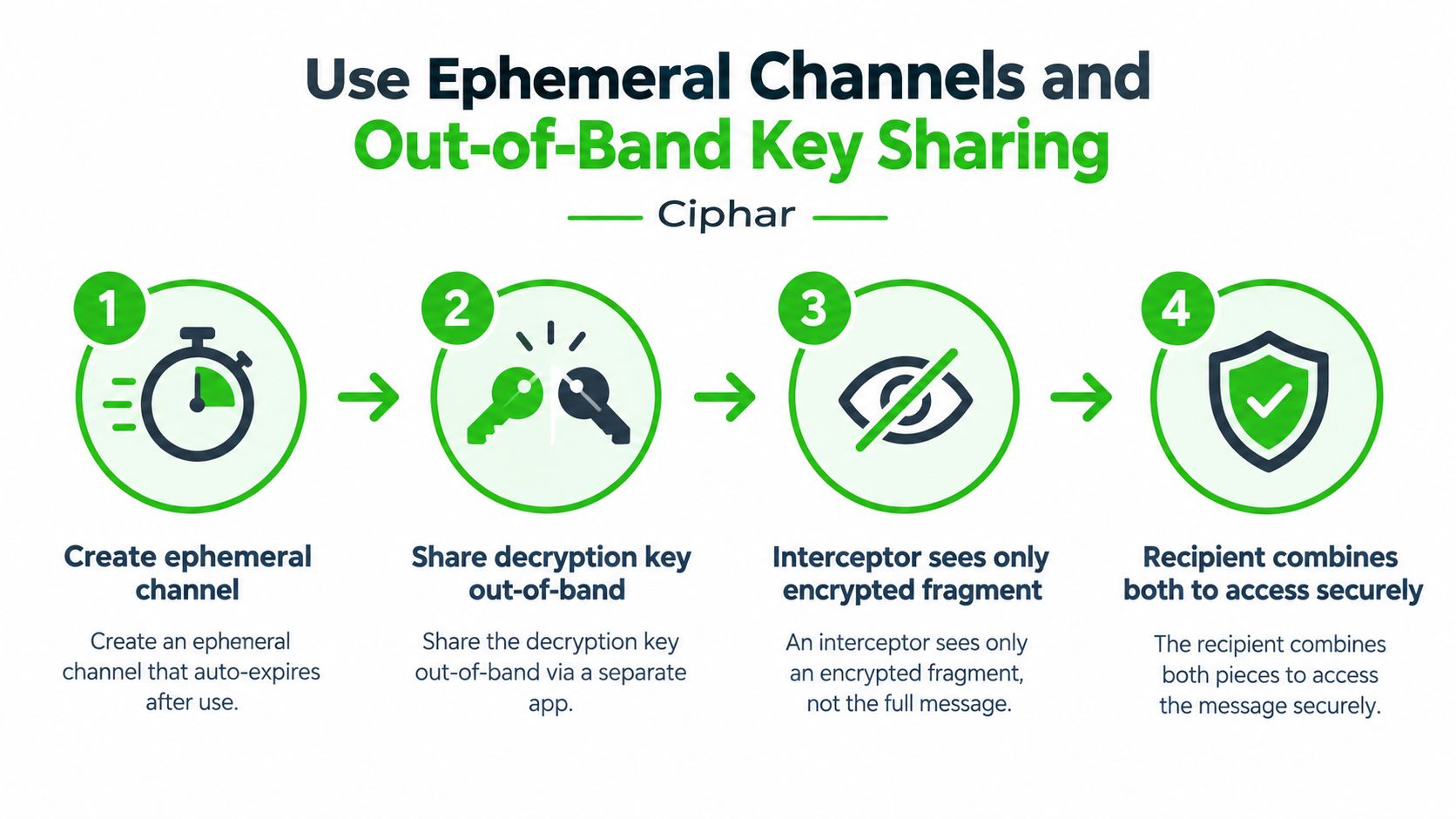
Ephemeral channels change the economics. When a channel expires automatically, burns on logout, or vanishes after read, the attacker has to act in real time. That shrinks the window for mailbox compromise, forwarding abuse, and stale-link recovery. It also forces you to think about access as a temporary event, not a permanent relationship.
Split the channel from the key
Out-of-band key sharing is the part many teams skip. Send the access link through one path and the decryption key through another. A QR code, NFC tap, phone call, or in-person handoff breaks the attacker's ability to collect both pieces from one inbox or one device.
That's the practical reason solutions like out-of-band key exchange matter. If the link is intercepted, it's useless without the key. If the key is stolen, it's useless without the link. If both are stolen, your process is broken.
A browser-based example is Ciphar, which uses short-lived encrypted channels, an access key, and a manual burn option to terminate access quickly. That model fits confidential conversations where persistent accounts are a liability.
Add verification before you unlock anything
Do not trust the delivery path alone. Confirm the recipient through a second channel before sending the key, and require a verification step before granting access to the content. That blocks the classic mailbox compromise where the attacker reads the invitation and answers it from inside the same account.
Use ephemeral sharing when the data is sensitive, time-bound, or likely to be discussed once and then discarded. Use persistent storage only when there's a real business reason to keep a long-lived record. If the record doesn't need to survive the meeting, it probably shouldn't survive the meeting.
Harden Browsers and Devices Against Local Intrusion
Focusing on logins while ignoring the machine doing the logging in is a mistake. If the browser or device is already compromised, your password policy won't save you.
Build a clean lane for sensitive work
Use one isolated browser profile for privileged tasks. No extensions, no saved payment data, no autofill clutter, and no casual browsing in that profile. Remove any extension you don't actively need. A browser used for banking, legal work, or source communications should look boring on purpose.
Lock the device at the OS level too. Turn on full-disk encryption, screen lock on idle, and hardware-backed key storage where the platform supports it. If you still have remote desktop services enabled and you don't use them daily, shut them off.
Cut off the easy local leaks
Clipboard history is a common footgun for sensitive material. Turn it off for workflows where passwords, keys, or snippets are regularly copied. Block third-party cookies in the sensitive profile, because cross-site tracking and session confusion help attackers more than users.
Good endpoint hygiene doesn't feel clever. It feels boring, repetitive, and slightly annoying. That's the point.
The same principle applies to mobile devices. Keep them patched, keep them encrypted, and don't let a convenience feature become a credential dump. If a device stores the secret and the access path, it becomes the first target in the room.
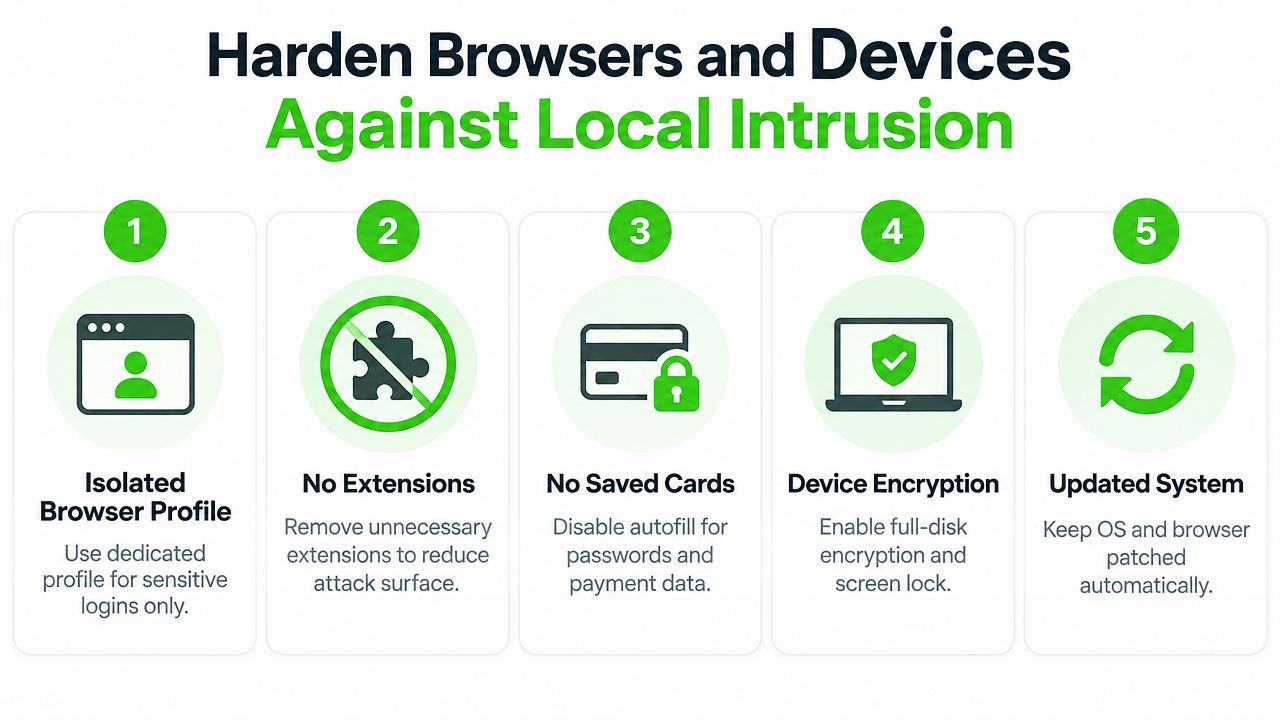
For executives, journalists, and small teams, the practical answer is not “buy a bigger stack.” It's “reduce what the browser and device can leak if the login gets compromised.”
Protect Networks, Sessions, and Channels From Interception
A credential isn't useful if the attacker can't ride it across the network. That's why session integrity matters as much as authentication.
Public Wi-Fi is still a bad place for sensitive access. A personal hotspot removes the shared-network risk, and a reputable VPN adds another layer when you're on untrusted networks. Direct TLS connections are still the default for secure web apps, but don't confuse a padlock with complete safety. TLS protects the transport, not your device or the session already sitting in the browser.
Use network controls for session integrity, not theater
DNS-over-HTTPS helps hide query content from local observers, but it doesn't make a bad device safe. Certificate pinning and HTTP Strict Transport Security raise the bar against interception and downgrade attacks by making it harder to impersonate trusted endpoints. They're useful when your app and clients support them correctly.
Here's the operational rule. Alert on new device fingerprints, sudden IP changes, and impossible travel. Ignore noisy location jumps that come from normal mobile carrier behavior unless they line up with other signals. The value is in correlation, not in spamming your inbox.
| Network Protection Method | Best Use Case | Key Limitation |
|---|---|---|
| Personal hotspot | Sensitive work on public networks | Depends on mobile coverage |
| VPN | Reduce exposure on untrusted Wi-Fi | Doesn't fix a compromised device |
| Direct TLS | Default web session protection | Doesn't stop token theft |
| DNS-over-HTTPS | Hide DNS queries from local snoops | Limited value against endpoint compromise |
| HSTS | Prevent downgrade to insecure transport | Only helps after the site is configured correctly |
| Certificate pinning | Protect specific apps or clients | Can break if managed poorly |
The mistake many teams make is treating the VPN as the finish line. It isn't. It's one control in a chain that still needs session monitoring, clean devices, and fast revocation.
Spot Intrusion Attempts Early With Alerts and Verification
The best response to unauthorized access is to catch the attempt before the intruder settles in. That means you need alerts you'll review, not a dashboard you ignore.
Watch for the signals that matter
Account-level warnings are the first line. A login from a device you don't recognize, an MFA prompt you didn't trigger, or a password reset email you never requested all deserve immediate attention. Endpoint signals matter too, unexpected startup items, odd processes, or sudden battery drain often show up before a user notices anything else.
Channel-level tells are equally important in sensitive conversations. If someone gets read receipts they shouldn't have, or if a thread shows replies from an unexpected identity, stop treating the channel as trustworthy until you verify it. A short note on intrusion detection basics helps here if your team needs a common vocabulary.
Verify through a second path before you share more
Access verification should be boring and routine. Confirm identity by phone, in person, or through a separate secure channel before sending anything sensitive. If the request came from email, don't answer it in email. If the chat looks compromised, don't use the chat to ask whether the chat is compromised.
For teams managing transactional or storefront flows, the same logic applies to bot-heavy environments. The resource on Securify on Shopify bot gaps is useful because it shows how attackers exploit weak checks and why verification needs to happen outside the path they're already abusing.
Use a simple first-hour routine:
- Check the alert source. Confirm whether the login, reset, or prompt is real.
- Verify the sender. Move to a second channel before responding.
- Freeze the account. If the signal looks wrong, stop sharing new material.
- Review the device. Look for unfamiliar processes or changes.
- Document the sequence. Write down what happened while it's fresh.
The point is speed. You're trying to stop a social-engineering chain before the attacker gets a second round.
Respond to a Suspected Intrusion in the First Hour
The first hour decides whether you're containing an incident or narrating a breach after the fact. Don't improvise. Follow a fixed sequence and keep it short.
Minute 0 to 15, freeze access
Lock the active device immediately. Terminate persistent logins on the suspected account. Revoke access keys, recovery tokens, and connected app grants tied to that identity. If the account touches shared drives, email, or collaboration tools, cut those sessions too.
Minute 15 to 30, contain the blast radius
Rotate credentials only after you've frozen the session layer. If a device handled shared secrets, isolate it from the network and stop using it for anything sensitive. Burn any live ephemeral channel that might have been exposed. Verify the person on the other end through a second channel before resetting anything that affects production data.
Do not clean up first and ask questions later. Preserve the evidence before you erase the trail.
Minute 30 to 60, preserve and communicate
Pull logs for the last 72 hours for the affected identity, the device fingerprint, and any inbound network peers. Save a tamper-evident copy before you wipe or reimage anything. Then notify the people who received keys, document a short incident note with timestamps, and decide who needs to be told externally.
If you use ephemeral communications, the design pays off. A short-lived channel, a burn button, and rate-limited guessing narrow the attacker's window and reduce the amount of cleanup you'll have to do later. That's the answer to how to prevent unauthorized access when the attacker already has part of the stack.
Ciphar gives sensitive teams a browser-based way to run short-lived encrypted chats with access keys, burn controls, and no account requirement. If you need a workflow that fits this playbook, visit Ciphar and compare its ephemeral model against the way your team shares secrets today.