A reporter has a document from an unknown source and two hours before filing. A solo attorney is using a borrowed laptop to walk a client through a sensitive disclosure. In both cases, opening a normal chat app feels too slow, while sending the material by email creates a record that may outlive the conversation.
A browser tab can provide a fast private channel, but the padlock in the address bar isn't the whole security story. Who can read the content depends on the encryption design, where keys are handled, what the server retains, what the browser can observe, and what the participants do with the messages. The practical goal is to understand those boundaries well enough to choose responsibly under pressure.
When You Need a Private Channel Right Now
The reporter first needs to verify that the document is genuine. The source doesn't want to create an account, install software, or share a phone number. A browser-based channel appears attractive because both people can open a link, exchange the verification details, and close the conversation when the immediate task is finished.
That convenience can hide important questions. Does the server receive plaintext, or only ciphertext? Does the channel expire because the server enforces deletion, or does the interface merely hide old messages? Can either person verify that the other participant has the right key? What happens if someone opens the link on a shared computer?
A lawyer faces a similar decision in a different setting. A client may need immediate guidance, but the lawyer still has to consider privileged information, device hygiene, screenshots, browser extensions, and whether the session leaves recoverable artifacts. A security responder may need a temporary room for an active incident, yet speed can lead the team to skip participant verification and share secrets in the wrong window.
Practical rule: Treat a browser chat as a security boundary, not as a private room by default.
The rest of the decision comes down to four questions: how the connection travels, how participants identify each other, where encryption occurs, and how long the system keeps data. Once those mechanics are clear, a vendor checklist becomes more useful than a list of fashionable features. The right choice for a journalist may be unsuitable for legal records or an incident-response bridge.
What a Web Based Secure Chat Actually Is
A web based secure chat splits its work between code running in the browser and code running on a server. The browser displays the conversation, derives or holds keys, and encrypts or decrypts content. The server usually relays messages, manages connections, and applies channel rules, but its ability to read content depends on the product's architecture.
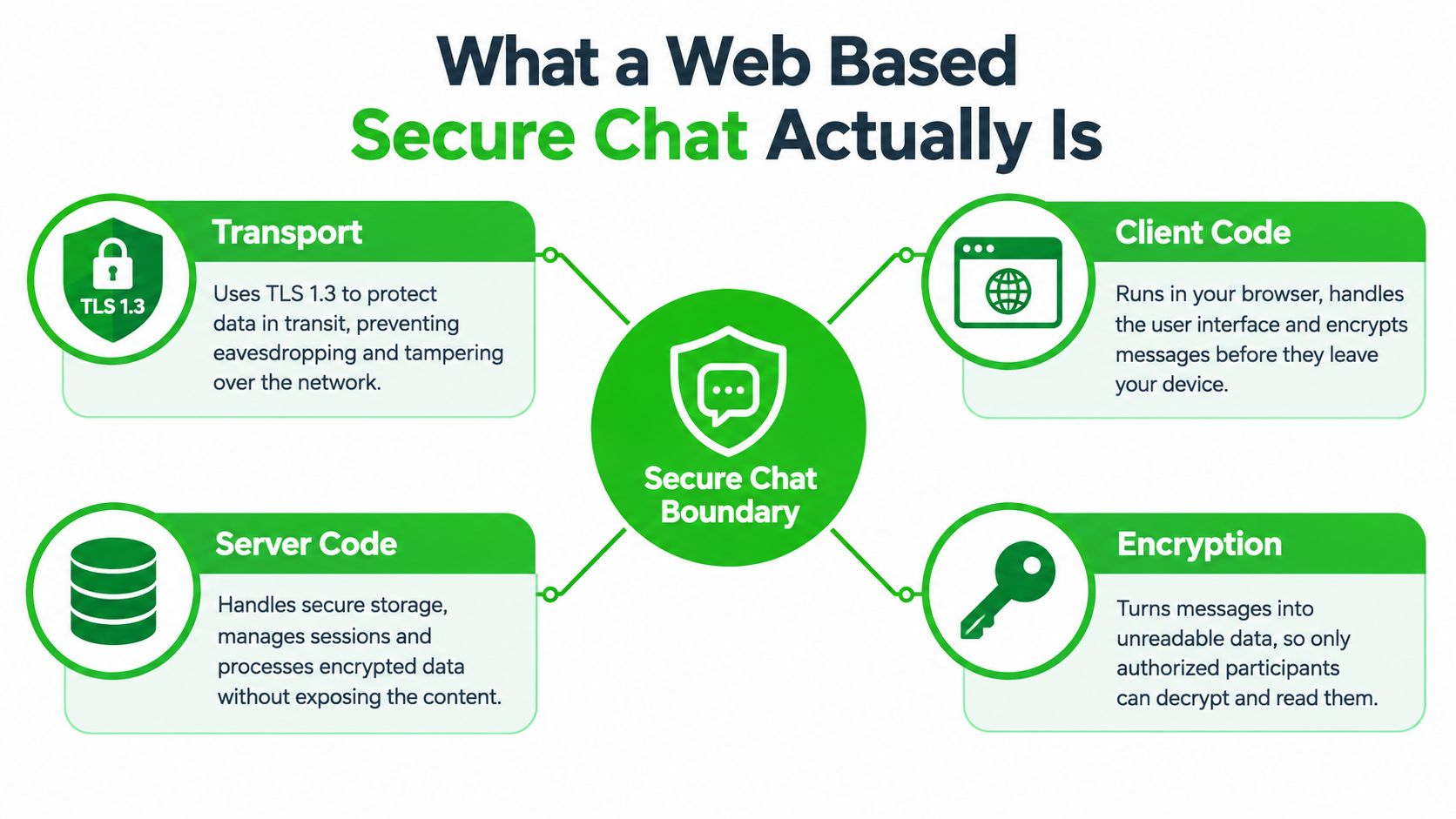
Four boundaries to inspect
Transport protects the trip between the browser and the relay. A production chat should use HTTPS and a secure WebSocket connection, not unencrypted ws://. OWASP's WebSocket security guidance explicitly warns against unencrypted WebSockets in production. TLS helps stop network observers from reading or altering traffic, but it doesn't automatically stop the server from reading plaintext.
Identity answers a different question: who is on the other end? An invite link, access key, short code, or verified fingerprint can establish channel access, but none of these proves a person's real-world identity unless participants verify that detail separately.
Encryption determines whether the server sees readable messages. In a client-side design, the browser encrypts content before transmission and decrypts it locally. The relay handles ciphertext rather than the conversation itself.
Retention defines how long messages, files, access records, and session information remain available. A channel can be encrypted and still create a durable archive. A genuinely ephemeral design makes expiry a server-enforced rule rather than a visual setting.
Compared with a native application such as Signal, the browser removes installation and account friction. It also introduces reliance on a sandboxed JavaScript runtime, browser storage, extensions, and a page that the service operator can update. That makes the browser convenient and cross-device, but it creates a broader trust surface than many users expect.
Client Side Encryption and Key Management
Client-side encryption works by moving the most important secret operation into the browser. The browser derives or generates a key locally, encrypts the message, and sends the resulting ciphertext to the relay. The server can deliver the encrypted payload, but it can't turn that payload into readable text without the key.
A typical channel can use AES-256-GCM for message payloads and PBKDF2 to derive a key from an invite passphrase. The flow looks like this:
- You enter the channel passphrase in the browser.
- The browser combines it with a per-channel salt.
- PBKDF2 performs the derivation locally.
- The resulting key encrypts the message with AES-GCM.
- The browser sends ciphertext, an initialization vector, an authentication tag, and the salt to the server.
- The recipient's browser repeats the local derivation and verifies the protected payload before displaying it.
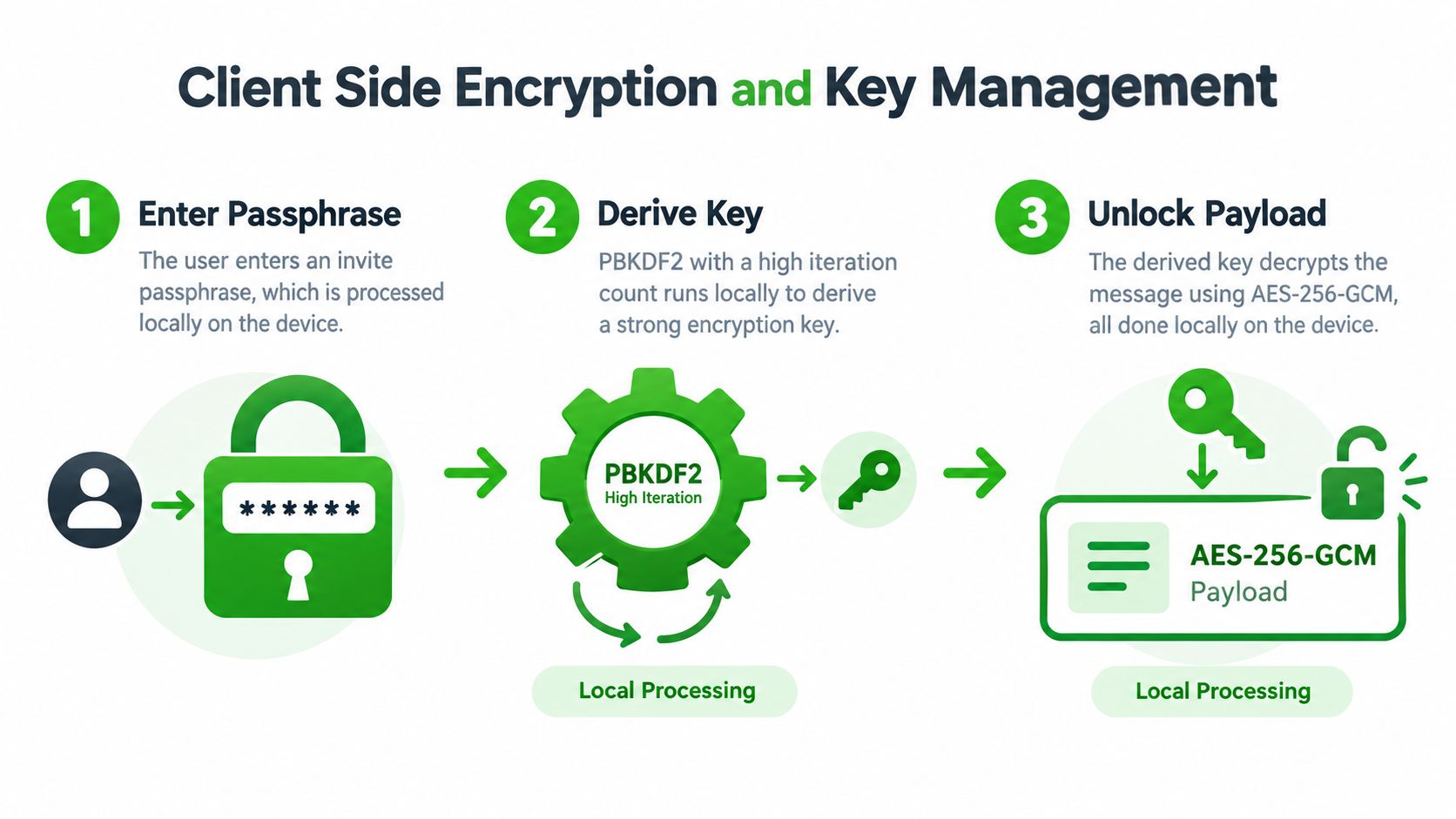
The authentication tag matters because encryption should also detect tampering. If someone changes the ciphertext, associated data, or nonce, GCM verification should fail rather than produce a modified message. Each message needs a unique nonce for safe operation under the selected key. Rotating keys at channel boundaries also limits the damage from a leaked passphrase, because a different channel doesn't automatically share the same secret.
For readers who want a non-specialist introduction before evaluating designs, encryption basics explained provides useful background on how encryption protects information and where different approaches fit.
The phrase “keys never leave the device” needs careful interpretation. It means the server doesn't receive the usable decryption key. It may still hold opaque wrapped material or encrypted payload metadata. It doesn't mean the key is protected from every local threat: a malicious browser extension, a memory dump, a compromised operating system, clipboard history, or a screenshot can expose information after the browser has decrypted it.
The client-side encryption architecture is therefore strongest when paired with a clean endpoint and a passphrase shared through a separate channel. Browser cryptography can reduce server exposure, but it can't repair a device that an attacker already controls.
Ephemeral Channels, Intrusion Alerts, and Self Destruct
An ephemeral channel has a defined life rather than an open-ended archive. In a server-enforced design, the expiry timer applies to message retention even if the participants forget to close the tab. A product may also offer manual burn-on-read, view-once images, or a sender receipt showing that the recipient opened the channel.
The distinction matters because the server enforces retention, not trust. A participant can still photograph the screen, copy text, record audio, or preserve a file before expiry. Expiration reduces the time available to retrieve data from the relay, but it doesn't control every endpoint where the content appeared.
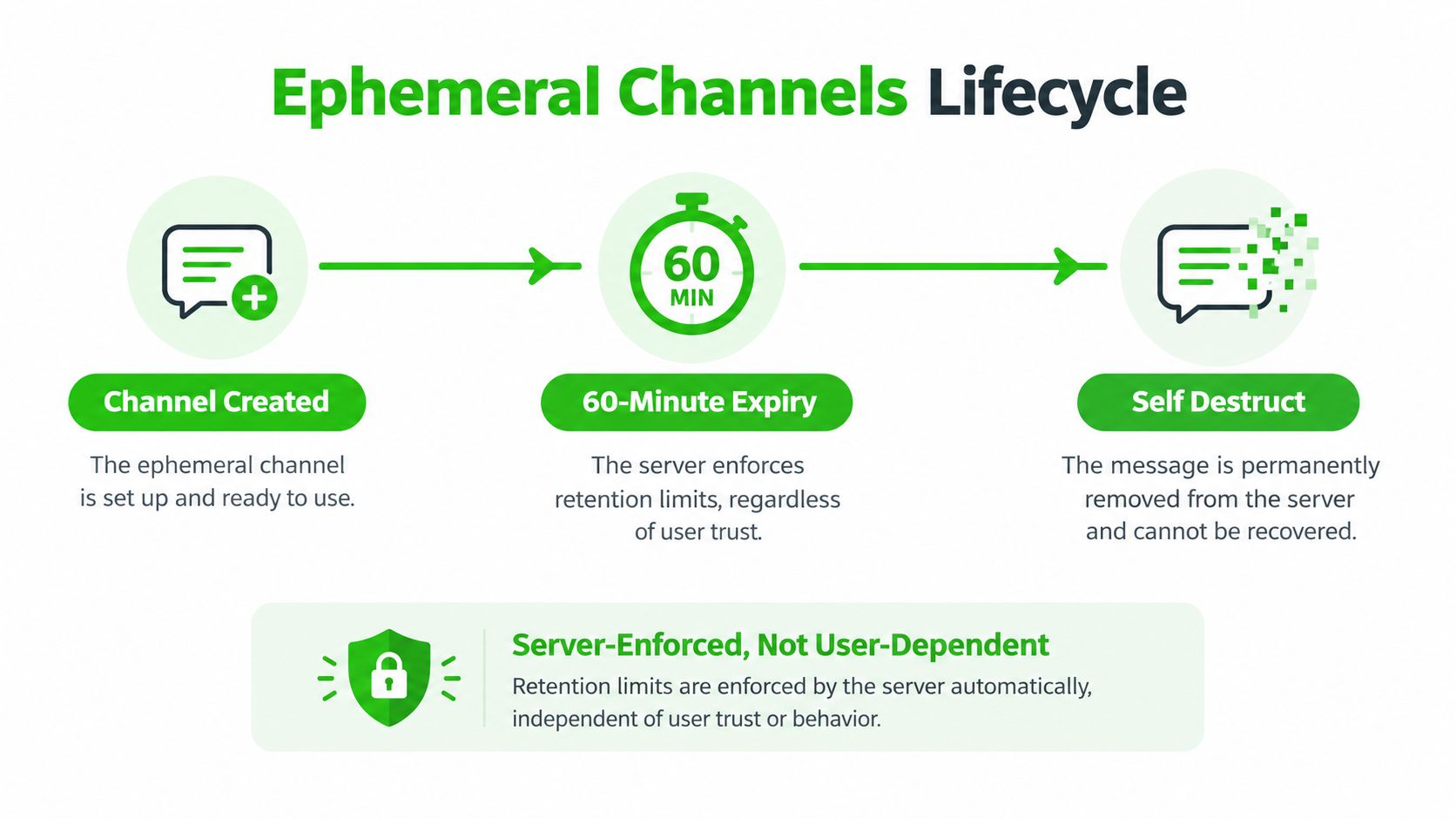
Signals that deserve attention
An intrusion alert should give participants a useful reason to stop and reassess. Examples include repeated failed access attempts, a connection appearing from an unfamiliar network, or a suspicious attempt to interact with protected page content. Alerts don't prove that an attacker succeeded. They indicate that the channel's assumptions may have changed.
Rate limits are equally important. Without them, a short access key may be tested repeatedly. A useful system should slow guessing, notify participants, and make it possible to burn the channel immediately. Teams designing response procedures can pair those controls with insider threat training for CISOs, especially where staff must recognize suspicious access without exposing message content in logs.
Deleted means removed from server queues and in-memory browser caches. It doesn't mean erased from a recipient's device, an operating system's swap space, a screenshot, a clipboard manager, or a backup.
The self-destructing message model also shouldn't be confused with forward secrecy. Expiry controls persistence. Key rotation controls how much previously protected traffic remains exposed if a key is later compromised. A system can have one without fully delivering the other, so ask the vendor to describe both mechanisms separately.
The Real Trade Offs Behind Browser Based Security
Encryption doesn't make the entire browser private. The browser is part of the trusted computing base, yet users rarely control every component running inside it. An extension may inspect page content, a script may contribute to fingerprinting, and clipboard features can expose plaintext the moment someone copies a message.
That produces three different privacy questions:
- Network confidentiality: Can someone watching the connection read the traffic?
- Operator confidentiality: Can the service provider read the message content?
- Endpoint confidentiality: Can the browser, extensions, operating system, or another person using the device observe the content?
TLS addresses the first question. Client-side or zero-knowledge encryption addresses the second. None of those protections automatically solves the third. The zero-knowledge encryption model is useful precisely because it separates server blindness from endpoint security instead of treating them as interchangeable.
Usability changes the risk
A long passphrase can make guessing harder, but a complicated process can cause people to reuse secrets or bypass the tool. Aggressive expiry reduces the window for server retrieval, yet it can interrupt a lawyer who needs to consult a message while drafting a document. Strict device pairing can reduce account-takeover paths, while also blocking emergency access when the approved device isn't available.
Browser-linked messaging has another practical weakness: an active linked session may expose a conversation history to that browser. A 2025 analysis of web-based messaging sessions also described the difficulty of reconstructing a disconnected link later when no historical record of the link remains. That combination creates a governance problem. A session can be convenient while active, but difficult to audit after termination.
Honest vendors publish a threat model that names what they protect and what they don't. Look for plain answers about extensions, metadata, browser updates, logging, backups, endpoint compromise, and legal requests. A cipher name alone can't tell you whether a product fits the risk you accept.
A Vendor Evaluation Checklist for Sensitive Work
Use the following table as a scoring template. Mark each item as verified, unclear, or absent, then assign more weight to the requirements that match your workflow. Don't award credit for a feature label without documentation showing where the operation occurs and what remains on the server.
| Criterion | What to verify | Journalism weight | Legal weight | Healthcare weight | Incident response weight |
|---|---|---|---|---|---|
| Cryptography posture | Client-side encryption, authenticated payloads, forward secrecy claims, and any post-quantum roadmap | High | High | High | High |
| Key management | Local key generation, passphrase handling, recovery options, and whether recovery creates an escrow path | High | High | High | High |
| Server architecture | Whether the relay is zero-knowledge, what jurisdiction applies, and whether an independent audit exists | High | High | High | Medium |
| Channel controls | Enforced expiry, burn-on-read, view limits, failed-access alerts, and rate limiting | High | Medium | High | High |
| Operational features | Guest access, workspaces, SSO, and audit records that exclude message content | Low | High | High | Medium |
| Trust signals | Published threat model, transparent policies, open-source client, reproducible builds, and update practices | High | High | High | High |
The weight labels are deliberately qualitative. A journalist may value server blindness and jurisdiction above collaboration features because source protection is the primary concern. A legal team may need verified participants, SSO, and defensible access records, while a healthcare organization has to examine retention, access control, and its own compliance obligations rather than assuming that encryption alone satisfies them.
Incident responders usually need a room that opens quickly, supports multiple participants, and surfaces suspicious access attempts. They may accept less convenience elsewhere if the channel can be terminated immediately and doesn't become a permanent incident archive.
Ask vendors to demonstrate the lifecycle, not just the interface. Request a diagram showing key creation, message handling, expiry, backups, logs, and recovery. If the answer depends on trust in an undisclosed server process, record that as an unresolved risk.
Use Cases for Journalists, Lawyers, and Responders
The same browser feature can solve one workflow and create a problem in another. These short examples show how to connect the technical design to the actual decision.
An investigative journalist receives a tip that needs confirmation before publication. The source wants no account and no phone-number exchange, so an identity-light invite can reduce onboarding friction. The journalist cares most about a server-enforced expiry rule and a remote burn control, but must still protect the endpoint, verify the source through an independent method, and remember that a source can preserve a copy outside the channel.
A corporate lawyer coordinates deal terms with outside counsel at another firm. The priority isn't only confidentiality. The team may need verified participant identity and session records that show access events without exposing message content to ordinary administrators. The remaining risk is governance: an exportable record can support review, but it can also become sensitive evidence if the organization stores it carelessly.
A hospital ethics committee discusses a sensitive case. The committee needs access control, carefully defined retention, and logging that helps identify unauthorized access without turning message content into a broad internal dataset. A browser chat shouldn't be treated as automatically suitable for regulated communication. The organization has to assess its own policies, contracts, and legal obligations.
An incident response lead opens a temporary room during a breach. The binding constraint is speed, so link-based creation and intrusion alerts may matter more than a complex workspace. The limit is device hygiene: responders who use an infected endpoint can expose plaintext even when the relay only sees ciphertext.
| Use Case | Feature That Matters Most | Residual Risk |
|---|---|---|
| Journalism | Server-enforced expiry and participant verification | Source identity, screenshots, and metadata can still leak |
| Legal coordination | Verified participants and carefully scoped audit records | Records may create new retention and discovery obligations |
| Healthcare review | Access controls and retention aligned with organizational requirements | Browser and endpoint exposure remain possible |
| Incident response | Fast temporary rooms with intrusion alerts and immediate burn | Panic-driven sharing and compromised devices can defeat controls |
The product choice should follow the workflow's binding constraint. A short-lived, identity-free room isn't a replacement for a long-term collaboration system, a records-management platform, or an organization's formal compliance controls.
Best Practices Before You Open the Channel
Security becomes more reliable when the routine is short enough to follow under pressure. Before opening a sensitive browser chat, check the endpoint, the participants, the channel settings, and the exit plan.
- Clean the device: Update the browser, remove unmanaged extensions, use full-disk encryption, and create a private profile reserved for sensitive work.
- Verify participants: Compare fingerprints, codes, or another identity signal through an independent channel before sharing the confidential material.
- Separate matters: Use a distinct channel and access secret for each conversation. Don't reuse an invite passphrase across cases.
- Prefer expiry: Choose a defined retention limit when the work doesn't require an archive. Treat manual burn as an emergency control, not as proof that recipients can't retain copies.
- Assume capture: Screenshots, cameras, clipboard managers, shoulder surfing, and endpoint malware remain possible. Share the minimum necessary detail.
- Plan failure: Establish a fallback contact method before the urgent conversation begins. A secure channel that can't be reached at the critical moment can encourage unsafe improvisation.
- Test the service: Organizations can use automated security testing for web apps to examine authentication flows, session handling, access controls, and client-side behavior as part of a broader security program.
No browser tool defeats a compromised endpoint. Encrypted content can still produce metadata, and a participant can preserve what they see. That isn't a reason to abandon browser-based secure chat. It's a reason to match its short-lived, low-friction design to conversations where reduced server exposure and limited retention matter more than permanent collaboration.
Ciphar offers browser-based, zero-knowledge encrypted chat for short, identity-free conversations, with client-side AES-256-GCM protection and channels that self-destruct after sixty minutes. Review the Ciphar security model and use-case guidance, then decide whether its no-account, ephemeral workflow fits the next sensitive conversation you need to hold.