The most repeated advice about anonymous chat no registration is simple. Skip the account, and you disappear. That advice is wrong in a way that gets people hurt.
A Pew Research Center survey of 1,002 U.S. internet users in July 2013 found that 86% had taken at least one step to mask a digital footprint, and 55% had tried to avoid observation by specific people, organizations, or governments. The same survey found that 59% believed complete anonymity online was impossible, while only 37% thought it was possible. Privacy worry was already tied to harm. 21% said an email or social account had been compromised, 12% reported being stalked or harassed online, and 11% had important personal information stolen.
Those findings belong together. People want contact without a profile, and most of them already suspect the disguise is incomplete. Dropping registration removes the account, the phone number, and the persistent name. It does not remove the browser, the network, the person holding the key, or the recipient who can copy what you type.
Treat the next hour as a live session. Settle the sharing route, a verification phrase, and a one-line threat model before any channel exists. The controls below stop specific mistakes. They do not make you invisible.
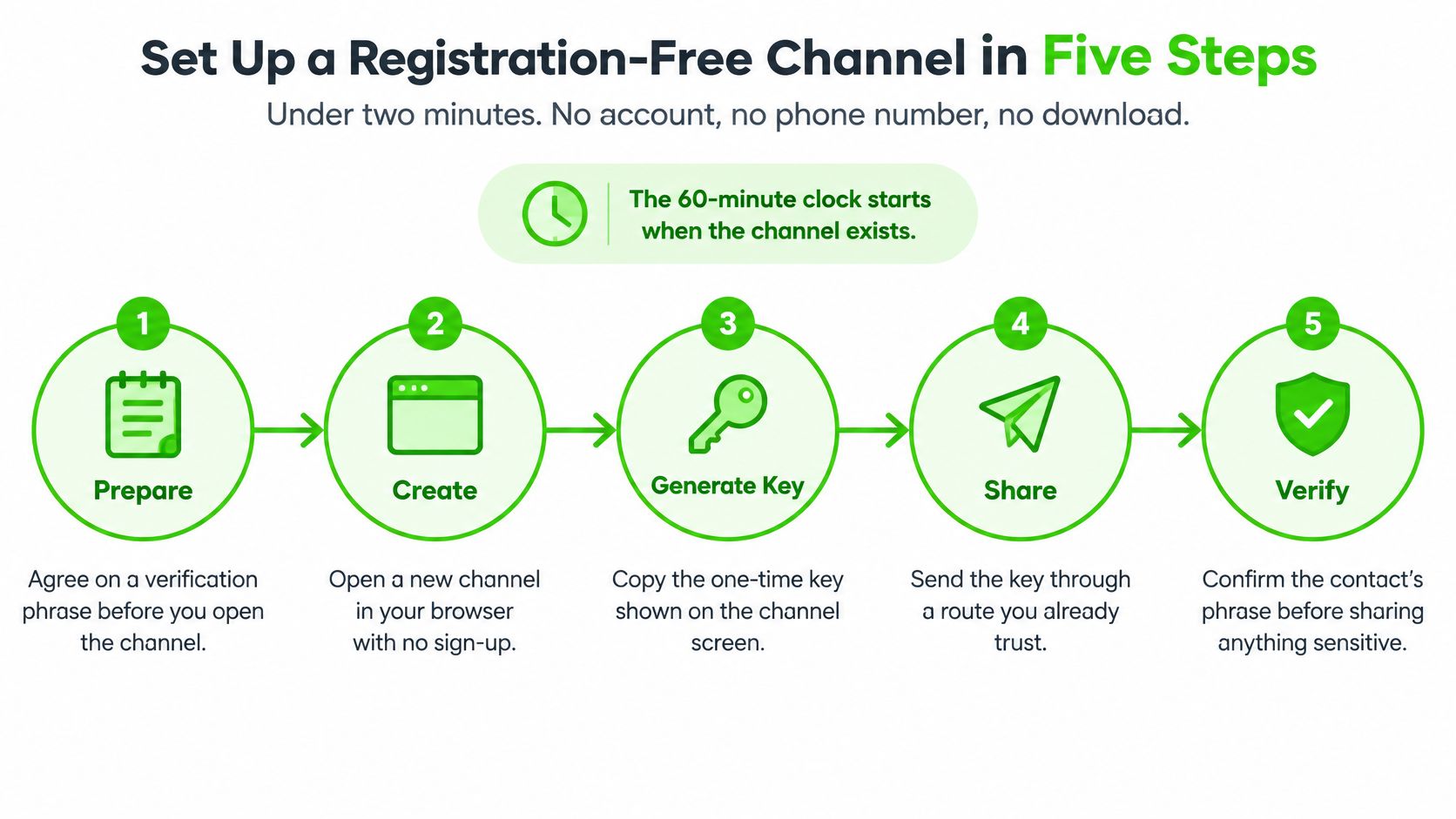
Set Up a Registration-Free Channel in Five Steps
A registration-free channel can be open in under two minutes, with no account, phone number, or download. The catch is the clock. On Ciphar, the 60-minute lifetime starts when the channel exists. There is no extension and no recovery, so a missed detail usually means a new channel rather than a repair of the old one.
Settle three things before you open anything. Agree how the link and the key will travel on separate routes. Agree a short verification phrase only the genuine contact knows. Write one line on who might watch and what harm follows if they do. Then confirm the address starts with https and shows a secure padlock before a key is typed.
Forge only after the plan is set
Open the site on a device you control. Use a current browser, not a shared kiosk and not a work machine you do not administer. That stops a later user, or a managed image, from inheriting the tab and anything still on screen.
Forge a channel with a blank name. Pick a human-readable name that says nothing about you, your employer, or the project. A clever label is something an observer can search for after the hour ends.
Take the generated per-channel access key, or set your own. The next section is the strength test. For now, refuse any key built from a name, a date, or a phrase you would say aloud. A guessable key is the session.
Choose a callsign for this channel only. Reusing a handle lets anyone who sees two rooms connect them. A fresh callsign keeps this hour from pointing at the last one.
Write the expiry time on a note you control, then wait. Send nothing until both sides are in the room. A message dropped into an empty channel is still content you cannot pull back after expiry.
Practical rule: A wrong key should be rejected, and failed attempts should appear as system notices in the channel rather than succeed silently.
If that first-minute check fails, stop and forge again. Do not negotiate inside a room you cannot explain.
Sharing the Access Key Without Exposing It
Most leaks happen at the moment of sharing, not inside the encrypted room. The rule is strict. Send the link and the access key over two different routes, and agree those routes before the channel exists. One message that contains both is one leak of the whole room.
Treat the key as an online authenticator, not as proof of who is holding it. NIST guidance on authenticators calls throttling the primary defense against online guessing. A 20-bit secret, about one chance in 1,000,000 per guess, still has about a 1-in-10,000 success probability after 100 permitted guesses. Baseline guidance caps consecutive failures at no more than 100. A short-lived channel with no recovery should use a tighter budget than that, because you cannot reset a burned key.
The strength test
Generate the key with a cryptographically secure random source, or pick about four random words or 20 or more characters. Never use a name, a date, a pet, or a phrase people choose by habit. Practical test: if a stranger could land on it in a few hundred tries, rewrite it before you share it. Length matters because throttling is a safety net, not a guarantee. Human-readable keys with low entropy, unlimited retries spread across addresses, and error messages that reveal whether a channel exists all turn guessing into a workable attack. Spell a spoken key only on a private call. Destroy a printed card after the meeting. Never paste the key into the same thread as the link. A fuller walk-through of split delivery is in this note on out-of-band key exchange.
| Sharing route | Who can see the key | Main exposure | Reasonable use |
|---|---|---|---|
| Spoken in person | People in the room | Overheard or recorded by a nearby device | Contacts you already meet face to face |
| Phone call, read aloud | Both parties and the carrier | Call logs show that a call happened; calls can be recorded | Short keys you can spell out in a private call |
| Separate messenger app | Messenger provider and recipient | Your existing account is linked to the contact | Only when the contact already knows your identity |
| Both mailboxes and mail providers | Permanent copy that can be retained, breached, or subpoenaed | Avoid for active keys | |
| Link and key pasted together | Anyone who sees that message | One leak exposes the whole channel | Avoid |
| Printed card handed over | The holder only | A physical copy can be found; it must be destroyed afterwards | Planned meetings with high-risk contacts |
If you would be uncomfortable reading the key across a crowded table, do not put it in a chat thread either.
Verifying the Person on the Other End
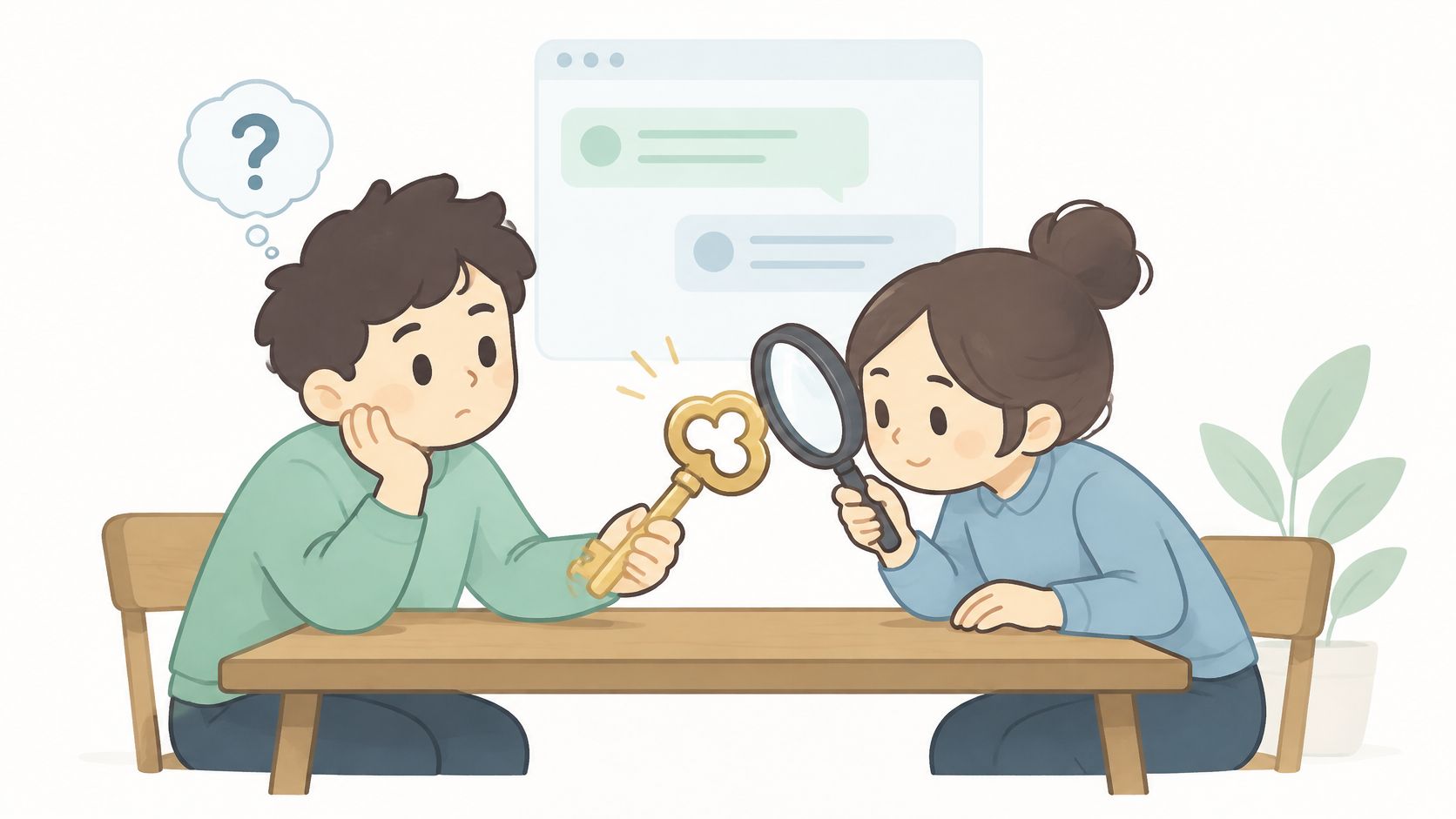
A correct key confirms that someone has it. It does not confirm who they are. The key may have been forwarded, seen over someone's shoulder, or guessed if it is weak. Journalism guidance from GIJN covers planning how a source makes contact, protecting their identity, and assessing the device and travel setting. Choosing an encrypted channel is only one part of that work.
Anonymous first contact removes the profile you would normally use to judge whether someone is genuine. That makes the identity check, not the encryption setting, a central risk point.
A check you can rehearse
Agree the phrase first. Set a verification phrase or private question through a route you already trust, such as an in-person meeting, before the session begins. This gives you a check that is independent of the anonymous channel.
Stage what you reveal. Start with a low-stakes question only the genuine contact could answer. Keep names and files out of the conversation until the answer checks out.
Treat writing style as a clue, not proof. A change in tone may signal a mismatch, but a familiar handle or voice alone cannot establish identity.
Treat a wrong answer as intrusion. If the person cannot answer, or appears to have learned the key from a forwarded message, stop the exchange. Do not prompt them with hints. Close the channel and arrange a fresh one through the agreed route.
Set a duress phrase. A coerced contact needs a way to warn you without alerting someone nearby. Agree on a phrase and what action it triggers before the session.
Name the fallback if the key is lost. There is no recovery. Decide in advance where to meet or how to establish a new channel, while you can still communicate safely.
Before sharing confidential material, confirm the out-of-band phrase, reveal information in stages, and agree how to shut the session down. Share only the files needed for the task. Self-destruct settings cannot prevent screenshots, copied messages, or a recipient who is not the person you intended.
What Anonymity Still Exposes to Others
Removing the account reduces identity collection. It does not stop observation. Encryption can keep a relay from reading the message and still leave timing, addresses, routing, device detail, and who talks to whom. Independent research on encrypted traffic notes that this metadata can support deanonymization and behavioral profiling even when the payload stays unreadable. Journalists get the same warning in plainer form. An encrypted service may still show when a message went out and who received it, and a provider may retain or disclose that detail.
Content and metadata are different problems. Client-side encryption protects what was said. It does not hide when the session ran, how large the frames were, which network originated the connection, or how long it stayed open. A product that claims complete anonymity from "no signup" is describing onboarding, not a threat model. The practical difference is covered in what metadata means once you separate the message body from the trail around it.
| Observer | What they can typically see | What reduces it |
|---|---|---|
| Your browser and device | Open tabs, history, copied text, screenshots | Private window, close the tab, clear the clipboard after copying a key |
| Local network operator | That you connect to the service, when, and roughly how much data | Use a network you trust; a VPN moves the visibility to its provider |
| Internet provider | Connection to the service, timing and data volume | Network-anonymity tools are separate from identity-free chat and need their own review |
| Ciphertext relay operator | Ciphertext, timestamps, connection origin and channel expiry | Check the current documentation on what is stored or logged |
| Recipient | Full message content, callsign and anything they copy | Staged disclosure, least-necessary files, no personal details |
| Device seizure or malware | Everything decrypted on screen and in memory | Use a clean device, lock the screen, and end the session promptly |
Three questions before you rely on a service
- Does it store IP addresses? Ask what is kept, for how long, and whether a failed visit is logged the same way as a successful one.
- Does it log failed attempts? Alerts inside the room help you. A durable log of those failures is a record you did not mean to create.
- Does it retain metadata after expiry? Ciphertext that vanishes on a timer is not the same as connection records that outlive the channel.
Write the threat model in one line before you start. Who might watch, what harm would follow, and which exposure matters most. Then look for the boring traces. A screenshot, a clipboard manager that kept the key, and a browser history entry all survive a wiped room. A chat tool protects a conversation, not a person's whole routine.
Burning a Session When Something Goes Wrong
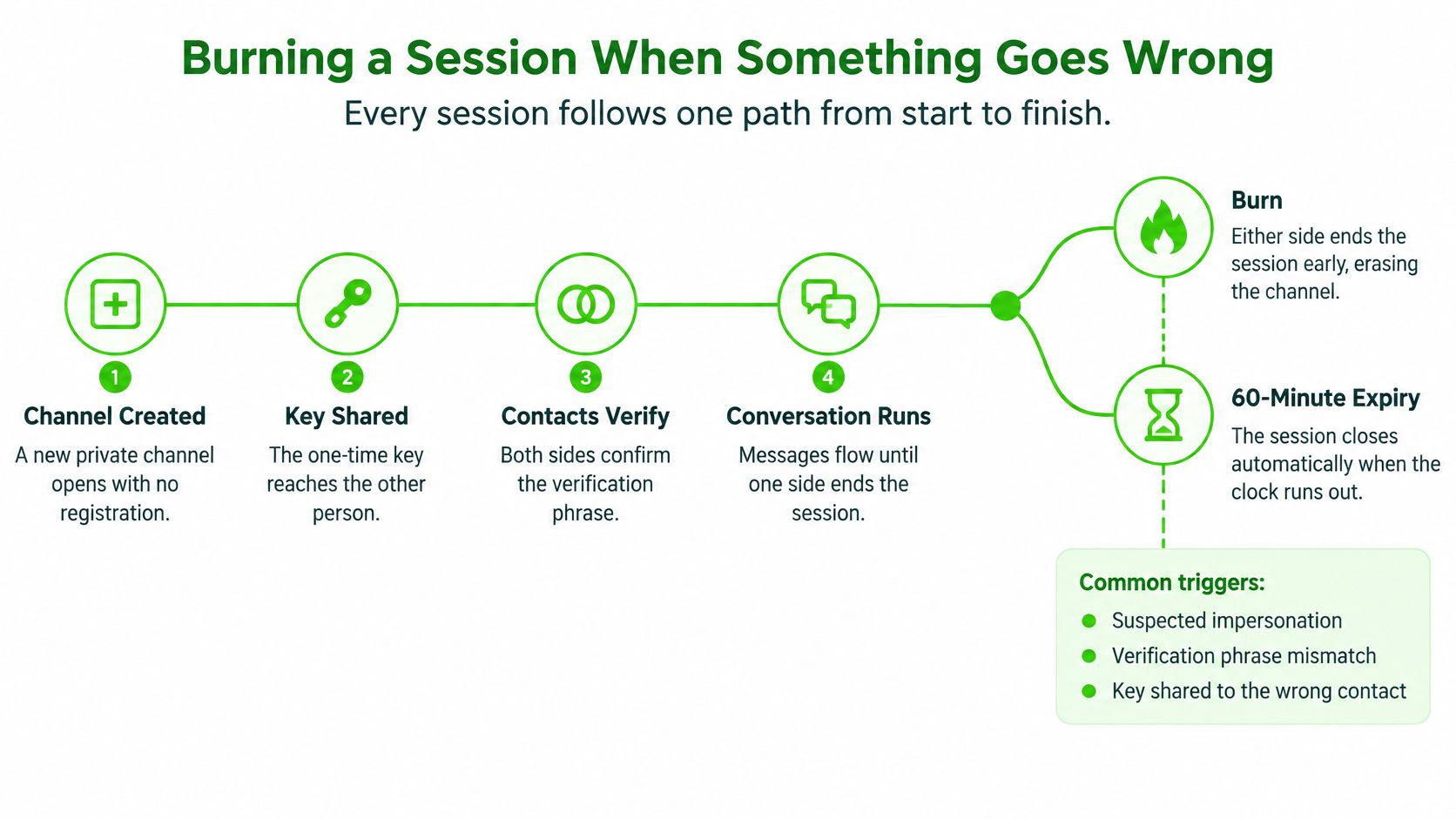
Every session follows one path. The channel is created, the key is shared, the contacts verify, the conversation runs, and the session ends by an early burn or by the 60-minute expiry. There is no archive waiting on the other side of that line.
When to end it early
Burn as soon as one of these is true.
- An access alert you cannot explain. Someone is trying keys, and you do not know who.
- The contact drops the agreed phrase. Possession of the key is no longer enough.
- A device feels wrong. Compromise on either end puts decrypted text on a screen you do not control.
- The duress sentence appears. Treat it as a warning, not as small talk.
- The meeting is over. Leftover time is leftover exposure.
Press BURN CHANNEL. That wipe is the same end state as expiry, and it takes effect immediately. If you still trust the other person, say the agreed phrase first so they are not left talking into a dead room. The mechanics of that wipe are the same idea as how to delete a chat once you accept that delete means gone, not archived.
A burn does not reach backward. It does not remove screenshots, text pasted into another app, or anything the recipient already copied. If an intrusion alert fires, stop negotiating. Assume the key has leaked. Open a new channel with a new key instead of continuing in the old one.
After the session, close the tab, clear the clipboard, and delete any note that held the key. Record only what your own notes require, and keep that record outside the chat.
Decide Whether Registration-Free Chat Fits Your Risk
Registration-free access removes account creation from the start of a conversation. It does not make the exchange trace-free: the content, network, device, and recipient can still expose information. Judge the fit by the work the channel must support.
- Is the conversation short and one-off? It needs to finish within the hour, with no later thread to reopen.
- Does the contact need no shared history? Avoid this channel if decisions depend on retrieving the conversation later.
- Can you verify the person through a route you already trust? Without that check, the room does not establish who joined.
A journalist arranging one short exchange with a source may find the format suitable. Two researchers coordinating a disclosure may also use it if they can verify each other separately. For privileged or regulated communications, consult counsel or complete a compliance review before using any registration-free channel. A team tracking a case over weeks should choose a tool that retains the history it needs.
If the work requires ongoing records, group membership, file storage, or a regulated archive, use a system designed for those needs. An expiring room is not a records system, and encryption does not decide whether a communication meets legal or compliance obligations. Settle the sharing route, verification method, and threat model before opening a channel. End the conversation when its agreed time is up.