You're about to send a private document, a medical question, or a message you wouldn't want appearing on someone else's screen. Your chat shows a padlock and says it's encrypted. Does that mean the messaging company can't read it, your backup is protected, and nobody can save a copy?
Those are different questions. Encryption protects particular information against particular readers, not against every way a conversation can escape. A useful security check starts with the keys, then follows the message through the network, backups, notifications, and receiving device.
What Encrypted in Messenger Really Means
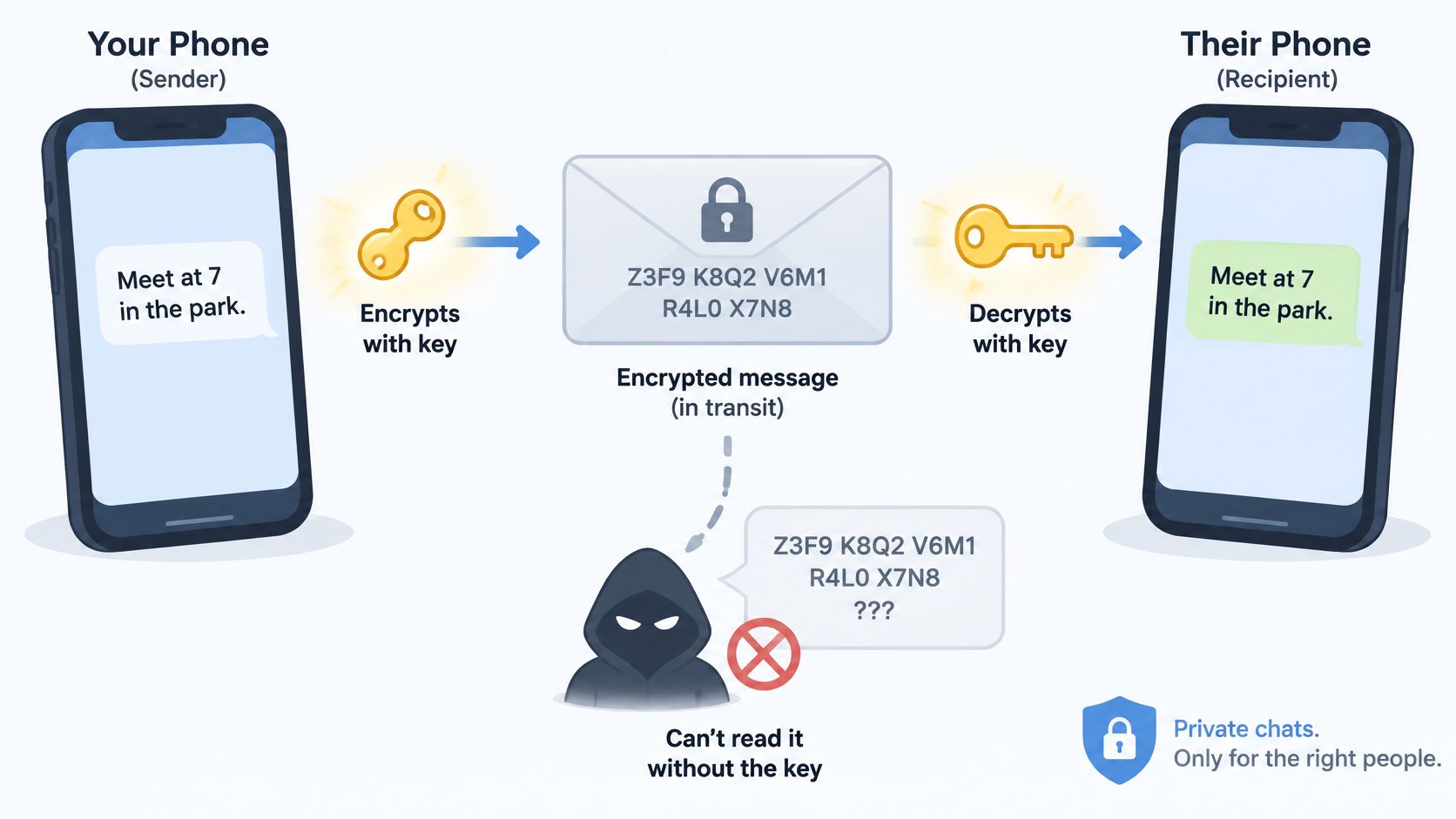
An encrypted message is like a sealed envelope whose contents are scrambled with a secret key. Someone intercepting it should see unreadable material rather than your words. The intended device uses the appropriate key to turn it back into readable text.
When you see encrypted in Messenger, or a similar notice in another messaging app, the phrase describes protection applied to some part of that journey. It might cover chat text, photos, files, voice notes, and calls, but you must check which features and storage locations it includes.
Consider two hypothetical apps. Both encrypt messages, but one lets its operator hold the decryption key, while the other leaves the necessary secrets only with participants' devices. The first operator can potentially access content; the second cannot ordinarily decrypt it from its servers.
Broad protection isn't a new expectation. In April 2016, WhatsApp completed its default end-to-end encryption rollout across messaging and calling for users with current app versions, as the Electronic Frontier Foundation explained.
Start with the key: A padlock describes a security feature. It doesn't independently prove who can unlock your conversation.
You don't need to understand cryptographic mathematics to make a sensible decision. You need answers to three practical questions: Who holds the keys? What remains visible? How can you check your particular conversation?
End-to-End, Client-Side and Server-Side Encryption Compared
Encryption models compared
| Model | Who holds the keys | Can the provider read content? | Typical example |
|---|---|---|---|
| End-to-end encryption | Only participating sender and recipient devices hold the necessary decryption secrets | No, not from server-held ciphertext alone | Signal; WhatsApp personal and group chats |
| Client-side encryption with provider-held key | The device encrypts; the provider also keeps an accessible key | Yes | Cloud storage or sync configured with provider-accessible keys |
| Server-side encryption | The provider encrypts stored data and holds the keys | Yes | Telegram default cloud chats |
End-to-end describes who can decrypt
End-to-end encryption, often abbreviated E2EE, puts the readable conversation at the participating endpoints rather than the service's relay. The provider forwards encrypted material without holding the secrets needed to read it.
Think of a courier carrying a locked box without a key. The courier still knows something about the delivery, but opening the contents isn't part of its normal capabilities. Linked phones and computers can also be endpoints, so the trusted set may include more than the phone in your hand.
Client-side describes where encryption happens
Client-side encryption means your device encrypts information before uploading it. That's useful, but the phrase alone doesn't establish who else has the key.
If the provider retains an accessible copy, it can still decrypt the upload. Conversely, client-side encryption can form part of an end-to-end design when the provider never receives the necessary secrets. For a plain-language explanation of that distinction, our guide to how encryption keys work separates the locked content from the ability to access it.
Server-side protects storage under provider control
With server-side encryption, the provider receives or processes readable information and encrypts it for storage. This helps protect stored disks or databases, but it doesn't prevent authorized provider systems from decrypting the information.
Telegram illustrates why you must inspect the feature, not just the app's name. Its ordinary cloud chats and its end-to-end encrypted Secret Chats use different models. Treat a private-looking interface as an interface, not a cryptographic guarantee.
Account recovery isn't automatically evidence against E2EE. The deciding question is whether the provider can recover readable history without a user-controlled secret or an already trusted device.
A recovery password, a protected backup vault, or another authorized device can support recovery without granting the provider ordinary access. Ask what enables access to the history, not just whether a “restore” button exists.
How a Message Stays Unreadable in Transit
The envelope analogy becomes more useful when you follow an actual encrypted delivery. This diagram shows the broad path; the authentication check is just as important as the scrambling.
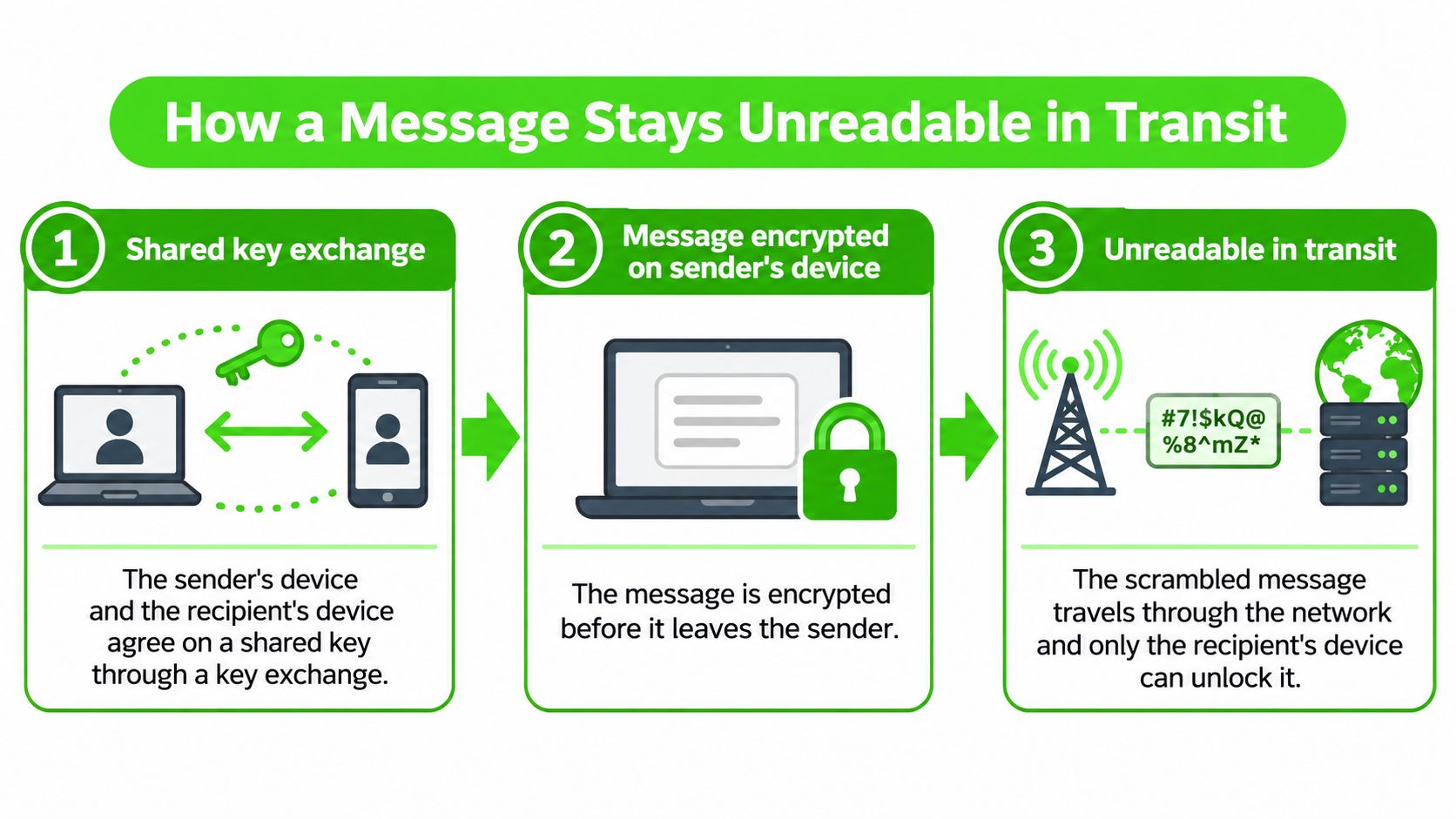
The devices establish secrets. In a typical end-to-end protocol, devices exchange public information and derive the secrets needed for communication. The server can carry that exchange, but it shouldn't obtain the private secrets needed to decrypt content.
The sender encrypts locally. The app transforms the message into ciphertext before transmission, using a fresh cryptographic value where the encryption scheme requires it. The server can see the resulting encrypted record, not the original sentence.
An authentication tag travels with it. The recipient uses this tag to detect unauthorized changes to protected information. The relay can see the tag and ciphertext, but cannot legitimately change protected content without detection.
The relay forwards or temporarily stores the record. A minimal relay handles opaque ciphertext and technical delivery fields rather than readable messages. It can see the fields it stores, such as an initialization vector and expiry timestamp, but not the plaintext or decryption key.
The recipient checks and decrypts. The device verifies the protected record and rejects it if authentication fails. The server may learn that delivery occurred, but successful delivery doesn't give it access to the decrypted message.
Why the authentication check matters
The NIST specification for GCM describes authenticated encryption, which combines confidentiality with an integrity check. Nonce uniqueness under the same key is essential: reusing that value can undermine both secrecy and authentication.
Our relay follows a zero-knowledge policy: it holds ciphertext without the decryption key, so it cannot supply readable messages to a court, attacker, or employee. That statement concerns server-held content, not someone's open browser or a recipient's saved copy.
For another explanation of the delivery process, this video provides a visual companion.
Check whether your app provides contact-key verification and clear handling of failed security checks. GoSafe Dark Web monitoring's guide to recognizing signs of MITM attacks provides useful context for unexpected certificate warnings or suspicious connection behavior, although those signs alone don't prove a chat's encryption has failed.
How to Verify Encryption in Your Messenger
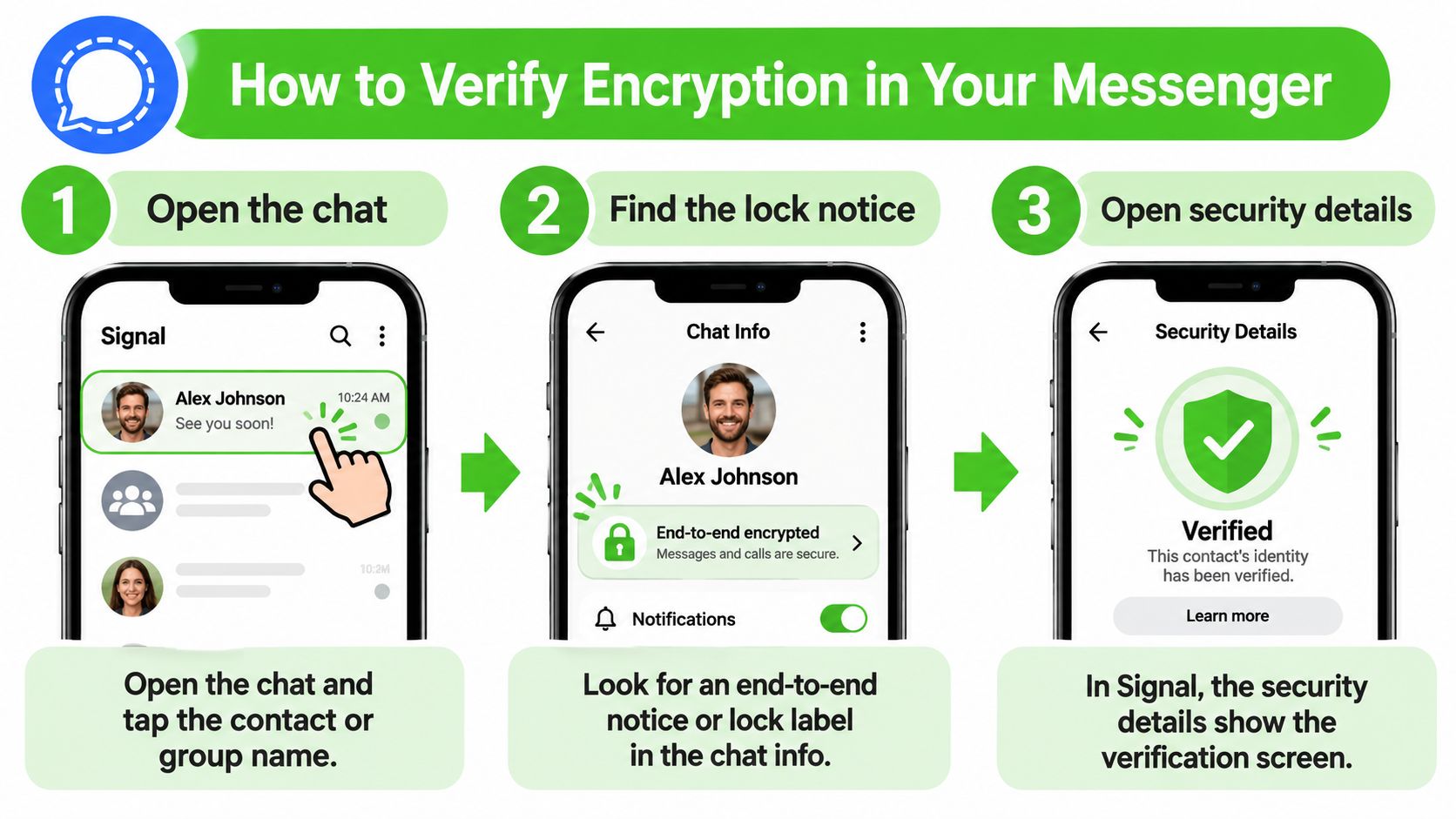
Open the specific conversation. Tap the contact or group name to find its information screen. Checking general privacy settings isn't enough if different chat types receive different protection.
Find the encryption notice. Look for an explicit end-to-end encrypted label, not merely a lock beside the account name. In Facebook Messenger, inspect the conversation's information rather than assuming every messaging feature has the same coverage.
Open the verification details. Signal provides a safety number; WhatsApp provides an encryption code and QR code. Telegram Secret Chats provide a visual encryption-key representation; don't confuse that with the emoji verification used for Telegram calls.
Compare using a trusted route. Compare the complete displayed value in person, or use a call whose participant you can authenticate. Sending the code through the same potentially intercepted chat doesn't independently establish who's at the other end.
Check the conversation mode. Confirm whether you're in an ordinary chat, a Secret Chat, a group, or a call. A passing check for one mode doesn't establish the protection of another.
Investigate changes. Recheck after reinstalling, changing phones, or adding linked devices when the app indicates keys have changed. A change can be legitimate, but an unexpected change deserves confirmation before you send sensitive material.
Know what a passing check establishes
Matching verification values helps confirm that the app is using the expected cryptographic identities. It doesn't prove that the other person's phone is free of spyware, that the account belongs to the person you assume, or that the recipient won't copy your message.
Our explanation of out-of-band key exchange shows why the comparison route matters. You're checking not just that a key exists, but that you've associated it with the right person.
Use this visual reminder while opening the app's conversation settings.
Where to verify encryption in popular messengers
| Messenger | Default encryption | Where to check | Passing result |
|---|---|---|---|
| Signal | End-to-end for chats | Open the contact and view the safety number | Safety number matches through a trusted comparison |
| End-to-end for personal and group chats | Contact info, then Encryption | Code or QR comparison succeeds; conversation shows its encryption notice | |
| Telegram | Cloud chats aren't end-to-end; Secret Chats are | Open a Secret Chat and inspect its encryption key | Visual key representation matches on both devices |
| Facebook Messenger | End-to-end for supported personal chats in current versions | Chat info, then encryption details | Conversation is labeled end-to-end encrypted; compare keys where available |
Menu wording can change with operating system and app updates. Follow the row for your app, but distinguish a label confirming the intended mode from a comparison confirming the expected keys.
In our channel-admission process, a browser must derive the correct key and successfully decrypt the channel's encrypted test blob before the participant enters. That verifies possession of the channel secret, not the participant's real-world identity.
What Encryption Still Leaves Visible
What each party can and cannot see
| Party | Can still see | Cannot see |
|---|---|---|
| Messaging provider | Account identifiers, contact relationships, timestamps, and device information it collects | E2EE message text, attachments, and call content from ciphertext alone |
| Network operator | Connection times, your connecting IP address, and data volume | Properly encrypted message content |
| Push notification service | Sender names or previews if supplied in readable notification payloads | Full message history merely from delivering notifications |
| Cloud backup service | Readable backup content if the backup lacks E2EE and the service can decrypt it | Content protected by E2EE when it lacks the necessary secret |
| Recipient's device | Everything decrypted for that recipient | Nothing in the delivered content is hidden from the recipient |
The provider row describes an account-based service that collects those fields, not a universal requirement of messaging. Content encryption and metadata minimization are separate design decisions.
In a June 2025 survey of roughly 700 adults in each of the United States, United Kingdom, France, and Germany, around one-third of UK respondents didn't know WhatsApp collected metadata such as timestamps and contact lists, according to Proton's encryption survey. The practical gap is clear: knowing a message is encrypted doesn't tell you what records surround it.
Follow the information outside the chat
A network provider may observe your connections even when it can't read your conversation. An account-based app may connect your activity with a phone number, contact list, or device identifier. Our guide to what metadata means explains why those surrounding records can still be sensitive.
Notifications introduce another route: readable previews may appear on a locked phone or paired computer. Also, notification systems differ, so don't assume every push service receives plaintext previews because your device displays them.
Private content isn't anonymous communication. A service can hide your words while other systems still reveal your presence.
Our lawful-process policy limits disclosure to encrypted blobs that expire on a one-hour clock; we hold no plaintext, keys, or message history. That doesn't make a person's device or network activity invisible.
An encrypted attachment can also contain dangerous instructions or links. The 247TechTeam explanation of PDF phishing links and QR codes addresses a different risk: encryption can deliver a harmful document confidentially without making it safe to open.
Pitfalls and a Decision Checklist
A common mistake is verifying the encryption label but never verifying the contact. An impostor-controlled device can take part in an encrypted conversation if you've accepted the wrong identity. Whether the app raises an alert depends on how the impersonation happened and which protections you enabled.
Correct encryption with the wrong person is still the wrong conversation. Before sending privileged instructions, source-identifying details, or recovery credentials, establish who controls the destination.
Fix the routes encryption doesn't close
Unprotected cloud backups: Enable end-to-end encrypted backups where supported, or disable chat backups if you don't need them. Check the backup setting separately from the live conversation's encryption notice.
Screenshots, forwards, and copied text: Agree on handling rules before sharing sensitive material. Keep it out of shared notes, ordinary email, and other destinations that don't meet the same confidentiality requirements.
Lock-screen previews: Hide message content in notification settings, including on paired watches and computers. Test the result by locking your device and asking someone to send a harmless message.
Linked sessions and authorized devices: Review the app's linked-device list and remove sessions you don't recognize or no longer use. Lock your computer when stepping away rather than leaving a decrypted conversation accessible.
Outdated apps: Update both participants' apps and operating systems. If a needed security feature is missing, resolve that before assuming the conversation has the protection you intended.
Groups and calls: Inspect those modes individually and review membership before sharing. A trusted contact's presence doesn't establish that every participant or linked endpoint is appropriate.
Weak shared passphrases: Use generated, high-entropy secrets and share them through a separate trusted route. NIST's password-based key-derivation guidance explains how salts and repeated computation increase guessing costs, but they don't turn a predictable password into a strong secret.
Decide whether the conversation should disappear
Confidentiality isn't the only requirement for professional communication. The Virginia State Bar's technology report identifies recordkeeping challenges even with encrypted messaging services.
A lawyer may need a client instruction preserved in the matter file. A healthcare professional may need clinically relevant information entered into an approved record. An incident responder may need to preserve evidence rather than let it expire.
Before sending, complete this decision checklist:
- Confirm the mode: The actual conversation uses the protection you intend.
- Authenticate the person: Compare verification details through a trusted route.
- Control secondary copies: Backups are appropriately encrypted or disabled.
- Choose the record policy: Establish what must be retained, where, and by whom.
- Reduce incidental exposure: Remove previews and unnecessary linked sessions.
For broader identity-theft concerns, MY CYBER GUARD identity protection packages address a separate service category. Identity monitoring doesn't verify a chat's keys or prevent a recipient from copying content.
For an authorized first contact or one-off exchange, our short-lived browser channel requires no download, account, phone number, or email verification. Click Initialize Secure Channel, share the link and access key through a trusted medium, and converse; the channel and its encrypted content are deleted 60 minutes after creation. Use that option only when disappearance fits your obligations, never as a substitute for regulated records or evidence preservation.
Ciphar offers browser-based encrypted conversations for exchanges that don't need a lasting server archive. Visit Ciphar to review the security model and start a channel when short-lived communication fits your needs, then verify your recipient through a separate trusted route before sharing sensitive information.