Ordinary SMS and MMS are not end-to-end encrypted, and they're the wrong channel for passwords, login codes, or confidential identities. A carrier handles the readable message along the way, so privacy depends on systems neither sender nor recipient controls.
The popular advice is to keep texting but be careful, watch for scams, and use a strong phone passcode. That advice misses the deeper problem. A text can compromise you even when nobody intercepts it, because your phone number is treated as identity, your inbox feels trusted, and copies in backups outlive the conversation. If you're asking how secure are text messages for a source, a client, or a patient, careful habits on the wrong channel aren't enough.
How Secure Ordinary Text Messages Are
A text can expose someone without being intercepted. The inbox feels trustworthy, a phone number can stand in for identity, and copies in backups may outlast the conversation. Ordinary SMS and MMS also lack end-to-end encryption: carrier systems process messages, so protection does not rest solely with the sender and recipient.
The CISA mobile communications best practices guidance advises organizations to move away from SMS-based multifactor authentication, especially for highly targeted users. SMS codes are neither end-to-end encrypted nor phishing-resistant. Transport encryption can protect a connection between devices and a network; end-to-end encryption keeps message keys under the control of the endpoints, so intermediaries cannot read the content.
What Never Belongs in SMS
Keep passwords, recovery codes, legal strategy, medical details, source identities, and incident-response secrets out of ordinary texts. A carrier PIN, a port-out lock, and a separate authenticator can reduce the risk of number-based account takeover when SMS recovery cannot be avoided. They do not make the message private: carrier compromise, signaling abuse, a compromised phone, or forwarding can still expose it.
When choosing a channel for a document, why faxing can be more secure can help clarify the difference between point-to-point delivery and store-and-forward copies. Apply the same question to texts: who can handle the readable content, and what copies remain after delivery?
| Channel | End-to-end by default | Who can read plaintext | Copies that remain | Fit for secrets |
|---|---|---|---|---|
| Standard SMS | No | Carrier systems and anyone with access to them | Carrier handling plus handset copies | No |
| MMS picture or video text | No | Carrier media servers and the handsets | Media often kept longer than a short text | No |
| RCS chat | Only on some one-to-one paths | Endpoints on a confirmed encrypted path, carrier delivery if it falls back | App and carrier copies tied to the actual path used | Only after end-to-end is confirmed |
| iMessage between Apple devices | Yes | The endpoints, not Apple's message key | iCloud backup is end-to-end only with Advanced Data Protection | Yes if backup and SMS fallback are controlled |
| Signal-class end-to-end app | Yes | Sender and recipient devices | Disappearing messages are optional, backups are a separate choice | Yes for ongoing private chat |
| SMS one-time login code | No | The carrier path and whoever holds the number | The code is short-lived, the account takeover is not | No |
A green bubble or RCS conversation may fall back to SMS if the other person's device cannot use the richer mode. That fallback drops end-to-end protection. iMessage is end-to-end encrypted only between Apple devices, and an iCloud backup is end-to-end encrypted only if Advanced Data Protection is enabled.
Use the Fit for secrets column to choose: “Yes” rows suit sensitive content; “Only after end-to-end is confirmed” and “Yes if...” rows require their stated conditions; rows marked “No” should never carry codes or identities.
Logistics can stay in a low-stakes text, such as confirming a meeting time without naming who is involved or why. A name, diagnosis, legal position, or credential changes the stakes. Move that conversation to a suitable channel before sending the sensitive detail.
What Happens After You Hit Send
Think of SMS as a postcard dropped at a post office, not a letter sealed by the sender and opened only by the recipient. Staff and machines along the route handle the card to sort and deliver it. That handling is the privacy story.
Your phone sends the text to a cell tower on the carrier network. The carrier's short message service center accepts it, stores it briefly, looks up where the recipient's number currently is, and forwards it toward that phone. If the other phone is off or out of coverage, the system holds the message and retries.
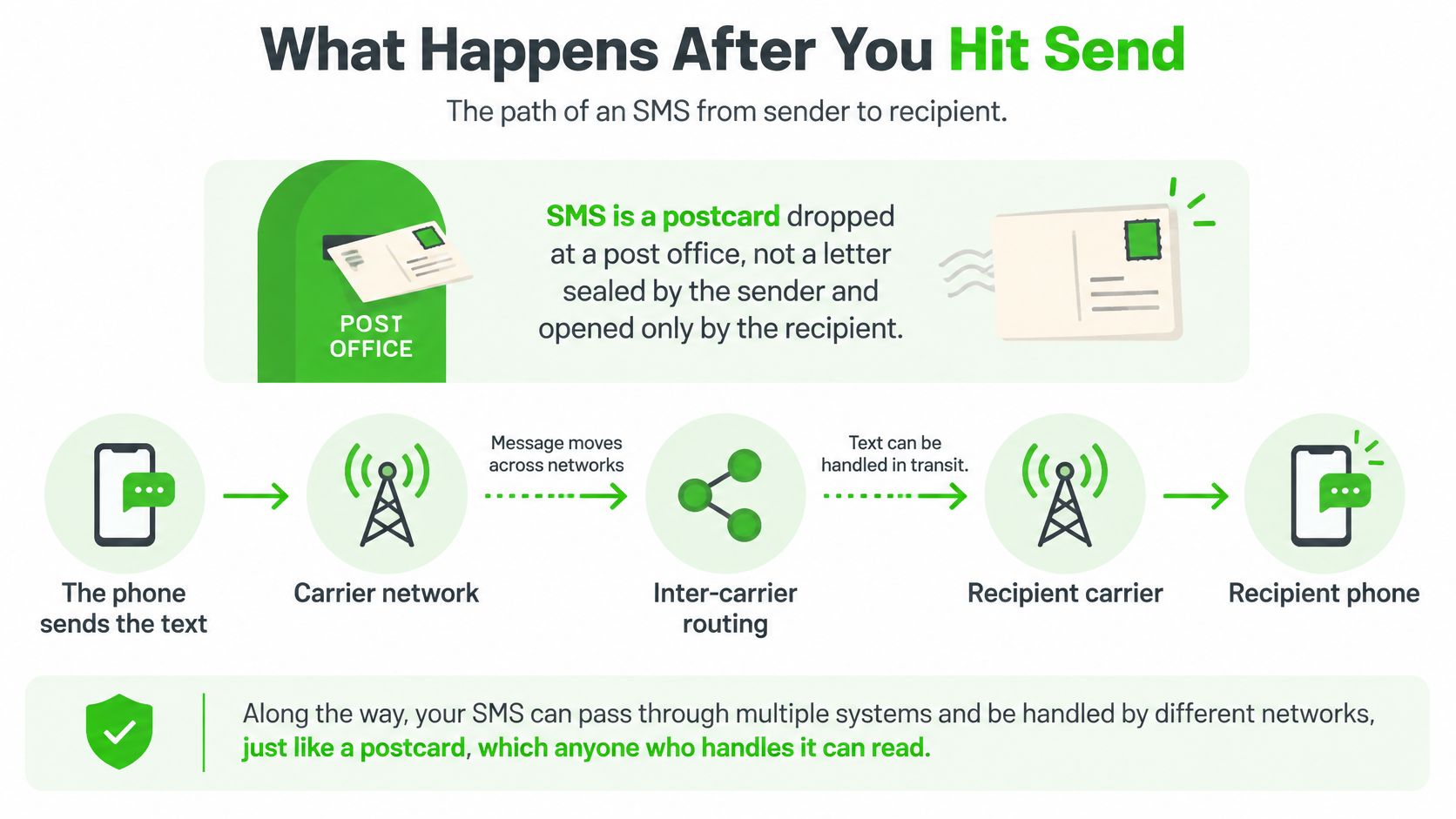
When the two numbers sit on different carriers, the message crosses inter-carrier routing before it reaches the recipient carrier and then the recipient phone. A delivery report can travel back through the same store-and-forward system. At each carrier step, infrastructure processes the message rather than passing along a sealed envelope only the recipient can open.
Where MMS and Chat Apps Diverge
A picture or video text works differently because media is too large for the tiny SMS payload. The carrier stores the photo or video on a media server and sends the other phone a pointer to fetch it. That creates another server-side copy, separate from the short notification that arrived in the thread.
The same messaging icon on your home screen can hide three different behaviors: SMS, MMS, and a richer chat such as RCS or iMessage. You can't judge privacy from the app icon alone. You have to know which path a specific thread used and whether it stayed on that path.
End-to-end encryption changes who holds the readable version. The sending device encrypts with keys tied to the endpoints, relays move ciphertext, and only the receiving device decrypts. A relay can still see routing information about the exchange, which is why it helps to understand what metadata means before assuming an encrypted app hides everything.
Encryption on the wire is not the same as encryption between people.
That one sentence resolves most confusion about how secure are text messages in daily use. A protected radio link can exist while carrier systems still handle plaintext. The copies to worry about are the carrier's handling in transit and every copy that lands and stays on a handset.
Carrier Interception SS7 and SIM Swaps
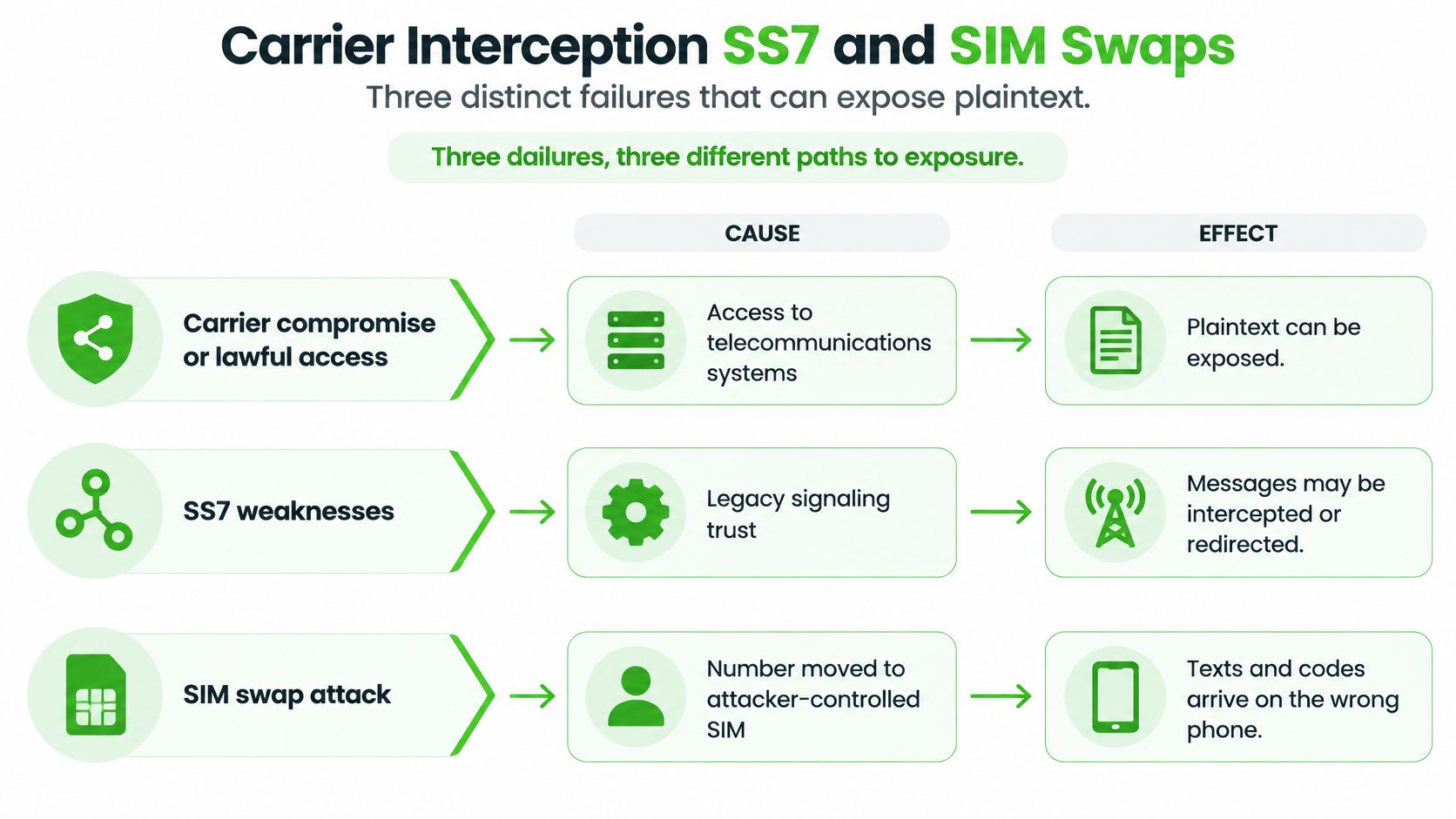
Three different failures can expose a text, and they don't work the same way. Mixing them up leads to the wrong fix. A stronger phone passcode, for example, does nothing if the message never needed your phone to be attacked.
Carrier Access Puts Plaintext in Reach
Because the carrier sits in the trust path, compromise of telecommunications systems or lawful access to them can expose readable content. The exposure doesn't require malware on either handset. It follows from design, since infrastructure between the phones can process plaintext.
SS7 exploitation is a separate route. SS7 is the older signaling system telephone networks use to set up and route calls and texts, and it was built around trust between network operators. An attacker who reaches that signaling network can abuse routing functions to redirect or intercept calls and texts, again without hacking the victim's phone.
A SIM Swap Moves Your Identity
A SIM swap attacks identity rather than a single message. The attacker convinces or tricks the carrier into moving your number onto a SIM the attacker controls. From that moment, your texts and calls, including login codes, arrive on the attacker's phone.
The CISA fact sheet on implementing phishing-resistant MFA identifies SS7 exploitation, phishing, and SIM swapping as attack paths that can let adversaries obtain SMS-delivered authentication codes. It also describes the core identity bug clearly. A service treats possession of a phone number as proof of who you are, while the carrier, not the application, controls who receives that number.
Follow one sequence to see how fast this turns. The attacker ports your number, requests a password reset on your email, and receives the SMS one-time code meant for you. The attacker resets the password, changes recovery settings, and moves to banking or work accounts while you're still wondering why your phone lost cellular service.
None of those steps requires breaking encryption on your handset. That's why NIST restricts public-switched-telephone-network authenticators, including SMS one-time passwords, and recommends stronger verifier-impersonation-resistant methods where higher assurance is required. Passkeys and hardware security keys answer a different question than a texted code does, since they can't be redirected by moving a number.
For day-to-day decisions, treat your number as a public routing label, not a secret credential. A careful review of phone number privacy helps separate what's safe to share as a contact detail from what should never depend on that number alone. If an account can be recovered by whoever currently receives your texts, the account is only as strong as your carrier's customer-service checks.
Smishing and the Sensitive Texts It Exposes
A text can compromise someone without being intercepted. The inbox feels familiar, a phone number looks like identity, and a tap or backup can preserve information long after a message disappears.
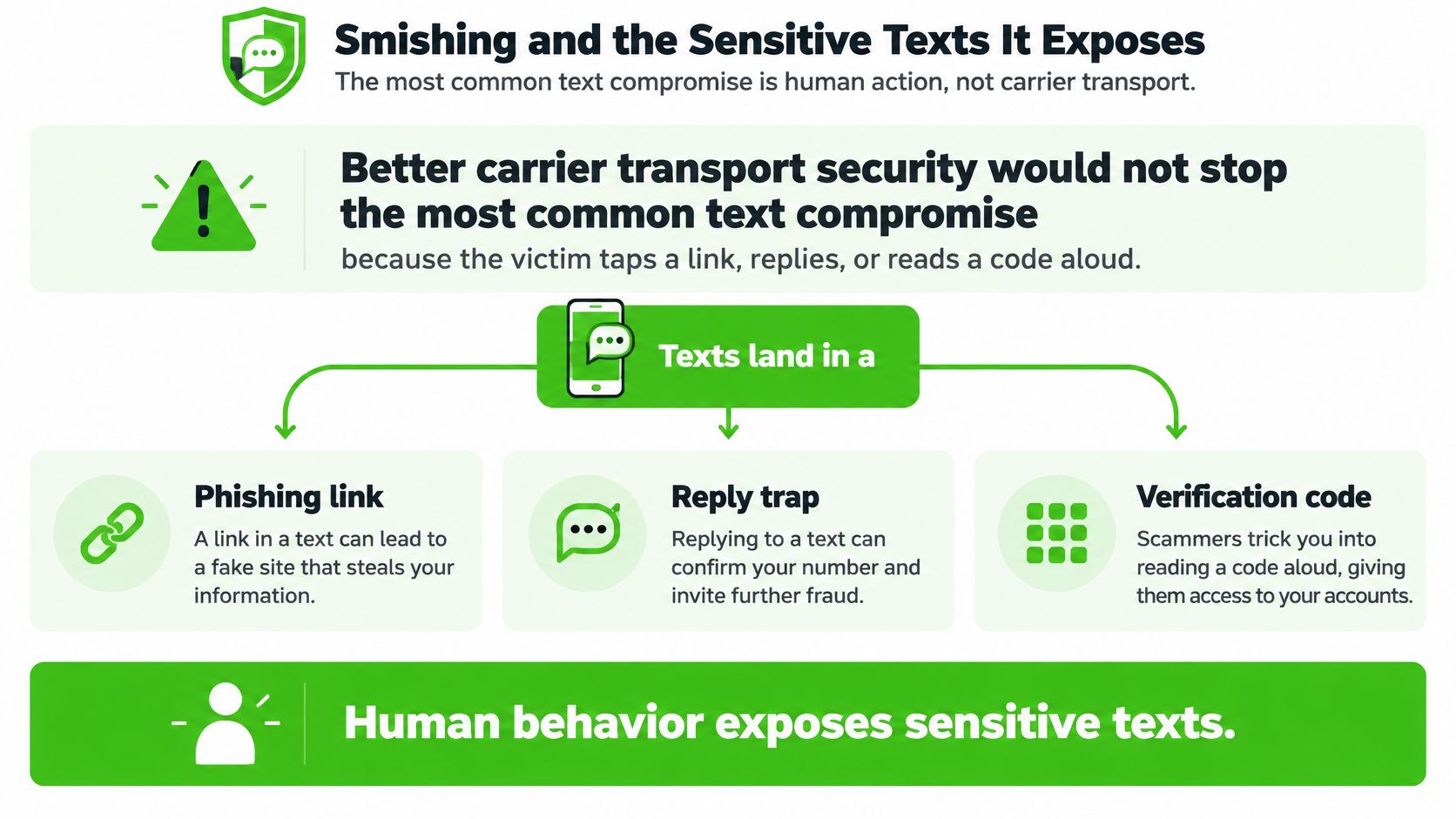
Texts sit beside messages from family, banks, and colleagues, so a fake delivery notice or fraud alert can prompt a quick response. Smishing, or SMS phishing, exploits that trust. Better carrier transport security cannot stop someone from tapping a malicious link, replying to a scammer, or reading a code aloud.
The Zimperium 2025 Global Mobile Threat Report reported that smishing made up more than two-thirds of observed mobile-phishing attacks, while smishing volume increased by more than 22%.
Four Questions People Merge Into One
“Can someone read my texts?” combines several different risks. Separating them shows why securing the network alone cannot protect a conversation.
- Message confidentiality: Can someone between the phones read the content? End-to-end encryption can protect it from intermediaries.
- Sender authenticity: Did the named person or company send the message? Displayed names and numbers can be spoofed.
- Link safety: Does a tap open the legitimate service or a lookalike page designed to steal a password?
- Authentication resilience: If you share a code, can someone else use it to sign in?
Consider a caller who says your account is under attack and asks you to read back a code. The code arrives by SMS, you repeat it, and the caller enters it first. No one intercepted the text. The account may still be compromised.
SMS security depends on more than encryption in transit. A phishing-resistant method such as FIDO authentication binds sign-in to the genuine site and device, rather than relying on a short number someone can persuade you to share.
What a Sensitive Text Actually Exposes
A journalist who texts a source's name creates a record tied to two phone numbers. The carrier path, handsets, backups, and screenshots may all preserve parts of the exchange. Even cautious wording can reveal the damaging fact: who contacted whom, and when.
A lawyer's case strategy can remain readable in a store-and-forward text or a phone backup. A clinician's message can tie medical details to a phone number. An executive's incident update may expose response plans to someone who later gets access to a device, backup, or forwarded screenshot.
| Scene | What gets exposed | Safer move |
|---|---|---|
| Source tip that names a person | Identity and content on the carrier path and in handset backups | End-to-end chat without exchanging phone numbers |
| SMS login or recovery code | The code to whoever receives the number or is persuaded to repeat it | Passkey or hardware security key |
| Legal or incident strategy | Readable text and copies in later backups | End-to-end app with backup encryption checked |
| Medical detail or patient coordination | Content tied to phone-number metadata | End-to-end channel with limited retention |
| Parcel, bank, or boss smish | A tap, reply, or code shared with the scammer | Open the real app or site, not the text link |
Scammers also target newer inboxes. In 2024, Switzerland's National Cyber Security Centre received approximately 63,000 cyber-incident reports and noted that parcel-phishing scams were increasingly conducted through SMS, with scammers shifting toward RCS and iMessage to bypass SMS filters.
A richer message bubble does not establish that a sender is genuine. A malicious link can arrive through different channels, and a code can still be shared under pressure. Filters may catch some campaigns, but scammers can change their wording and route.
Disappearing-message timers have limits, too. They may remove a thread from view, but they cannot erase a screenshot, a photograph of the screen, or a backup made before expiry. The other person's device may also be seized, synced to a computer, or left open. A timer on your phone does not control their copy.
You control what you send. You don't control every copy the other side keeps.
Habits That Keep a Sensitive Conversation Private
Once you know SMS is weak, you need a routine, not more warnings. Each habit below blocks a specific failure, so skipping one leaves a named gap.
- Replace SMS codes on important accounts: Switch email, banking, work, and cloud accounts to a passkey or hardware security key so a SIM swap can't deliver your login to someone else. Use an authenticator app only when those stronger options aren't available.
- Lock the number itself: Put a carrier account PIN and port-out lock on your mobile line, using a PIN you don't reuse elsewhere. Treat sudden loss of cellular signal, especially with working Wi-Fi, as a possible SIM swap and call the carrier from another phone.
- Never surrender a code: Don't read an SMS code to a caller, and don't type one into a site you opened from a text link. Close the message, open the service from its real app or a bookmark you saved, and check the account there.
- Keep secrets out of SMS and MMS entirely: Passwords, source names, medical details, and legal strategy don't become safe because you word them vaguely. Move the thread first, then share the detail.
- Control the copies in your chat app: Turn on disappearing messages for sensitive threads and confirm cloud backup is end-to-end encrypted, not merely encrypted while traveling to the vendor. The same discipline applies to scans and notes on your computer, and following best practices for securing personal files keeps a private chat from leaking through an unprotected folder.
- Treat previews and linked devices as copies: Turn off lock-screen message previews on shared or work-visible phones, and review desktop clients and tablets signed into the same account. A forwarded message is also a copy you no longer govern.
- Don't invent a private SMS workaround: Code words and deleting the thread afterward don't change the carrier path or the other handset. For a short talk with someone who shouldn't learn your phone number, use a channel built for that case instead.
These habits block account takeover and careless copies. They don't make the carrier path itself private, which is why channel choice still matters after the routine is in place.
Verifying a Channel Is Truly End-to-End
Don't trust a thread with a secret until you've checked it, in the thread, on that day. Settings change, contacts switch phones, and a conversation can drop to a weaker path without a dramatic warning.
- Find the explicit label: Open conversation settings and look for an end-to-end encryption indicator for that specific chat. A green bubble or an RCS label alone isn't proof, because RCS can fall back to SMS when the other side lacks support.
- Watch for fallback signs: A bubble color change, a note that a message was sent as a text, or lost read receipts can mean the thread moved onto the carrier path. Stop and recheck before sending anything sensitive.
- Compare safety numbers: Read the safety number or security code aloud or scan it in person on both devices, using a path you already trust, never the chat you're verifying. A mismatch can signal a changed key, a new device, or an intermediary.
- Check the backup, not just the chat: Confirm cloud backup is end-to-end, such as Apple's Advanced Data Protection, rather than encrypted only in transit to the vendor. A short primer on end-to-end encryption explained can help you spot that wording difference.
- Ask what the timer doesn't cover: Check whether disappearing messages also address backups, notification previews, and linked devices. Reading about the limits of end-to-end encryption is a useful reminder that encryption protects content between endpoints, not a screenshot at an endpoint.
Pick a Channel That Matches the Secret
Choose by the lifetime of the secret and the relationship, not by habit. A months-long collaboration and a ten-minute first contact need different tools, and forcing one tool into both jobs creates risk.
If the relationship is ongoing, both people can install an app, and message history is useful, pick a messenger with end-to-end encryption on by default, disappearing messages available, and backups you can verify. Signal-class apps fit that job. An ordinary text thread doesn't, no matter how carefully you word it.
If the conversation is short, the other person shouldn't receive your phone number or email, and a permanent archive would itself be a liability, a browser room that keeps keys on the devices fits better. Ciphar is built for that narrower case. Starting it takes no download, no account, and no phone number or email verification, and the server stores only ciphertext without the key, so it can't read the messages or produce cleartext.
Each Ciphar channel expires 60 minutes after it is created, and then the channel and all its ciphertext are deleted. That limit is the honest trade. A one-hour room is a bad place for a months-long matter, a large group, or a record you must keep, and sharing the access key still has to happen over a trusted out-of-band path.
Match the tool to how long the secret must live, who may learn your identity, and whether history helps or harms. Then move the next sensitive thread off SMS before it starts, while moving is still easy.
For a short conversation that shouldn't expose your phone number or leave a permanent archive, try Ciphar for a browser-based encrypted channel that keeps keys on your device and deletes its ciphertext after sixty minutes. Open a channel, share the access key through a path you already trust, and have the talk without putting a source, client, or patient into ordinary SMS.