When a call says it is encrypted, do you mean the words are protected, the relay can't read anything, or the speaker can't be identified? Those are three different problems, and encrypted voice chat only looks simple until you separate them.
That distinction matters because a relay, a browser, and a network observer don't all learn the same things. A serious privacy design has to answer three questions at once, what can they hear, what can they infer from metadata, and what can they recognize from the voice itself?
What Encrypted Voice Chat Actually Means
People usually search for encrypted voice chat as if it were a single switch, on or off. In practice, it's a stack of protections, and each layer closes one gap while leaving others open. The first layer protects the words, the second limits what the relay and network can see, and the third asks whether the speaker's voice itself can still identify them.
Three separate confidentiality problems
If you're trying to judge a call's privacy, start with the content. Are the words protected while they move across the network, or are they protected all the way from one participant's device to the other's? Those are not the same thing, and a service can say “encrypted” while still keeping enough control to see parts of the conversation path.
Then look at metadata. Even if nobody can read the audio, a relay or observer may still learn who connected, when they connected, and how long they stayed. That information can be enough to map a conversation pattern even when the content stays hidden.
The third layer is the one many explainers skip. A human voice can carry accent, gender cues, emotional state, and other identifying traits, so the speaker can still be recognized even when the words are unreadable to outsiders. A voiceprint is not like a password, you can't rotate it after compromise. For that reason, a confidential call has to protect both the message and the person speaking.
Practical rule: if a product only answers “is it encrypted?”, you still don't know whether it protects the words, the route, or the speaker.
This isn't a niche idea anymore. On April 5, 2016, WhatsApp completed a major rollout of default end-to-end encryption across messages, group chats, files, photos, videos, voice notes, and voice calls, and it did so at a scale of roughly 1 billion users worldwide at the time TechCrunch's report on the rollout. That milestone turned encrypted voice communication from a specialist feature into a mainstream expectation.
The useful question is not “is it encrypted?” It's “what can the relay, the browser, the network observer, or the endpoint still learn?” Keep that question in mind, because every later choice in encrypted voice chat flows from it.
End-to-End Encryption Versus Transport Encryption
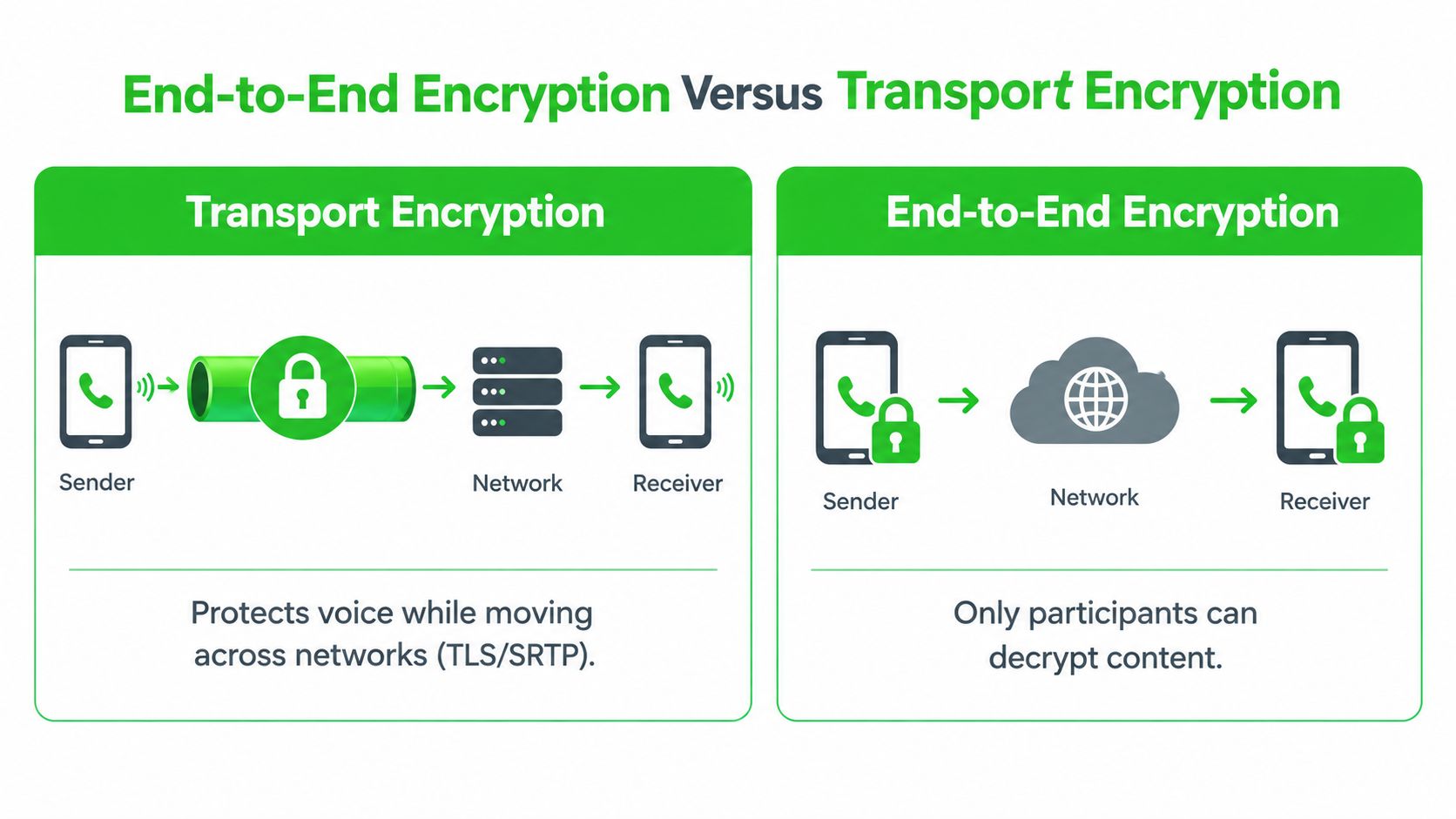
The fastest way to get confused is to treat transport encryption and end-to-end encryption as the same thing. They both use cryptography, both matter, and both can exist in the same call, but they protect different boundaries. Mail in a sealed envelope is not the same as mail that is sealed only while it rides on a truck.
Who can open the envelope
Transport encryption protects voice while it moves across networks. In WebRTC, media packets must use SRTP/SRTCP rather than plaintext RTP/RTCP, and SRTP adds payload encryption, integrity protection, replay protection, and limited source authentication RFC 8834. The wire is protected, but the relay is still part of the path.
End-to-end encryption moves the trust boundary inward. The service provider relays the communication, but it is not supposed to possess the keys needed to understand the call. The difference is simple, the truck can carry the envelope, but it cannot open it.
Why WebRTC still isn't zero-knowledge by default
WebRTC negotiates SRTP keys through DTLS-SRTP, and NULL-encryption cipher suites are prohibited, so the transport layer is never optional. That is strong transport security, but it does not by itself create an application that hides everything from the service. A relay can still sit in the path, and a media-terminating server can still learn things at the endpoint if the application is built that way.
For sensitive rooms, the question is where the authoritative confidentiality boundary lives. If the browser encrypts voice frames before the relay ever sees them, then AES-256-GCM at the application layer becomes the boundary that matters, while transport security becomes defense in depth. The service provider relays the communication, but it is not supposed to possess the keys needed to understand the call.
A useful internal reference on that distinction is Ciphar's end-to-end encryption guide. The same logic applies in browsers and relayed systems, the security promise depends less on the padlock icon and more on who holds the keys.
How Encrypted Voice Chat Is Actually Transported
How does encrypted voice chat move across the network without handing the service everything in plain form? Two transport patterns show up most often in browser-based voice, WebRTC and a WebSocket relay. They solve the same user problem, but they protect different parts of the stack, and that difference matters when you separate words, metadata, and the speaker's voice into distinct confidentiality problems.
WebRTC and the metadata it can expose
WebRTC is the familiar browser path for live audio. It can connect peers directly or send media through a TURN relay, and in both cases the media itself is protected with SRTP. That gives you strong confidentiality for the audio stream in transit. It does not make the rest of the session invisible.
A relay or browser observer can still learn useful metadata. IP information may appear in signaling and connection setup. Timing can reveal when people joined, how long they spoke, and whether traffic spikes line up with a conversation. The audio words stay protected on the wire, but the outline of the session can still be visible.
That tradeoff is acceptable for many calls. It is less comfortable for a one-time confidential conversation where the room should exist only long enough for the call, and where the system should avoid leaving behind anything that behaves like a durable conversation record.
WebSocket relays and opaque ciphertext
A minimal WebSocket relay takes a different path. The browser encrypts the voice frames first, then the relay forwards only opaque ciphertext. The relay can see that traffic exists, and it can still pass along control data, but it cannot use the audio itself as a source of truth. That is a narrower trust boundary, which is often the point in identity-light rooms.
For builders comparing formats, browse input components helps with browser-side voice capture and input handling. The component choice is secondary. The core question is what the relay or network observer can still learn.
A relay that only forwards ciphertext can still see that traffic exists. It just cannot use the audio content itself as a source of truth.
That is the same design pattern used by zero-knowledge rooms such as Ciphar's voice rooms, where client-encrypted frames move through a relay that stores only opaque ciphertext and related control data.
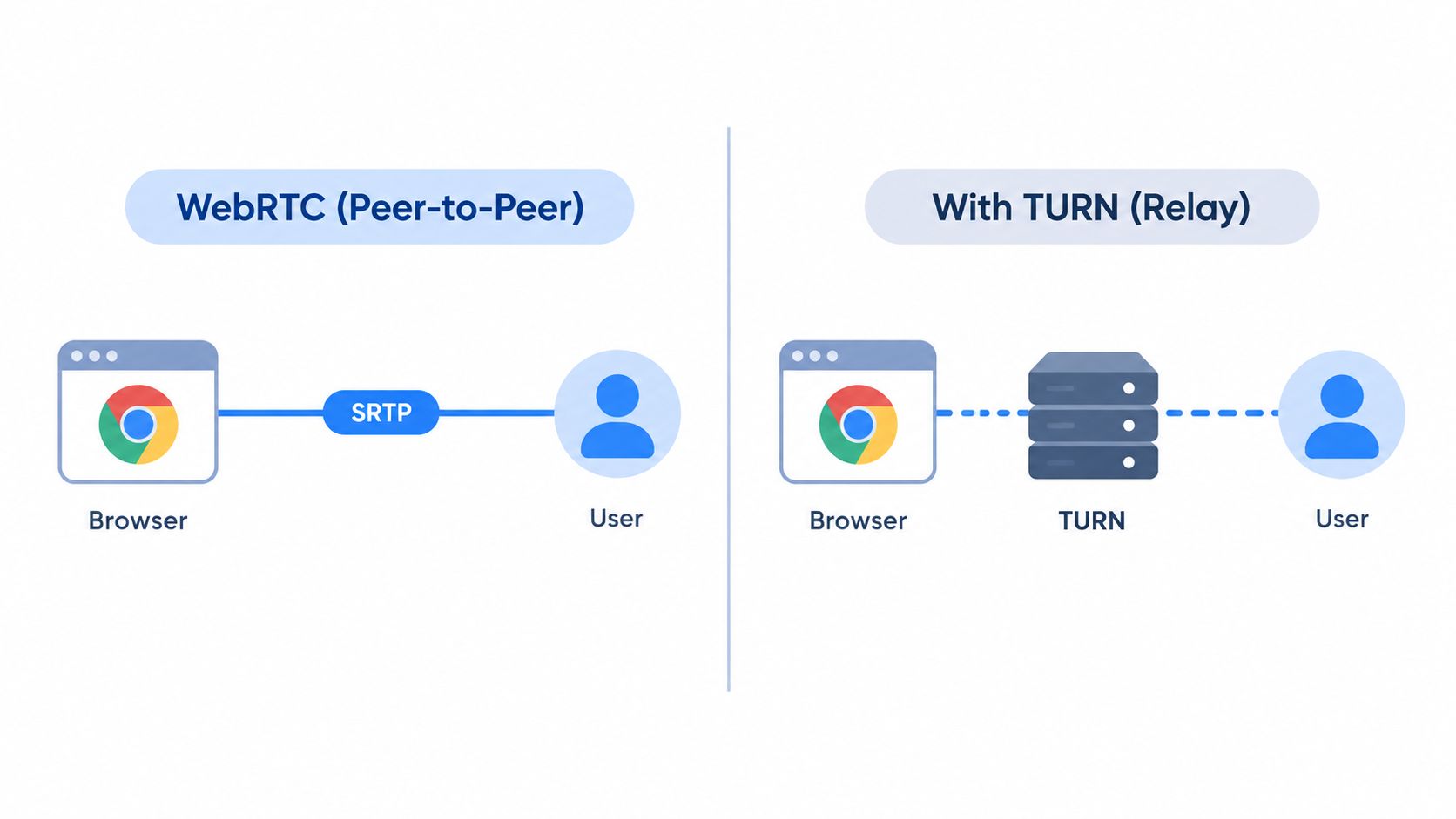
The cleanest way to think about this is simple. WebRTC tends to optimize for broad calling infrastructure, while a ciphertext-only relay optimizes for a narrow confidentiality promise. If the room is temporary, sensitive, and anonymous by design, the second model is usually easier to reason about.
Voice Quality, Latency, and Encryption Overhead
Why does an encrypted voice call sometimes feel slow when the encryption is not the main source of delay? The usual answer is codec choice and frame sizing. Encryption still adds work, but audio encoding decisions shape latency, jitter tolerance, and packet behavior first.
Opus does the heavy lifting
Opus is the dominant modern interactive audio codec, and it supports roughly 6 to 510 kbps with frame durations from 2.5 to 60 milliseconds Cloudinary's Opus codec guide. Shorter frames reduce algorithmic delay, but they also raise packet-rate overhead and make the stream more sensitive to jitter. For conversational speech, a profile around 16 to 24 kbps is a practical wideband starting point, and 20 ms frames are a sensible balance.
A call can still sound poor even if the cryptography is sound. Misconfigured codec settings, oversized frames, or an unstable network path can make audio rough before encryption becomes a meaningful factor. Small messages can also create churn if the browser and relay are processing too many packets each second.
What encryption adds to each frame
At the application layer, frame encryption adds an authentication tag and a nonce or IV. Those fields are necessary, but they make very small frames less efficient because the overhead takes a bigger share of each packet. Larger frames reduce that relative cost, then increase mouth-to-ear delay and make each dropped packet carry more missing audio.
The right design measures the tradeoff instead of guessing. Benchmark end-to-end latency, jitter, packet loss, CPU use, and ciphertext expansion at several Opus settings, then choose the combination that holds up in the room. For short conversational sessions, 20 ms frames with a speech-friendly bitrate and loss concealment enabled are a practical starting point.
When weighing these tradeoffs against wider calling infrastructure, compare SIP, WebRTC and UCaaS to see how relayed and peer-to-peer designs differ in overhead.
Security still needs operational discipline
The crypto can be sound and the session can still be mishandled. Nonce uniqueness has to hold, authentication tags have to be verified, decryption failures need safe handling, and keys should be disposed of immediately when the channel ends. Encryption alone does not guarantee secure deletion from browser memory, operating-system buffers, or microphone subsystems.
The relay also should not decode or transcode. Once the server can hear the audio, the zero-knowledge boundary has already moved in the wrong direction.
For a wider comparison of cipher strength and what that means in practice, use Ciphar's encryption strength overview. Benchmark before you commit, because a cipher suite that is strong on paper can still fail a real-time voice budget.
The Speaker Is a Biometric Signal
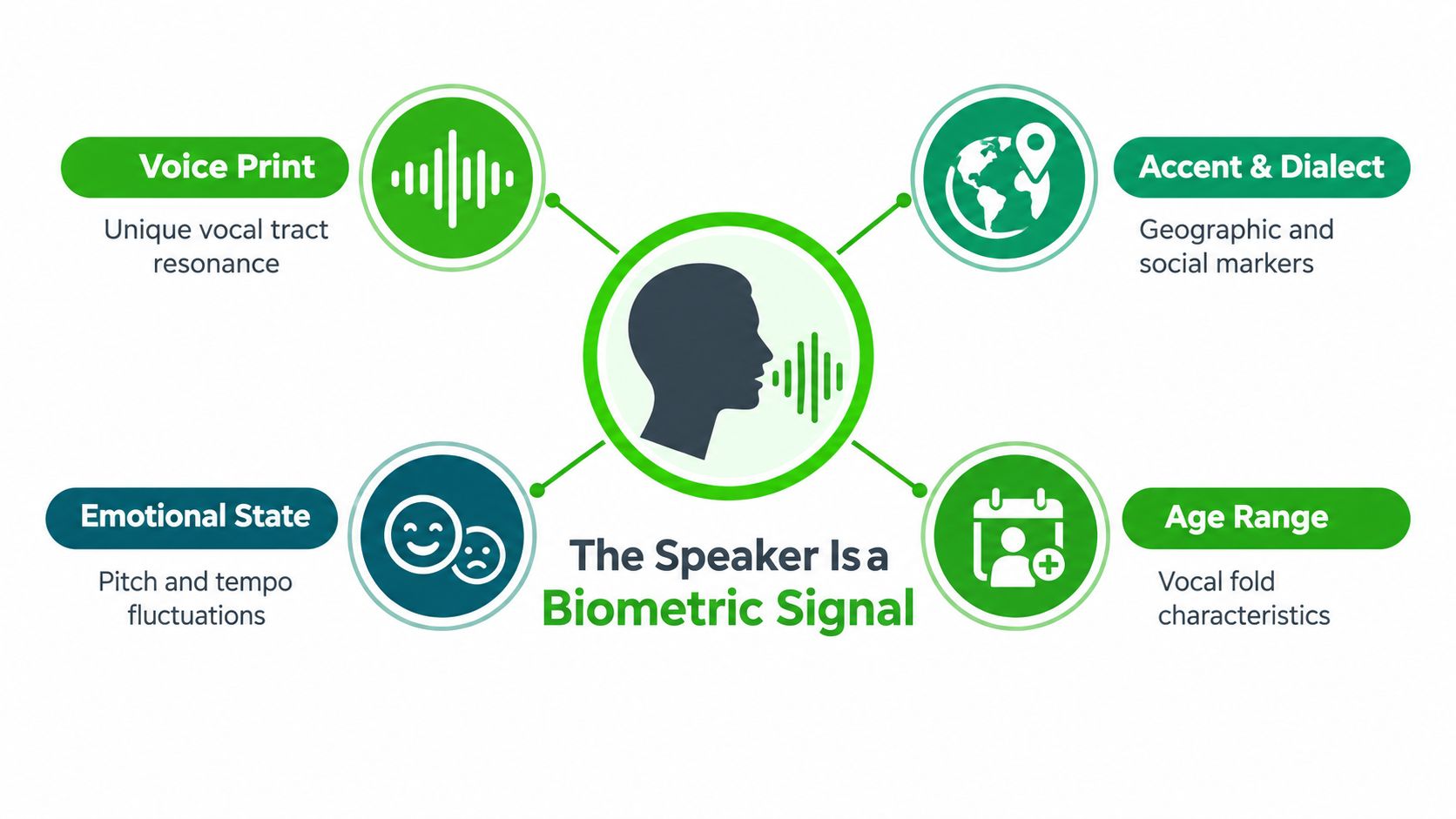
The hardest part of encrypted voice chat is that the words aren't the only thing being exposed. A voice can identify a person even when the content stays hidden, and that makes speaker privacy a separate problem from message privacy. If you only protect the content, you haven't fully protected the person.
What the voice itself gives away
Speech carries biometric and contextual signals, including accent, gender cues, emotional state, and other speaker characteristics that can support re-identification even when the audio content is unreadable to observers ScienceDaily's summary of the March 2025 research. That creates a distinct threat model from the one many people picture when they hear "encrypted."
This matters most for journalists, lawyers, healthcare workers, and incident responders. A confidential source may want the words hidden from the relay, but they may also need the speaker identity kept separate from the content, the location, and the recording trail. Those are not interchangeable goals.
Controls that reduce exposure
The practical controls are mostly operational, not magical.
- No server recording: The relay should never store the raw conversation, because stored audio creates a separate retention problem.
- No transcription: Third-party speech processing can leak content and identity even if the original stream was encrypted.
- Identity-free callsigns: A temporary room name or access key is safer than tying the session to a long-lived account.
- Immediate burn: End the room as soon as the conversation ends, because every extra minute extends exposure.
- Device hygiene: Malicious extensions, local recording tools, and compromised endpoints can still capture what the relay can't.
Those controls reduce the chance of re-identification, but they don't eliminate it. A participant can still record locally, a compromised endpoint can still leak, and an acoustic environment can still hint at location or context. The point is to make the relay blind, not to pretend the rest of the world is.
What the Relay and Browser Can Still Learn
Browser-based encrypted voice chat lives or dies on residual risk. If you're a high-risk user, the useful question is not whether the audio is encrypted, but what a relay, browser, or network observer can still infer from the session. That checklist is often more important than the cryptographic label.
The visible leftovers
A relay can usually still learn IP-related metadata, timing patterns, call duration, and sometimes packet loss characteristics, even when it can't read the audio itself. A network observer may see similar patterns. Browser permission prompts can reveal that the page wants microphone access, and in some cases screen capture too, which is enough to tell a lot about the session's sensitivity.
Browser behavior also matters. Mozilla notes that browser APIs and end-to-end WebRTC encryption capabilities differ in shape across browsers, which means the answer to “is it encrypted?” is implementation-specific, not universal Mozilla's WebRTC blog. A malicious extension can capture audio. A compromised endpoint can leak audio. A browser configuration can expose more than the user expected.
What good mitigations actually look like
Application design has to carry weight. In a zero-knowledge room, client-side AES-256-GCM protects the voice frames, PBKDF2-derived keys never leave the device, failed access attempts trigger intrusion alerts, and guessing is rate-limited. A manual burn control gives participants an immediate exit when something feels off.
Operational rule: if the room can't be burned quickly, it isn't really ephemeral.
The relay can still see that a session exists, and that matters. It just shouldn't be able to turn the session into readable speech or a recoverable transcript.
For a practical relay model, what a relay server does is worth reading because the design only works when the relay is deliberately dumb. That doesn't remove browser risk, it just narrows what the infrastructure itself can learn.
Running a Confidential Voice Session Step by Step
A confidential voice session should feel like a clear sequence, not a black box. A journalist speaking with a first-time source, a lawyer handling a privileged matter, or a researcher coordinating a disclosure all follow the same path. Create the room. Verify the key. Talk. Burn it when finished.
Start by opening a browser-based room in one click. Share the human-readable channel name, then send the access key out of band through a separate channel the relay cannot inspect. That matters because identity-free rooms should not depend on the server to decide who belongs there.
Next, each participant should verify that the test blob decrypts. That check confirms the key before any sensitive speech begins, and it lowers the chance of talking into the wrong room. During the call, watch for intrusion alerts. Failed access attempts are often the first sign that someone is guessing or probing.
When the conversation ends, burn the channel immediately.
In Ciphar's browser-based model, the room uses AES-256-GCM for client-side encryption, PBKDF2 with 100,000 SHA-256 iterations for key derivation, a server-enforced 60-minute expiry, and no recordings or transcripts. Those choices fit the use case, but they also make the tradeoff plain, you get easy anonymous first contact, not a long-lived communications archive.
Mainstream messengers already normalized encrypted calling, and browser-native rooms go a step further by removing installs and accounts. The relay still should not hear the words, yet it can still observe that a room exists, when traffic starts, and how participants connect.
The routine stays simple. Verify the key before speaking, keep an eye on alerts during the call, and end the room the moment the conversation is done.
Residual Risk and What to Verify Before You Speak
No encryption setup removes every risk. Once a room is burned, there's no recovery, no archive, and no transcript, which is the point and the downside. Before you speak, confirm the access key was shared out of band, make sure the test blob decrypts on entry, watch for failed-access alerts, and burn the channel immediately if anything feels off.
Ciphar provides browser-based, zero-knowledge encrypted chat with temporary voice rooms, so you can run a confidential conversation without installs, accounts, or a long-lived archive. If you need a short voice session where the relay can't read the audio, visit Ciphar and see how the channel, key, and burn workflow fit your use case.