You're on a call, and the other person won't give you a number. A shared inbox feels too permanent, and an app install would take longer than the conversation itself. You need a place to talk for a few minutes, then leave nothing behind.
A browser chat app is that place. It lives in a tab, asks for a key instead of a profile, and ends on a clock. Before you paste anything sensitive into it, it helps to know what the tab, the relay, and the network can still see.
What a Browser Chat App Actually Is
A browser chat app is a chat that runs in a browser tab, with no download, no account, and no phone number. You open a link, type the access key, and start talking.
Three traits set it apart from a normal messenger.
No install. The page is the client. It runs on a laptop and on a phone, so nobody has to visit an app store.
No identity. Starting a chat needs no account and no phone number or email verification. There is no profile tying this conversation to the last one.
A hard expiry. Every channel is one-time and lasts 60 minutes. When that window closes, the room is gone.
Say a source wants to send a tip to a reporter without handing over a number, and neither side wants an account. They share a link and a short key, talk, and leave. Think of it as a rented meeting room that opens with a door code, not a members club that needs a membership card and an installed app.
The habit behind it is already ordinary. Statista data indicate that approximately 94.1% of internet users worldwide accessed online chat or messaging services monthly in the second quarter of 2026, and usage stayed broadly stable from the first quarter of 2022 through the second quarter of 2026. People already know how to enter a conversation and exchange messages in real time. Browser delivery removes the install step with no extra effort.
That global figure mixes mobile messengers with browser chat, so it proves familiarity, not a preference for the browser.
A browser chat app is a chat room that exists only in your tab, for as long as the conversation needs it.
Ciphar is a zero-knowledge encrypted chat app that runs entirely in the browser, built for that rented-room pattern rather than a lasting social graph.
How a Browser Chat Channel Works From Start to Burn
Picture a sealed box with a combination only two people know. The courier can carry the box. The courier can't open it. A channel follows the same idea, from the moment the browser mints the combination until someone burns the box.
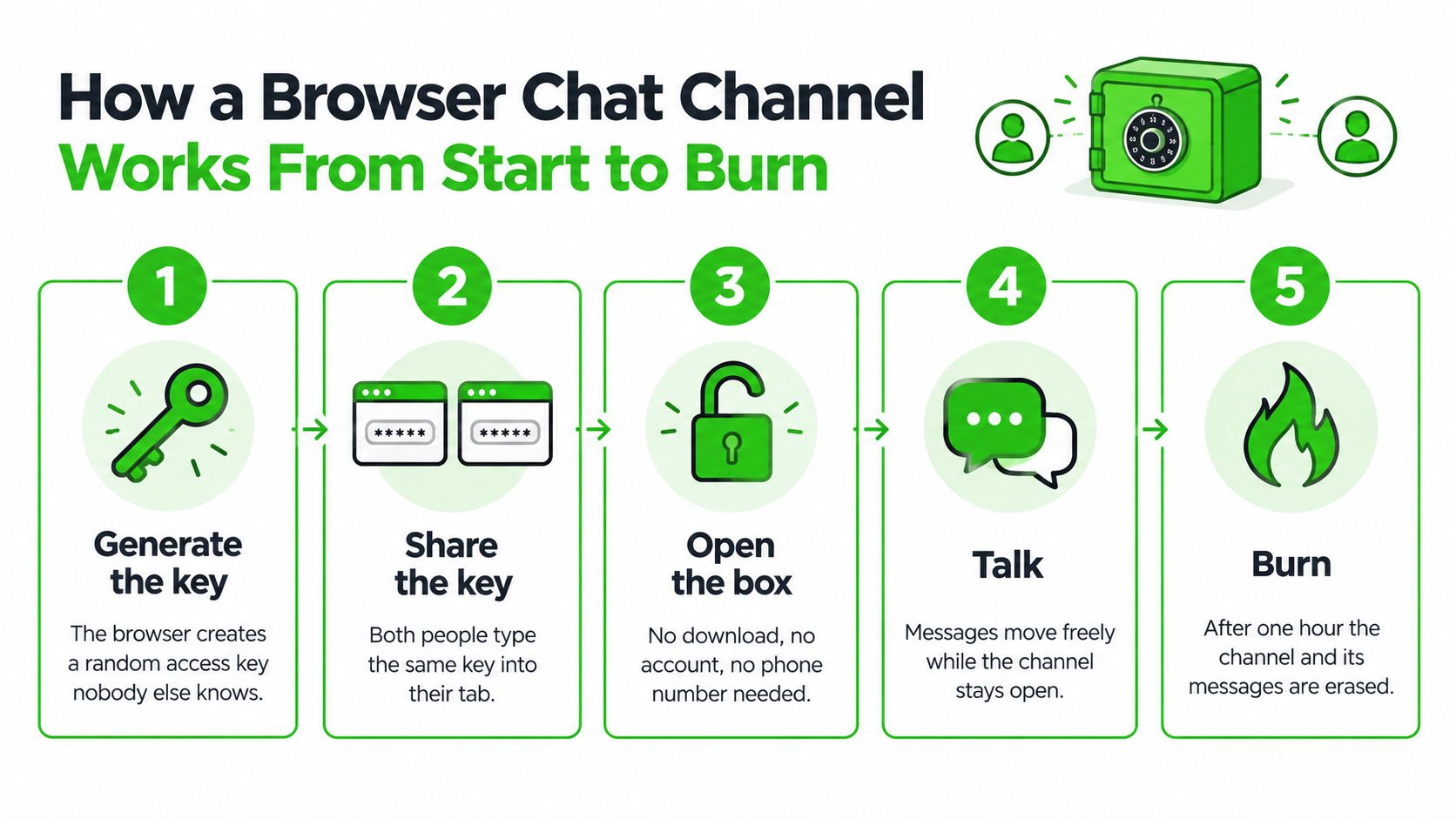
Clicking Initialize Secure Channel takes about three seconds. All randomness comes from the browser's native crypto source. Then the lifecycle runs like this.
The browser mints the room. It generates a channel name, which becomes the URL, and a random access key on the device. Nobody else chose that combination, and it never sat in an account database.
The browser turns the key into a lock. It derives the encryption key from the access key and a per-channel salt using PBKDF2 with 100,000 SHA-256 iterations, producing a 256-bit AES key. That key stays on the device. Stretching a short password this way makes guessing far more expensive than trying the password once.
You share the combination out of band. Send the link and the key over a separate trusted medium, such as a phone call or a meeting in person. A practical walk-through of that split lives in our guide to out-of-band key exchange. Putting both in the same chat message removes the separation that makes the model work.
The other browser proves it can open the box. A new participant is admitted only if their browser derives the same key and decrypts a test blob. If that fails, they never enter the channel. The test confirms the keys match. It does not confirm who is holding the other keyboard.
Everything leaves as ciphertext. Each message, file, reply, and voice frame is encrypted with AES-256-GCM before it touches the network. The relay stores ciphertext, IVs, auth tags, salt, and expiry. Voice audio uses an end-to-end encrypted WebSocket relay keyed off the channel secret, and only authenticated participants can decrypt it.
Every encryption gets a fresh IV. Reusing a key-and-IV pair breaks AES-GCM. NIST Special Publication 800-38D recommends 96-bit IVs for interoperability and simplicity, and states that the probability of repeating an IV with the same key should be no greater than 2^-32. In practice the browser must mint a new random IV for each message or voice frame, and the relay passes that IV along with the ciphertext. A one-hour life limits how many frames you send, but it doesn't replace that discipline. Non-secret context, such as message type and sequence, should ride along as additional authenticated data so a blob can't be moved into another context unnoticed.
The box is destroyed. The channel ends at 60 minutes, or the moment anyone presses BURN CHANNEL, which deletes the channel and every encrypted blob at once.
Before the first real message, read a short phrase aloud on the call that carried the key, or confirm a detail only the sender knows. A wrong access key gets a generic refusal, and repeated failures slow further attempts. If you see a join you didn't expect, burn the channel and open a new one with a new key.
The short version of that flow is easier to watch than to memorize.
What the Relay, Network and Browser Can Still See
Encryption protects what a message says. The facts around the conversation are a separate exposure.
Zero-knowledge encryption settles content confidentiality. Three other questions stay open: who can see the envelope, who can see the traffic, and who can see your screen. Split the problem into four viewers: your browser, the relay, a network observer, and a compromised device.
| Data item | Browser | Relay server | Network observer |
|---|---|---|---|
| Access key | Stays on the device and derives the key | Never receives it | Never sees it |
| Message text, replies and edits | Plaintext on the device only | Ciphertext, IV, auth tag | Ciphertext and message timing |
| File contents | Encrypted before upload | Ciphertext only | Ciphertext size and upload timing |
| Voice audio | Encrypted frames | Relays ciphertext frames | Frame sizes and call timing patterns |
| Channel name (URL) | Generated locally | Visible | Visible in the request |
| Website identity | Padlock confirms encrypted transport only | Not applicable | Destination domain and traffic patterns |
Read the relay column like a courier's view of a sealed letter. It sees the channel name and the approximate timing of activity, and it stores only opaque ciphertext, IVs, auth tags, salt, and expiry timestamps. Files are encrypted in the browser and uploaded as ciphertext, then self-destruct with the channel. For the plumbing behind that courier role, our note on what a relay server is spells out what it stores and what it cannot decrypt. The only lasting site metric is a single integer on the home page, the total count of channels ever created, with no timestamps, identifiers, or links to any user.
What the table can't fit in a cell
The padlock is the usual trap. It signals certificate-based encrypted transport to a domain, and nothing more. A look-alike domain can show the same lock. Research indexed by the ACM Digital Library found that clearer identity and encryption indicators improved people's detection of fraudulent websites, which tells you how often the lock alone leaves them guessing. Even against a passive observer, encrypted traffic keeps its shape: packet sizes and timing can reveal which pages a connection is loading, so a protected message does not make a session invisible.
Voice adds its own exposure. Real-time voice rooms relay over WebSocket, and voice traffic can reveal connection metadata such as IP addresses along the network path, with the amount of leakage varying by browser and configuration. Identity can also persist without any login at all, so reading up on how device fingerprinting works helps before you treat a fresh tab as a fresh identity. The last viewer is the simplest one. If the laptop itself is compromised, malware reads the plaintext on screen before encryption and after decryption, regardless of how careful the relay is.
Check the exact domain in the address bar before you paste an access key.
What Enforced Deletion Costs You
A channel that burns on schedule works like a safe-deposit box that shreds its contents at closing time. That protects you if someone shows up later with a subpoena, a breach, or a buyer for old logs. It also means the receipt is gone if you needed it.
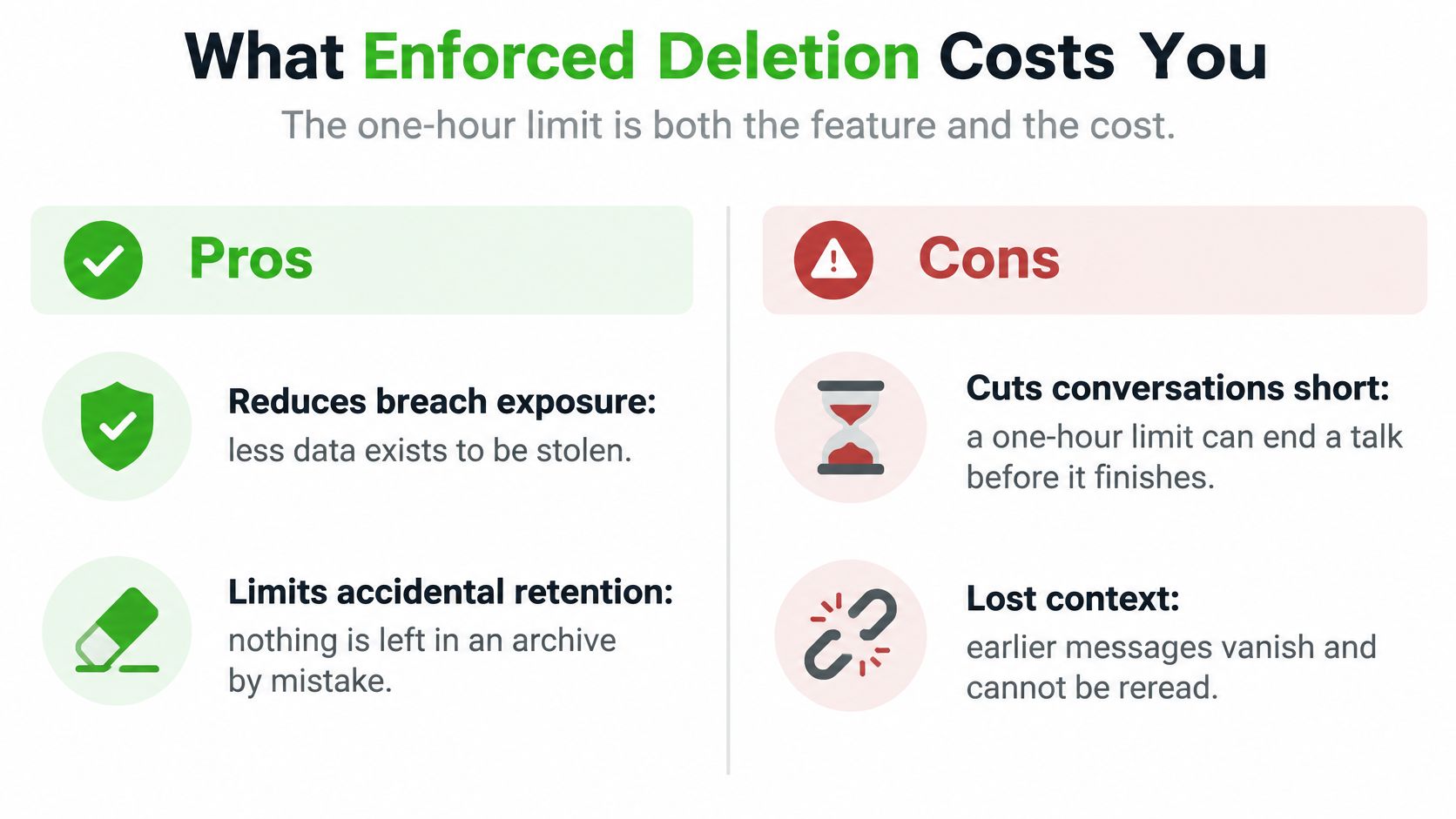
The one-hour limit is the feature and the cost in the same mechanism. Short retention can reduce breach exposure and accidental retention, but it also removes recovery, auditability, evidence preservation, and continuity across devices. Private modes and short timers do not make the endpoint trustworthy either: the clock clears the service side, while the browser, device, network path, and the other participant still deserve their own threat model.
What you gain
No archive to subpoena, breach, or sell. After expiry there is no server-side history to misplace.
No leftover thread on the service. Closing the tab is enough to stop using Ciphar, and expiry removes the channel's encrypted blobs from the relay. Treat the device separately: screenshots, saved files, or a compromised browser can still keep their own copies.
A smaller blast radius. If the conversation was sensitive for an hour, it is not still sitting there next week.
What you lose
Recovery. A lost key or a closed tab can mean the conversation is gone. There is no password reset for a room that was never tied to you.
Proof. You cannot later show exactly what was said. That gap matters in a dispute, a newsroom edit, or a clinical handoff.
Continuity. The talk cannot resume on another device after the blobs are wiped. A participant can also end it early.
BURN CHANNEL acts at once, with no confirmation, no undo, and no wait for the timer. That is a defensive control when someone unexpected joins. It is also an easy mistake if your thumb hits it mid-sentence.
What to write down first
Decide, before the call, which facts must survive. Write those into your own notes under your own retention rules, outside the channel, and keep names, times, commitments, and file hashes there rather than trusting the room to remember them. Do not treat the chat as the record. Screenshots feel like a backup, but they create a new copy on a device, and a screenshot privacy guide for journalists is a useful check on what a page can notice while you capture it. If the conversation has to last a week or appear in a formal file, this tool is the wrong room.
Limits and Abuse Controls to Plan Around
The tool is built for short, anonymous, ephemeral conversations under a hard self-destruct, and it is not a group chat, a long-term messenger, a file storage service, or a regulated-communications tool. The limits below are how that scope stays honest when the relay cannot read what you are sending.
| Limit | Typical value | What it means for you |
|---|---|---|
| Channel lifetime | 60 minutes, hard limit | No extensions; reconnecting does not add time |
| Message size | No published app cap; general WebSocket guidance suggests 64 KB or less | Very long pastes may be refused; split them |
| Message rate | Throttled, no published figure | Rapid flooding gets slowed or refused |
| Failed access attempts | Rate limited | Repeated key guesses stay slow |
| File size | No published global cap; the channel enforces its own ceiling | Check the channel limit before sending large files |
| Voice rooms | Heavier traffic than typing, no published cap | Voice is the most demanding mode in the room |
Why a ciphertext relay still needs quotas
The relay works like a conveyor belt carrying locked boxes. It can see the boxes' sizes and when they move, but never what is inside them, so it cannot tell a genuine voice call from a flood of junk traffic. OWASP's WebSocket Security Cheat Sheet recommends capping message sizes, typically to 64 KB or less, and applying rate limits so a single client cannot monopolize a connection.
For a service with no accounts, those controls matter more, because there is no user profile to suspend. The limits have to act on traffic itself rather than on identity. The one you will notice most is the rate limit on join attempts: a wrong key never gets into the room, and slowing guesses is what keeps a 60-minute channel from being brute-forced before it burns.
What you'll feel in a live channel
A wrong key never gets in. Admission requires your browser to derive the same key and decrypt the channel's test blob. Fail that check and you stay outside, with the rate limit making repeated guessing impractical.
Voice is the heavy mode. Each voice frame travels as its own encrypted payload over the WebSocket relay, so a call produces far more traffic than typed messages do.
Reconnecting doesn't add time. The 60-minute expiry is enforced on the relay side, so closing and reopening the tab cannot stretch the room.
If a document is large, send it through a file process you control instead of forcing it through the chat.
Where Journalists, Lawyers and Responders Use Them
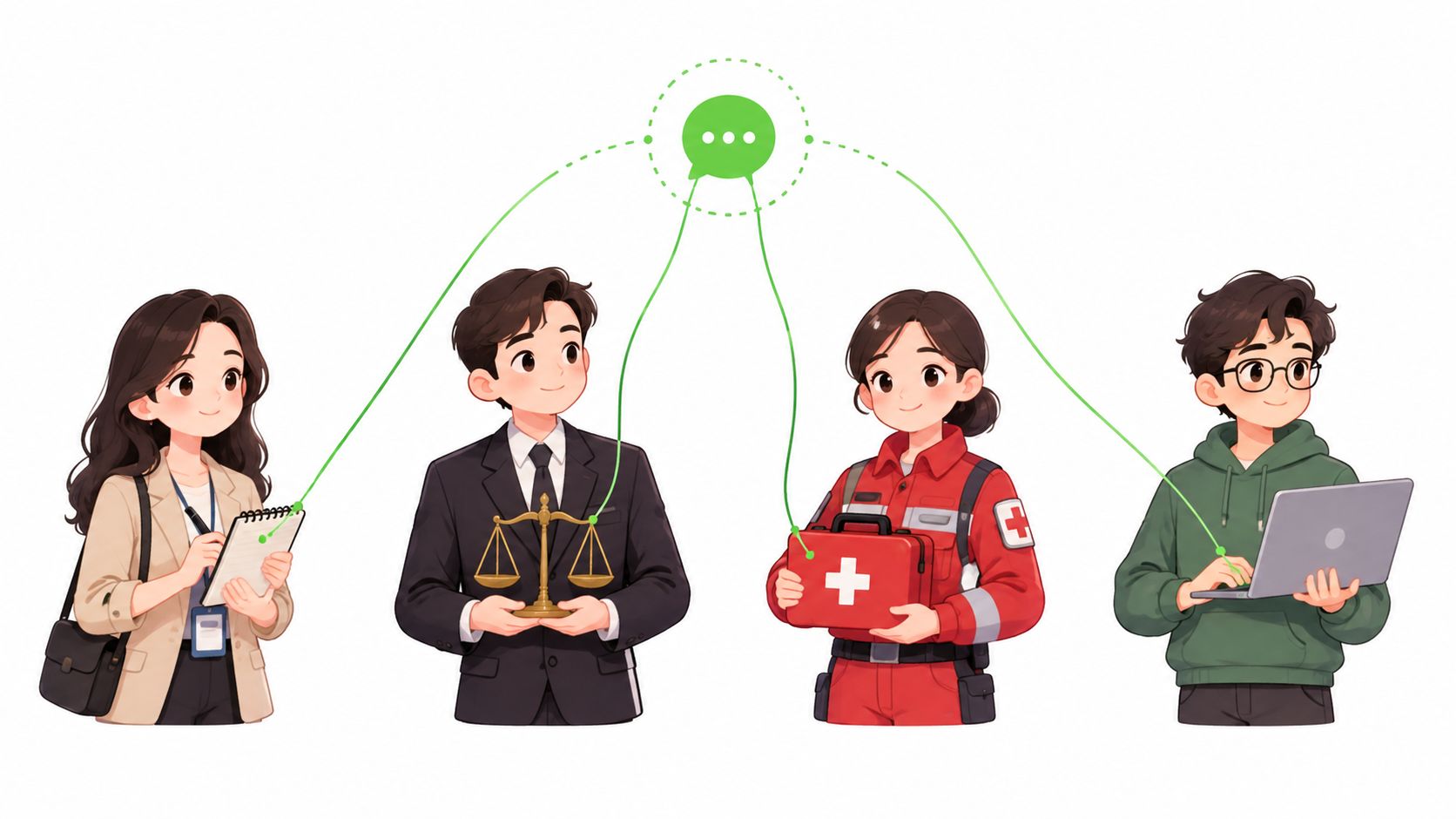
The conversations that fit share one shape. They're sensitive, they're short, both sides are reluctant to swap contact details, and a permanent archive would itself be a liability. Nothing here replaces a legal, regulatory, or records duty. The scenarios below are the jobs the room can actually do.
| Role | Typical conversation | Why identity-free access helps | Watch-out |
|---|---|---|---|
| Journalists and sources | Anonymous tip, first contact, short interview | No phone number or account exchanged | Verify the claim separately; keep working notes off-channel |
| Lawyers and clients | Urgent privileged question before a formal engagement | No account or install needed for a client in a hurry | Not a substitute for the firm's regulated records |
| Healthcare professionals | Coordinating a sensitive case between clinicians | No permanent message trail | Check local regulations on records first |
| Security researchers and responders | Vulnerability coordination or an off-the-record incident session | No shared accounts or contact details | Keep formal reports outside the channel |
A reporter gets a tip and reads the access key over a separate phone call, then checks the claim through other reporting. Our guide to journalist source protection covers that first-contact pattern in more detail. Working notes stay in the newsroom system, not in the tab.
A lawyer may need to hear an urgent privileged question before a formal engagement, from a client who won't install anything tonight. The firm's regulated records still apply. The tab is a waiting room, not the file.
Clinicians sometimes need to coordinate a sensitive case without leaving a message trail on a shared handset. Local rules on medical records still apply, so check those before you type a name or a diagnosis.
A researcher coordinating a vulnerability disclosure can talk without swapping personal accounts. Good-faith penetration testing of your own channels is allowed. The formal report still goes through the disclosure channel you already use.
If the conversation must survive for a week, or appear in a formal record, it is not a fit.
Choosing Between a Browser Chat App and Other Private Tools
| Feature | Ciphar | Signal | Telegram | Privnote | |
|---|---|---|---|---|---|
| Account required | No | Yes | Yes | Yes | No |
| Phone number required | No | Yes | Yes | Yes | No |
| Install required | No (browser) | Yes | Yes | Yes | No (browser) |
| E2E encryption by default | Yes | Yes | Yes | No (Secret Chats only) | Yes |
| Self-destructing chats | Yes (60 min) | Optional | Optional | Optional | Yes (one read) |
| Real-time chat | Yes | Yes | Yes | Yes | No (one note) |
| Voice rooms | Yes (E2E) | Yes | Yes | Yes | No |
Read the table as two filters, not one. The first filter is identity: only Ciphar and Privnote need no account, no phone number, and no install. The second is what the tool can actually do. Ciphar pairs that identity-free entry with real-time chat, replies, file transfer, and optional encrypted voice rooms, all under a server-enforced one-hour self-destruct. Privnote sends a single read-once note, which solves a different problem entirely.
Signal and WhatsApp suit people who already share a number and want history across devices. Both anchor every conversation to a phone identity, so the contact layer is never anonymous even when the content stays encrypted. Telegram standard chats aren't end-to-end encrypted by default, so only Secret Chats count as private.
One more column the table can't show: metadata. No tool erases it. The question is who holds it. An account-based app ties activity to a registered identity, while a browser channel leaves the relay a channel name and activity timing, with no account behind it.
Pick by the job:
- Short and identity-free, with someone you've never exchanged contacts with: a browser chat app.
- Ongoing privacy with a number you already share: Signal.
- One secret note: Privnote.
- You already live in Telegram: Secret Chats only.
Three questions settle the choice before the next sensitive conversation. Must the other person stay anonymous? Must the talk disappear within an hour? What has to stay outside the channel? Yes, yes, and something specific means a browser channel: open it, pass the key over a separate medium, and burn it when the risk changes.
We built a browser chat app for exactly that short, identity-free conversation: no download, no account, and channels that encrypt in the tab and self-destruct after 60 minutes. If your next sensitive talk shouldn't leave a number, a profile, or an archive, open a channel on Ciphar, share the key on a separate call, and burn it when you're done.