Only 12% of respondents in Keeper Security's 2024 survey said they used a secure password manager to store, generate, and share passwords, according to the Keeper Security survey announcement. That leaves an important practical question: when someone needs access now, what replaces the familiar email, screenshot, or chat message?
To share passwords securely, you need more than encrypted delivery. You need a reason to transfer the secret, a verified recipient, a defined access window, and a way to invalidate whatever the recipient still holds afterward. Encryption protects the journey. It doesn't finish the handover.
Decide Whether to Share and Pick a Method
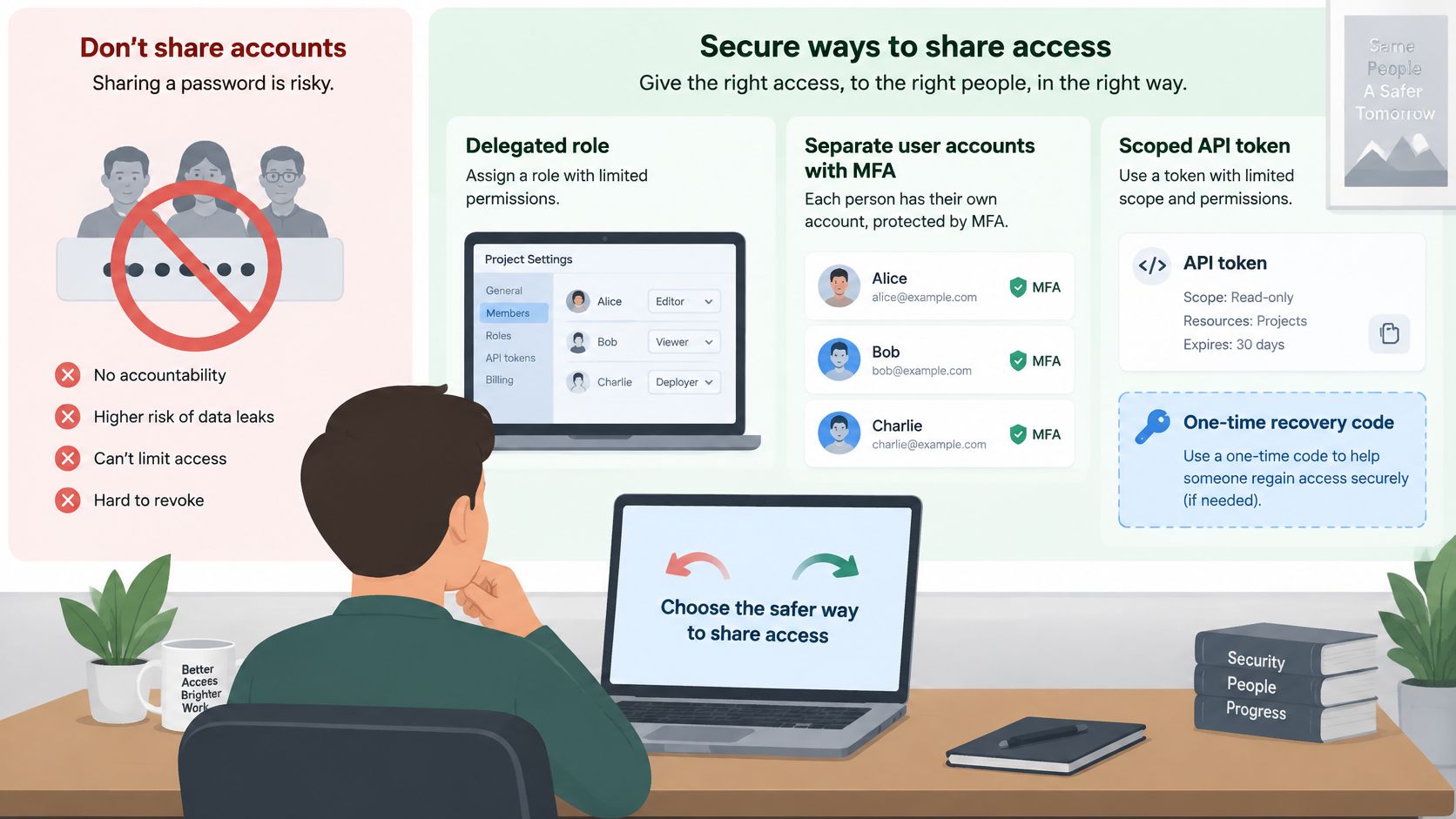
Start by trying not to share the password. Open the service's user-management settings and look for delegated roles, individual accounts, or scoped API tokens. Separate credentials with individual multifactor authentication, or MFA, let you withdraw someone's access without disrupting everyone else.
A one-time recovery code can sometimes support an authorized recovery workflow, but it isn't a general-purpose substitute for delegation. Treat it as a powerful authentication secret, not a convenient disposable message. Never transfer recovery capability merely because assigning a role takes longer.
The reason to avoid shared secrets isn't theoretical. Credential abuse was the leading initial access vector in 22% of confirmed breaches in Verizon's 2025 Data Breach Investigations Report. If the password also protects another account, an exposed handover can give an attacker access well beyond the intended service.
Consider the alternatives before choosing a delivery tool.
Choose access before choosing transport
For a contractor uploading documents, a restricted uploader role is better than the account owner's login. For an incident-response script, a narrowly scoped token is better than an administrator password. For ongoing collaboration, the extra setup for named accounts usually buys much cleaner offboarding.
Where the service offers no usable delegation, a password manager shared item is a practical default for continuing team access. Set up the manager, protect its login with MFA, and create a dedicated shared credential rather than exporting somebody's personal password into a group vault.
Households face similar decisions, although subscription rules and recovery ownership can complicate them. AccountShare's guide to password security for families sharing subscriptions is a useful companion when deciding who should own and maintain a household credential. Keep the account owner's email password out of that arrangement.
Password sharing methods compared
| Method | Best for | Recipient needs | How access ends | Main weakness |
|---|---|---|---|---|
| Password manager shared item | Ongoing team access | An account in the same manager | Sharer revokes the shared item; rotate any disclosed password | Recipient can copy the password |
| One-time link with separate access key | Short, sensitive exchange | A browser and the access key | Channel expires on its own timer | Interception of the key if it travels with the link |
| Encrypted message or file | Single handover to one person | Matching app or decryption key | Sender deletes their copy and requests recipient deletion | Copies persist in inboxes, backups, and devices |
| Read-aloud phone call | Very short handover | The verified person on the line | The conversation ends when the call ends, not the credential's validity | Overheard, recorded, or misheard |
| Separate account with MFA | Access that should last | Its own login and MFA device | Account is disabled or removed | Setup time and possible licence cost |
Put an owner on the ending
Before sending anything, settle these questions:
- Per-user access: Can the recipient do the job without receiving your credential?
- Expiry: At what exact time must temporary access stop?
- Verification: Who confirms the recipient, and through which established contact route?
- Revocation: Who removes access, and who checks that removal worked?
Record those decisions in the sharer's own password manager, alongside the account entry. Don't put the password into a project ticket just to document the arrangement.
For a short exchange, Ciphar provides a browser-based channel without requiring the recipient to create an account. Send the channel link and convey the access key through a separate trusted medium; the recipient opens the link and pastes the key. Every channel is a one-time, self-destructing session that expires 60 minutes after creation, with no key escrow, recovery mechanism, or backdoor.
That fixed window limits the channel, not the usefulness of a password copied from it. If the task outlasts the planned access period, rotate the temporary credential rather than treating it as permanent.
Practical rule: Write down the expiry time and revocation owner before anything is sent.
Six Steps to Hand Over a Password Safely
A safe handover combines password quality, independent verification, and a deliberate ending. CISA's guidance on choosing and protecting passwords recommends long, unique passwords or passphrases, MFA, and avoiding password reuse.
Use this visual checklist to keep the essential controls in view.
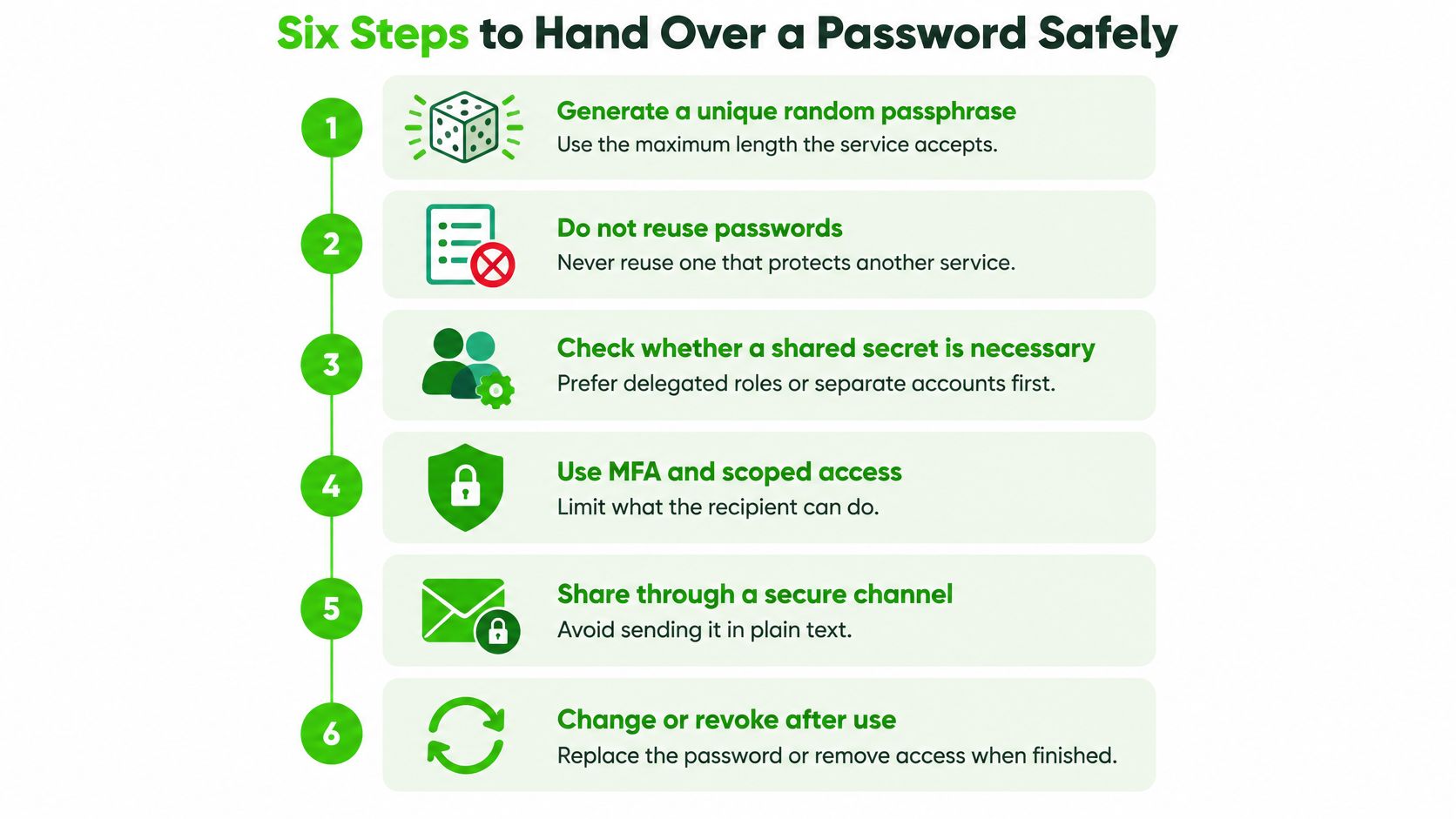
Carry out the handover deliberately
Generate a unique random passphrase. Use a password manager's generator and the maximum length the service accepts. Don't invent a memorable variation of a personal password. The UK National Cyber Security Centre's compromised-password analysis found 123456 in 23.2 million compromised accounts worldwide, illustrating why protected transport can't rescue a predictable secret.
Move away from the request channel. Deliver the secret through a protected channel different from the one where the request arrived. If an encrypted exchange requires an access key, convey that key through a separate authenticated route. A common slip is emailing both the encrypted file and its decryption password together.
Verify the recipient independently. Use a contact method established before the request, not a new number supplied inside it. Replying to the same thread confirms control of that thread, not the requester's identity. Pause unsolicited password requests instead of treating urgency as authorization.
Require prompt sign-in and appropriate MFA. For an account being handed over, have the authorized recipient enroll their own factor and confirm access. For temporary access, preserve the owner's recovery control and use supported individual authentication where available. MFA supplements a password; it doesn't automatically invalidate it or justify forwarding authentication codes.
Rotate or revoke at the agreed ending. Use the recorded deadline, not an assumption that the recipient has probably finished. Disable temporary accounts, remove delegated roles, or replace the shared password as appropriate. Closing the chat window isn't revocation.
Check the result. Confirm that the old credential is rejected and review sessions, recovery settings, and tokens. A password-change confirmation screen isn't enough if another access path remains available.
Split the login package
Send account context, such as the username and service address, separately from the password. Don't send recovery codes or recovery-account credentials as routine context. Those can grant more durable control than the access you intended to provide.
Avoid screenshots showing a revealed password, tickets containing both the secret and login address, and forwarded threads carrying earlier credentials. Don't enter the shared secret on a public computer; avoid performing the handover over public Wi-Fi when a trusted connection is available.
For the narrower task of sharing a wireless network credential between Apple devices, the walkthrough on iPhone password sharing with Simply Tech Today can help you use the device workflow instead of manually transcribing the secret. The decision about who should receive network access still comes first.
The accompanying video offers another format for reviewing password-sharing practices.
Could someone who intercepts a single message log in? If yes, separate the secret from its context and strengthen the recipient check.
Verify the Recipient Without Collecting Identity
A journalist's source may have only a borrowed phone. A lawyer's client may need an exchange without opening another account. An incident responder may need to coordinate before formal identity checks are possible.
In these situations, collecting less identity information can reduce exposure, but it also makes mistaken-recipient recovery and accountability harder. Asking for a passport photograph doesn't necessarily resolve the immediate question: is the person receiving this secret the participant you intended?
Establish temporary trust
Use evidence you already possess. Call a number confirmed during an earlier exchange, use an established authenticated messaging relationship, or ask for a passphrase agreed in advance and kept out of the password-delivery thread.
If there's no established route, reduce the proposed access rather than compensating with confidence. Give the participant a limited upload location instead of a full account, or postpone the credential transfer until verification is possible. For a sensitive administrative account, lack of verification is a reason not to proceed.
Our guide to out-of-band communications explains the separation between the request route and the confirmation route. Independence matters more than merely opening another app on the same compromised device.
In our channel admission process, a participant's browser must derive the same key and successfully decrypt the channel's test blob before admission. Otherwise, the participant never enters. That verifies possession of the correct secret, not the person's real-world identity.
Decide what failure looks like
Agree on the response before admitting anyone:
- Unexpected participant: Burn the exchange, replace any exposed account credential, and notify the account owner.
- Failed-access or rate-limit notice: Pause disclosure and confirm the intended participant through the established route.
- Unexpected account sign-in: Review the device and timing, then revoke suspicious access rather than assuming it belongs to the recipient.
- Mistaken disclosure: Identify who received the secret and who could have seen or forwarded it, without circulating the secret again during the investigation.
Don't make irreversible access decisions from an alert alone. A failed attempt may be a typing error, but it warrants checking before revealing anything sensitive.
Finally, verify the receiving environment. The NCSC's discussion of passkey limitations highlights dependencies involving devices, synchronization, cloud accounts, and recovery.
Ask whether the phone is borrowed, whether the browser profile is shared, and whether credentials or clipboard contents synchronize elsewhere. You can't prove a device is uncompromised through conversation, but you can reject an obviously unsafe setup. If the recipient can't use a reasonably trusted device, don't deliver a reusable high-impact credential to it.
Where Password Copies Hide After Sharing
A shared credential can outlive the provider's sharing controls. A comparative evaluation of passkey sharing warns that sharing a passkey should be treated as potentially irreversible because a recipient may extract or reshare it even when the original provider offers revocation. That finding concerns passkeys, but it exposes an equally practical question for passwords: what does the recipient still possess?
An encrypted transfer doesn't prevent the recipient from saving the result. Deleting the original message doesn't reach a screenshot, a synchronized vault, or a session already authenticated to the account.
Inventory possession and live access
Separate copies of the secret from access that no longer needs the secret. A saved password belongs to the first category; a logged-in browser session belongs to the second. You need to close both.
Where password copies survive after sharing
| Copy location | How it stays alive | Fix |
|---|---|---|
| Browser autofill | Saved in the recipient's browser profile and available wherever that profile is accessible | Remove the saved entry and sign out of the browser profile on shared devices |
| Clipboard history | Retained by a clipboard manager or synchronized to other devices | Clear clipboard history and remove synchronized copies where supported |
| Screenshots and chat logs | Copied into notes, cloud photos, message history, or deleted-item folders | Delete messages and screenshots, including recoverable deleted items where possible |
| Recovery email or phone | Allows a password reset after the shared password is replaced | Before sharing, keep recovery under the authorized owner's control; confirm it afterward |
| Active sessions | Authentication tokens may remain valid after a password change | Explicitly sign out all sessions after rotation |
| API tokens | Independent keys may survive password changes | Revoke tokens tied to the shared account and replace required integrations |
| Backups and synced stores | Restored or synchronized copies can reappear | Remove synchronized entries and purge relevant backups where possible |
Revoke before tidying up
Use this order: rotate the password, sign out all sessions, revoke tokens, correct recovery contacts, then remove local copies and inspect synchronized stores. Check registered MFA methods and passkeys too, removing any enrollment that shouldn't survive the handover.
Changing a recovery contact requires care. Don't replace the legitimate owner's address with the temporary recipient's address, and don't remove the owner's only working recovery method before establishing a safe replacement. For business accounts, use the organization's authorized recovery arrangement.
Deletion is cleanup. Revocation is what makes an uncontrolled copy less useful.
Our explanation of secure deletion helps distinguish removing visible content from eliminating recoverable copies. You generally can't prove that another person has destroyed every screenshot or backup, so don't base account security on their deletion promise.
A restored old password should remain useless after proper rotation. A restored session or surviving token may not, which is why clearing saved text alone doesn't complete the job.
Confirm the Secret Has Stopped Working
Treat closure as a testable result, not a completed checkbox. Run the checks from a trusted device, keep the account owner involved, and avoid recording secrets in the evidence you retain.
Test rejection and surviving access
Try the old password in a clean browser session. Use a fresh browser profile or private window without existing account cookies, go to the genuine sign-in page, and expect rejection. Don't make repeated attempts that could trigger a lockout, and don't mistake a network error for proof that the password has been invalidated.
Then inspect the service's session list. For completed temporary access, the recipient's session should be gone. For a legitimate continuing handover, the recipient should use their own authorized account and MFA, rather than a surviving session created with the retired shared credential.
Use a short verification checklist:
- Account activity: Compare devices, times, locations, and actions with the authorized work. Investigate unfamiliar events; a rate-limit notice warrants review but doesn't itself prove successful access.
- API credentials: Make a harmless authorized test with revoked tokens and expect an authentication failure. A permission error alone may indicate that a token still authenticates.
- Recovery settings: Confirm that the authorized recovery email, phone, MFA methods, and passkeys match the intended ownership.
- Synchronization: Let relevant credential stores synchronize, then check for restored entries or unexpected sessions. An old password reappearing locally shouldn't make it valid again.
For the exchange itself, our guide to using access keys explains how to handle the channel credential. Keep that separate from the service password you transferred, and don't preserve either in your closure notes.
Record the outcome without retaining the secret
Record the account identifier, planned expiry, actual revocation time, checks performed, and person who confirmed the result. Include unresolved exceptions, such as an integration awaiting replacement, rather than marking the entire handover complete. Store the record in an access-controlled location, not inside a disappearing conversation that must serve as your only audit trail.
If a check fails, treat the credential or access path as exposed. Rotate as needed, invalidate sessions and tokens again, investigate recovery changes, and notify the owner. Unknown activity requires investigation even if the old password is now rejected.
The end state is specific: the transferred credential no longer authenticates, temporary access is gone, continuing users have individual authorized access, and the activity record contains no unexplained events.
Ciphar offers browser-based encrypted conversations with self-destructing channels and a manual burn control for short, sensitive handovers. Visit Ciphar when you need a temporary place to exchange a secret, then complete the job by revoking the underlying credential and checking that access has ended.