You need to ask someone a question you can't put in email, and you can't ask them to install an app either. A source won't hand over a phone number. A client hasn't signed anything yet. A researcher wants to report a flaw without leaving a permanent record of the conversation that found it.
So you look at a service that calls itself an encrypted chat server, and the pitch says the server can't read your messages. That part is usually true. It's also the least informative claim on the page, because the security of the whole arrangement depends on everything else: who holds which key, what the relay stores anyway, and what happens the moment the key ends up in the wrong hands.
Strip away the jargon and it comes down to four questions. What does the server keep? Who can derive the key? What does a leak expose? And what does the countdown timer cost you in exchange for the protection it buys?
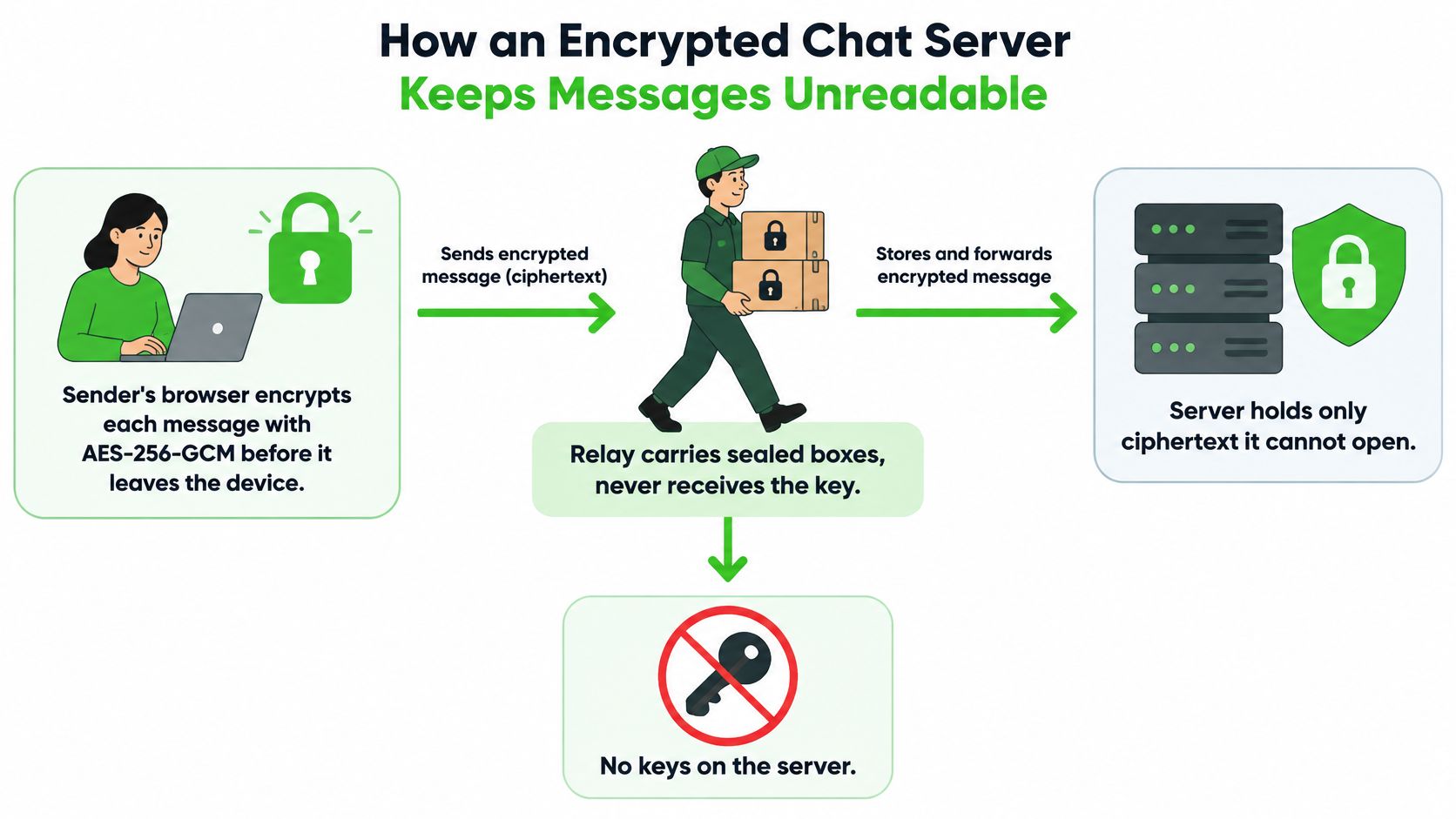
How an Encrypted Chat Server Keeps Messages Unreadable
A courier carries a sealed box across town. The courier knows the box exists, who handed it over, and roughly when it should arrive. It has no key, so the box stays shut for the whole trip.
That is the entire design of a zero-knowledge relay. The server moves traffic and coordinates sessions without ever holding the material needed to open what it carries.
The sealing happens on the device
Encryption runs in the sender's browser, before anything touches the network. Each message, file, reply and voice frame is encrypted with AES-256-GCM, and only ciphertext gets uploaded. AES earned that job slowly: NIST ran an open international competition that began in 1997, published the winning design as Federal Information Processing Standard 197 on November 26, 2001, and by 2020 more than 5,700 AES implementations had been validated as conforming to it (NIST's account of the AES standard). The 256-bit variant gives a very large keyspace while staying fast enough for a browser tab handling live traffic.
What the relay stores, item by item
Ask a provider what the server holds and you'll usually get a phrase like "military-grade encryption." Ask for the field list instead, because the list is short. In a browser-based service such as Ciphar it comes down to four items: the ciphertext, the initialization vector that travels with it, the authentication tag, and an expiry timestamp. Passwords, derived keys, message text and file contents never arrive at all.
| Data item | Stored on the relay | Held on the devices | Readable by the server |
|---|---|---|---|
| Message text | Only as ciphertext | Plaintext after local decryption | No |
| Files and voice frames | Ciphertext only | Decrypted locally | No |
| Access key (password) | Never sent | Generated and entered locally | No |
| Derived encryption key | Never sent | Kept in browser memory | No |
| Initialization vector and auth tag | Yes, stored with the ciphertext | Yes | Yes, but reveals no content |
| Expiry timestamp | Yes | Yes | Yes, the server enforces deletion |
Keep a table like that beside any tool you evaluate, because features that need server-side access to content show up immediately. Voice transcription, server-side search, link previews that fetch a page on your behalf, and "restore your history after deleting" all require the plaintext or the key.
Ask one question of any encrypted chat server: does this feature still work if the server never holds my key? If the answer is no, the feature is the price of the privacy.
How a Channel Gets Its Keys Without the Server
There's no key escrow, no recovery email and no administrator who can reset access for you. Six steps explain how two people end up with the same key while the relay keeps neither.
The flow from device to relay looks like this.
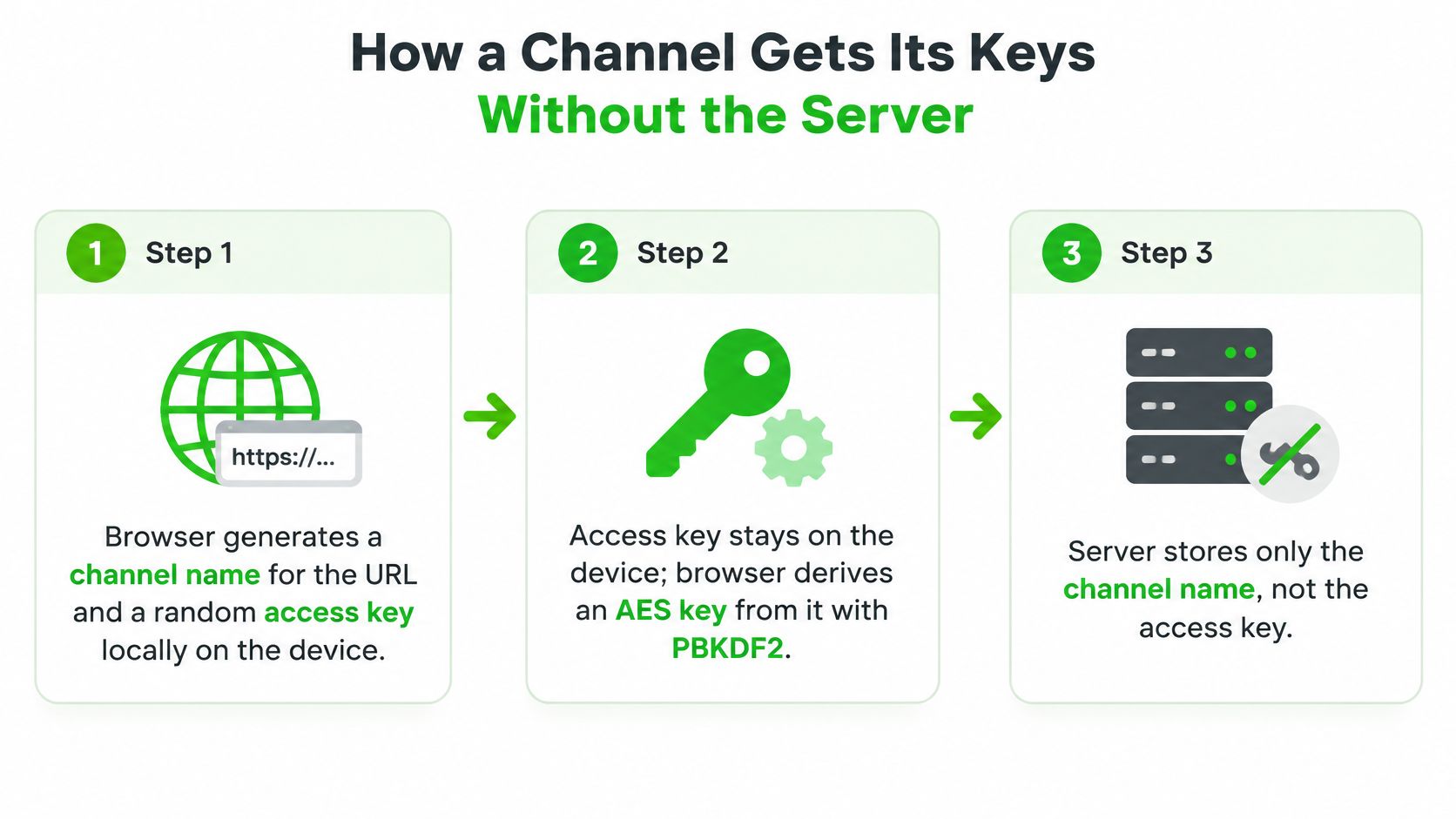
Generate both halves on the device. Creating a channel produces two things locally: a channel name that becomes the URL, and a random access key that behaves like a password. Both come from the browser's own randomness, and neither is created on the server. The common slip is treating the channel name as the secret. It isn't, because anyone holding the link can read the name. The access key is the part that has to travel privately.
Stretch the access key into an encryption key. The browser runs the access key through PBKDF2 with 100,000 SHA-256 iterations and a per-channel salt to derive the AES key. The salt is why the same password used in two channels yields two unrelated keys, so precomputed tables built for one channel are worthless against another. Our explainer on how encryption keys work goes further into that derivation. Slip: assuming the name and the key protect the channel together, when only the key does any work.
Send the key down a different road than the link. The link and access key get shared over a separate trusted medium: link by email, key by phone, or the reverse. The slip is pasting both into the same thread, which hands the channel to anyone who can read that thread.
Join without an account. The recipient opens the link, pastes the key, and is inside. No download, no sign-up, no phone number, no email verification on either side. Slip: a leading space or an autocorrected capital in the pasted key, which fails without notice because both versions look identical on screen.
Prove the key before anyone is admitted. A newcomer enters only if their browser derives the same key and decrypts the channel's test blob. If the blob doesn't open, they never get in. That's what separates someone with the link from someone with the key, and a failed test almost always means a mismatched key rather than a broken link.
Seal every item separately. Each message, attachment, reply, edit and voice frame gets a fresh 96-bit initialization vector sent beside its ciphertext, while the derived key stays in browser memory and is never transmitted. Slip: imagining that one key creates one long stream. It doesn't. Every item is sealed on its own.
Both sides know the channel is live when the test blob decrypts and the same conversation appears in both windows. Nothing else has to be trusted for that to be true, which is why the whole handshake stays short.
Practical rule: if the only copy of your access key sits in the thread you're about to open, you haven't shared a key. You've published one.
Why the Access Key Matters More Than the Cipher
AES-256 is almost never the weak point in an encrypted chat. The access key is. Grinding through 256-bit ciphertext isn't a realistic attack; guessing a phrase a human invented is.
| Control | Setting in Ciphar | Reference point | What it protects against |
|---|---|---|---|
| Key derivation iterations | 100,000 SHA-256 | 600,000 OWASP guidance for PBKDF2-HMAC-SHA-256 | Makes each guess take longer |
| Access key | Random, generated in the browser | Long random value, not a memorable name | Mass guessing |
| Per-channel salt | Unique per channel | Required for every channel | Reuse of precomputed tables across channels |
| GCM IV (nonce) | Fresh 96-bit per message | Must be unique for each key | Relationships between plaintexts after nonce reuse |
| WebSocket transport | wss:// over TLS | Required | Eavesdropping and tampering in transit |
| Online guessing | Rate-limited, with intrusion alerts | Limit failed attempts | Live guessing against a channel |
PBKDF2 slows each guess, and the count is doing real work. It's also below current guidance: OWASP's password storage guidance recommends 600,000 iterations of PBKDF2-HMAC-SHA-256 where PBKDF2 is required for FIPS-oriented deployments. The right number for a browser product is the highest one that doesn't make opening a channel painful on a low-end phone, which you find by benchmarking on that phone rather than on your laptop, plus a version field so the count can rise later. Where compatibility allows, memory-hard Argon2id resists GPU and ASIC guessing better than PBKDF2 does.
The honest limit is that the derivation is a delay, not a shield. Someone holding captured ciphertext and the public salt can guess offline at whatever rate their hardware allows, and no amount of rate limiting on the server touches that. Rate limits and the test blob only slow guesses made against a live channel.
Nonce handling belongs in the same list. NIST's publication on GCM defines the initialization vector as a nonce that must be unique within the relevant key and context, because reusing one exposes relationships between plaintexts and undermines authentication.
Keys also outlive the people meant to hold them. A contractor's access key is still a working key after the contract ends, and the offboarding checklist for former contractors covers the revoke-and-verify habit that stops a shared secret from outliving the engagement.
What a Leaked Access Key Exposes
WhatsApp put a marker down here on April 5, 2016, when it completed end-to-end encryption by default for text, photos, videos, files, voice messages and group chats, across a service with more than 1 billion users. It was built on the Signal Protocol's double-ratchet design, so compromising one session key would not automatically expose past and future conversations (BBC's coverage of the WhatsApp rollout).
That design gives an attacker a moving target. A channel derived from a single access key gives them a fixed one.
Say a participant forwards both the link and the access key to someone outside the conversation, believing they're being helpful. The outsider joins, passes the test blob, and reads every message still held on the relay until the timer runs out. No key rotation happens in between, so the exposure covers the whole conversation rather than a single message.
The mitigations are practical rather than clever.
- Keep channels short. The 60-minute deletion cap limits how much history a late arrival can reach.
- Open a new channel for each new topic. A long-running channel accumulates exactly the history you'd least want read.
- Treat the key as a secret, not a courtesy. Anyone who held it should trigger a fresh channel, not a polite request to forget.
The boundary is worth stating plainly: this design suits short exchanges. Conversations that run for weeks need a messenger with ratcheted keys. A shared credential that never rotates behaves like a session that never expires, which is the same failure mode described in this analysis of why user sessions leak data.
What Stays Exposed Even When Content Is Encrypted
Encryption protects what you say. It doesn't protect the fact that you said it, when you said it, or from which address. That gap is where most real incidents live.
Journalism guidance warns that services can collect who communicates with whom, and how often, and that this metadata may be available to courts or security agencies even when message content is encrypted. The same guidance is blunt about endpoints: phones stay a major attack vector, and metadata can't be encrypted away (SaferJourno's chapter on protecting sources).
The following survives encryption intact.
- Contact relationships: who spoke to whom, and how frequently.
- Timing: when a conversation started and whether it's still active.
- IP addresses: the network each participant connected from.
- Device compromise: malware reading the screen after decryption.
- Screenshots and forwarding: anything a participant can copy out.
- Backups and previews: a preview that fetches a page, or a phone backup holding plaintext.
We break down what metadata means in practice for anyone who wants the full picture, because it decides more cases than cipher strength does.
| Threat | Encryption protects content? | Short-lived relay limits exposure? | What still leaks or fails |
|---|---|---|---|
| Server breach | Yes, ciphertext only | Yes, little history to steal | Timing and IP addresses seen on the network |
| Compelled disclosure | Yes, no keys held by the server | Yes, deletion after 60 minutes | Metadata if the provider logged it |
| Malicious participant | No | No | Screenshots, copied text and forwarding |
| Seized device | No | Partly | Plaintext on screen or in memory before expiry |
| Browser extension or malware | No | No | Keystrokes and cleartext inside the page |
| Network observer | Yes, for content | Partly | Connection times and message sizes |
What lawful process actually gets: in response to a valid order, the operator can provide only encrypted blobs that expire on a one-hour clock, because it holds no plaintext, no keys and no message history.
That is the practical argument for a minimal relay. A system with no history has nothing to breach, nothing to subpoena and nothing to lose in a backup. But the same minimalism shifts work onto you: browser security, malicious extensions, a seized screen and a participant who screenshots are all outside what any server can control. When the worry is the room rather than the wire, bug sweeps in the UK deal with the hardware between a private conversation and a private space, and no relay can do that work for you.
Content confidentiality also cuts both ways, which is why the argument around it stays loud. A 2025 Savanta survey commissioned by the Internet Watch Foundation found that 92% of 1,796 UK adults were concerned about child sexual-abuse material being shared through end-to-end encrypted messaging services (the Internet Watch Foundation's survey summary). Decide which rows of that table matter for your conversation before you choose a tool, because the tool only ever solves the first two.
Ephemeral Messaging Helps Some Conversations and Hurts Others
The rule is fixed and it doesn't bend: each channel expires 60 minutes after it is created, and then the channel and every blob of ciphertext attached to it are deleted from the relay, with no archive and no recovery.
Start with what that buys you. A self-destructing channel shrinks the blast radius of a breach and of accidental discovery, and breaches aren't hypothetical: the 2023 Thales Cloud Security Study found that 39% of surveyed businesses had experienced a cloud-environment data breach in the preceding year, based on responses from nearly 3,000 IT and security professionals across 18 countries (Thales's 2023 cloud security findings). A store that erases itself leaves little behind to take.
Then price the cost. Deletion removes audit evidence, prevents later verification, complicates legal holds, and makes continuity impossible when a participant loses their session. Those aren't edge cases in regulated work, they're the normal requirement.
Healthcare guidance makes the split especially clear: encryption alone doesn't establish compliance, because organizations also need access controls, audit logging, retention rules and procedures for record-worthy content (Ciphar's guidance on secure messaging for healthcare). Journalism practice pulls the other way, recommending disappearing messages for sensitive conversations while telling people to preserve important material through a safe process rather than trust automatic deletion.
| Situation | Ephemeral channel fits? | Governed system needed? | Preservation step |
|---|---|---|---|
| First contact with a source or client | Yes | Only if it becomes a record | Move to a governed system once it matters |
| Urgent coordination with no record needed | Yes | No | Capture decisions in the official log |
| Clinical decisions or medical records | No | Yes | Audit logging and retention rules |
| Litigation or legal hold material | No | Yes | Preserve through counsel |
| Regulated advice | No | Yes | Retain under the applicable rules |
| Corporate decisions | No | Yes | Written record with an approval trail |
| Finalized reporting | No | Yes | Archive the approved final copy |
The workflow that makes this workable is short. Agree on deletion before anyone types, decide in advance which artifacts must survive and how they'll be saved through an approved process, and name the person responsible for preservation. Anyone weighing a self-destructing channel against a permanent one can compare temporary chat trade-offs against their own obligations, and treating "encrypted" or "zero knowledge" as a compliance certificate is the mistake to avoid.
Three Real Scenarios and What the Server Sees in Each
A channel looks like this from the inside: a browser tab, a name, a key field, and no install step at all.
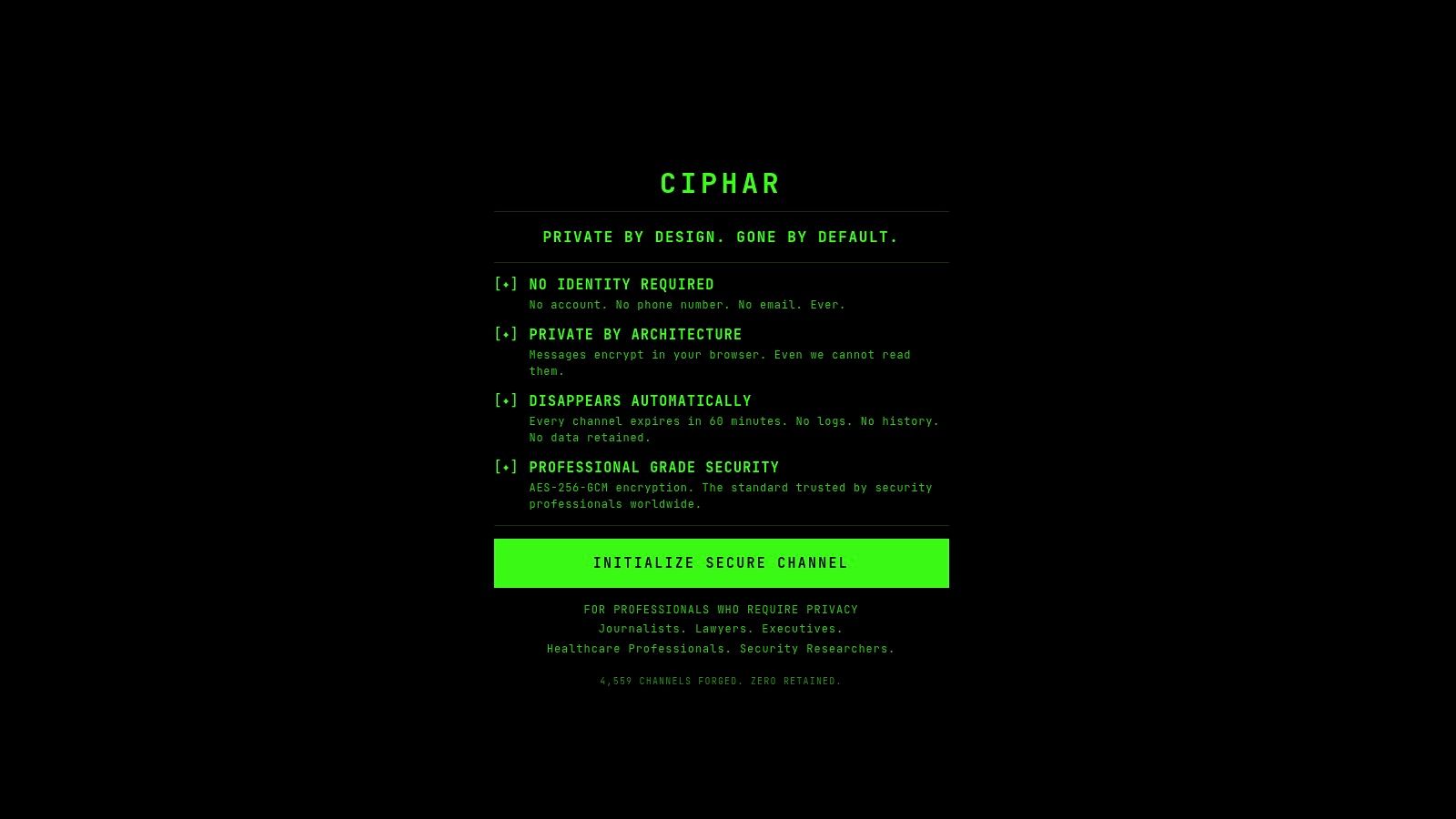
A journalist and a source. The source won't share a phone number or install an app, so the journalist sends a link by email and reads the access key aloud on a call. The relay sees ciphertext, connection timing and the channel's expiry, nothing more. Before the 60 minutes run out, the journalist saves only the two quotes that must be kept, through the newsroom's approved process, and lets the rest go. The one check before joining is whether the source's device is one they control.
If you'd rather watch the flow than read it, this walkthrough covers the same ground.
A lawyer and a prospective client. First contact happens with no engagement letter and no archive. The lawyer decides before the conversation what will be written down in the firm's governed system afterward, and who does the writing. The check before joining is whether the client understands that nothing said here survives the hour. The item to save is the conflict-check fact, not the discussion.
A security researcher coordinating a disclosure. The working session needs a few minutes of real-time back and forth, not a ticket. Before joining, the researcher confirms who else holds the link and whether the machine on the other end is trusted, since a compromised screen or a screenshot falls outside anything the server can protect. The item to save is the agreed disclosure timeline, copied into the tracker before the channel disappears. None of this needs a download, an account, or a phone number to verify, which is exactly why it works for a first conversation with someone who trusts neither.
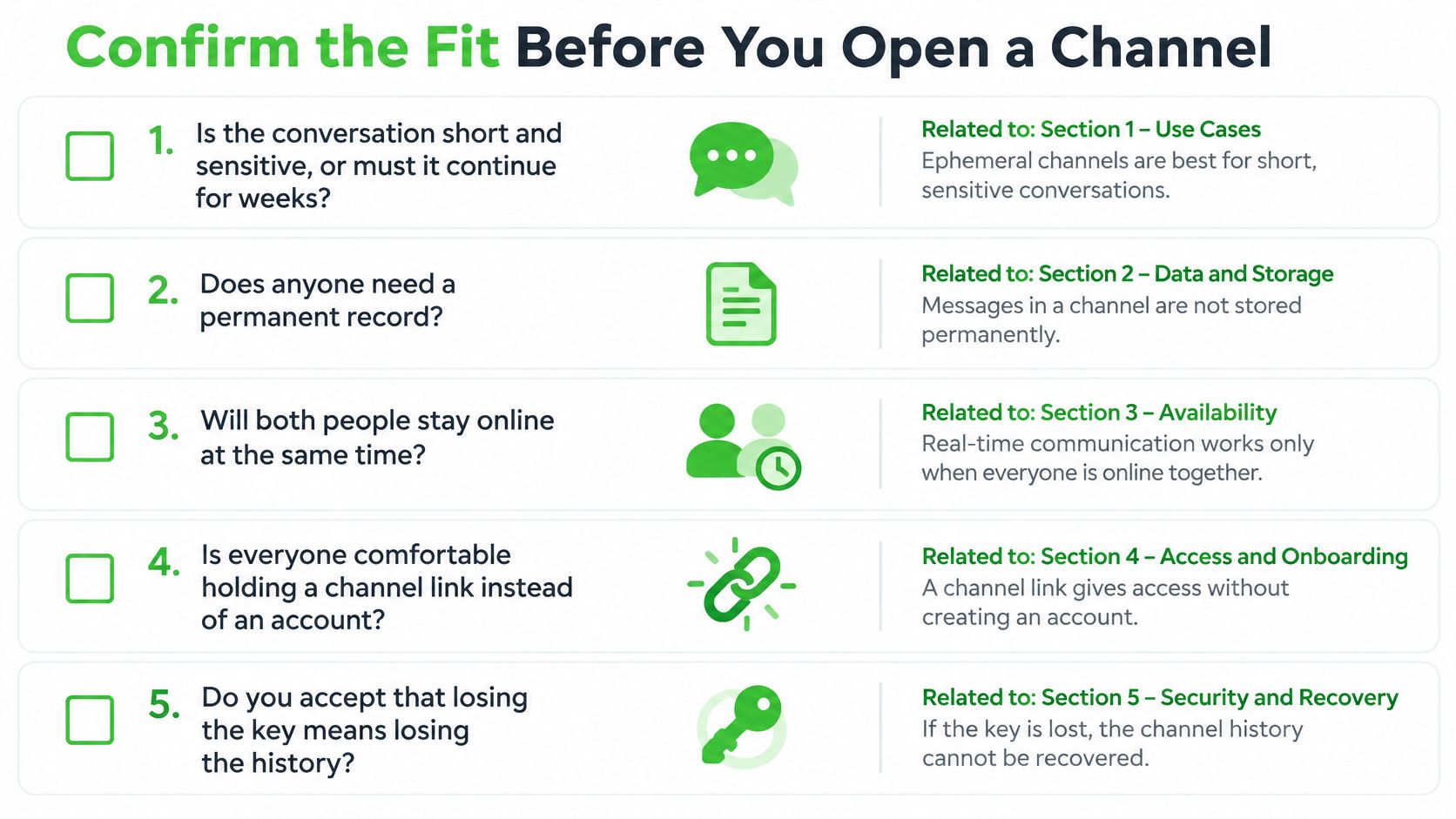
Confirm the Fit Before You Open a Channel
Five questions decide it, and each one maps back to a limit above.
- Is the conversation short and sensitive, or must it continue for weeks?
- Does anyone need a permanent record afterward?
- Will both sides accept a browser session with no account, phone number or app install?
- Can the material that matters be moved into a governed system before the timer runs out?
- Can the access key travel over a separate trusted medium right now?
Ciphar is a zero-knowledge encrypted chat app that runs entirely in the browser, and it isn't a long-term messenger, group chat, file storage service or collaboration tool. It's built for short, anonymous, ephemeral conversations under a hard self-destruct, where the device, screenshot and metadata limits above are accepted as the price of a relay that keeps no history.
When all five answers point the same way, the next move is one channel opened in a browser tab, with the link and the key sent by two different routes and a decision already made about what gets saved.
Ciphar gives you a one-time channel that encrypts messages, files, replies and voice frames in your browser with AES-256-GCM, then deletes the channel and every blob attached to it after 60 minutes. No account, no phone number, no install, and no key on the server to hand over to anyone. Open Ciphar, start a channel, share the access key through a medium you trust, and decide what to save before the clock runs out.