You've just found the address, tracking number, or meeting detail you need in a busy chat. You press and hold the conversation, choose Pin, and it jumps to the top of Messages. The change feels important because the thread is suddenly more visible, but the underlying message hasn't been rewritten, resent, encrypted, preserved, or protected.
That difference answers much of what happens when you pin a text message. On some platforms, you're pinning an entire conversation as a personal navigation shortcut. On others, you're pinning one message inside a shared chat, which can create a visible banner and notify other participants. The word is the same, but the privacy and retention consequences are not.
The Moment You Tap Pin and What It Does
You are scanning Apple Messages for a client's address when you press and hold the conversation, then choose Pin. The thread moves into the pinned area above ordinary recent chats, and its icon becomes more prominent. The action feels like saving the conversation, but it is closer to placing a shortcut on your desk. Apple's current guide explains how pinned conversations are managed in Messages (Apple's Messages support guide).
The original thread remains intact. Sender details, message text, timestamps, and delivery information stay where they were. Pinning does not rewrite, resend, duplicate, encrypt, or protect an SMS or iMessage. It changes how the app presents the conversation to you.
What changes on screen
Messages records an organizational preference connected to the selected conversation. When you return to the conversation list, the app reads that preference and places the thread in a pinned position instead of sorting it only by recent activity.
That is why the change appears immediately. The app can update the list on your device without changing the messages themselves or asking the other participant to approve anything.
A pinned conversation is easier to find, not inherently safer to keep.
The preference can also be separate from the message data. If Messages in iCloud or another platform's account sync is active, the pinned arrangement may appear on other supported devices. Its availability still depends on the platform, account, and sync settings. A device update may preserve the arrangement, but an update is not a promise that every presentation detail will remain identical. Treat the pin as an interface setting, not as an independent backup.
Deleting the conversation can remove the shortcut along with the thread. Deleting one message, allowing a message to expire, or clearing content through another device can affect what opens after you tap the pin. The pin does not create a protected copy that survives those actions.
Pinning a conversation also differs from surfacing one link, photo, or collaboration invitation inside it. Shared items may appear in conversation details, Messages search, or supported Shared with You areas. A conversation pin brings you to the whole thread. It does not preserve a particular item separately.
Across other messaging apps, pin may describe a message-level action instead. That pin can become visible chat state, notify participants, or expire. Identify whether you pinned a personal shortcut or a shared message before assuming what others can see or what will remain available.
The Two Different Actions Behind Pinning a Message
You tap pin a text message expecting one clear result, but the word can describe two different settings. One keeps a conversation close at hand for you. The other promotes a specific item inside a shared chat. The privacy and retention consequences depend on which setting the app uses.
A conversation pin changes the chat list. Apple Messages and Google Messages use this model: the app gives a thread a prominent position on a supported device or web interface. It works like a bookmark to the conversation, not like a new copy of any message. Opening the pin takes you back to the thread, where ordinary deletion, sync, and account settings still apply.
An individual message or shared item pin changes the chat itself. The selected item may appear in a banner, a pinned-items area, or another prominent location inside the conversation. Since the setting belongs to a shared chat, other participants may see it. The service might show who created the pin, publish a system notice, or remove the pin after a chosen period.
The same word, different platform behavior
Telegram's message pin model can place a selected message at the top of a chat for participants, with the chat presenting it as shared conversation state. Slack also lets a message or file be saved to a channel or direct-message details area, where members can find the item again. These examples show why the word pin cannot tell you, by itself, whether the change is personal, shared, temporary, or visible to others.
WhatsApp makes the message-level model especially clear. Its guidance says a pinned message appears as a banner at the top of the chat and can be configured for 24 hours, 7 days, or 30 days (WhatsApp's pinned messages guidance). In a group chat, WhatsApp may also post a system message identifying the pin and the person who created it.
A pin does not automatically confirm delivery, readership, backup, or protection from deletion. Those are separate properties. Tapping a banner normally opens the original message, rather than a preserved replacement. If the message was deleted, cleared, expired, or unavailable to a participant, the pin may lead to missing content.
Before assuming what others can see, identify the action first: did you save a route to a conversation, or promote one shared item within it? That answer also indicates what may survive deletion, expiry, or a change of device.
Pinning a Conversation on iPhone and Android
Apple caps pinning at up to nine pinned conversations. Google Messages allows up to 20 conversations and carries those pinned threads into Google Messages for Web. The difference matters because a pin is a shortcut in the conversation list, not a new copy of the messages.
On iPhone, touch and hold a conversation in Messages, then pin it. The thread moves to the top and appears as a larger icon. The pinned position helps you return to the conversation quickly, but it does not alter the text, attachments, or participants.
Google Messages follows the same basic pattern. On a phone, press and hold a conversation and select Pin. Google's pinning instructions for Messages describe the mobile action, the up to 20 conversations limit, and access through Google Messages for Web.
Side-by-side behavior
| Behavior | iPhone Messages | Google Messages |
|---|---|---|
| What gets pinned | A whole conversation | A whole conversation |
| Main effect | Moves the conversation to a prominent position in Messages | Gives the conversation a persistent priority position |
| Documented capacity | Up to nine conversations | Up to 20 conversations |
| Where the result appears | The Messages conversation list | Mobile Messages and Google Messages for Web |
| Does the message text change? | No | No |
| Does pinning confirm delivery or reading? | No | No |
| How to reverse it | Unpin the conversation | Select Unpin |
| Market limitation in the documentation | No limitation stated | Google notes availability is not supported in India |
The boundary is easy to miss. Pinning does not confirm delivery or reading, create a backup, or change the security properties of an SMS, iMessage, or RCS exchange. It changes where the conversation is displayed.
Deletion exposes the difference between a shortcut and storage. If you delete the thread, the pinned position has no separate message history to preserve. Selecting the pin can no longer restore content that the conversation itself no longer contains. A pinned thread may also be unavailable after a device change if the underlying messages were not transferred or restored.
Archived conversations follow a different organizational path. A guide explaining where archived messages are stored helps separate archiving from pinning. Archiving moves a chat away from the main inbox, while pinning keeps it prominent. Neither action, by itself, guarantees a permanent copy.
Google's web access adds another privacy consideration. Because a pinned conversation can remain prominent in Google Messages for Web, the shortcut may appear on another screen as well as on the phone. Anyone with access to that active browser session could notice the thread more easily than if it were mixed with ordinary recent conversations.
Before pinning, ask what you want to retain: quick access to the thread, or the message history itself. These apps provide the first, not the second.
Pinning a Message Inside WhatsApp and Group Chats
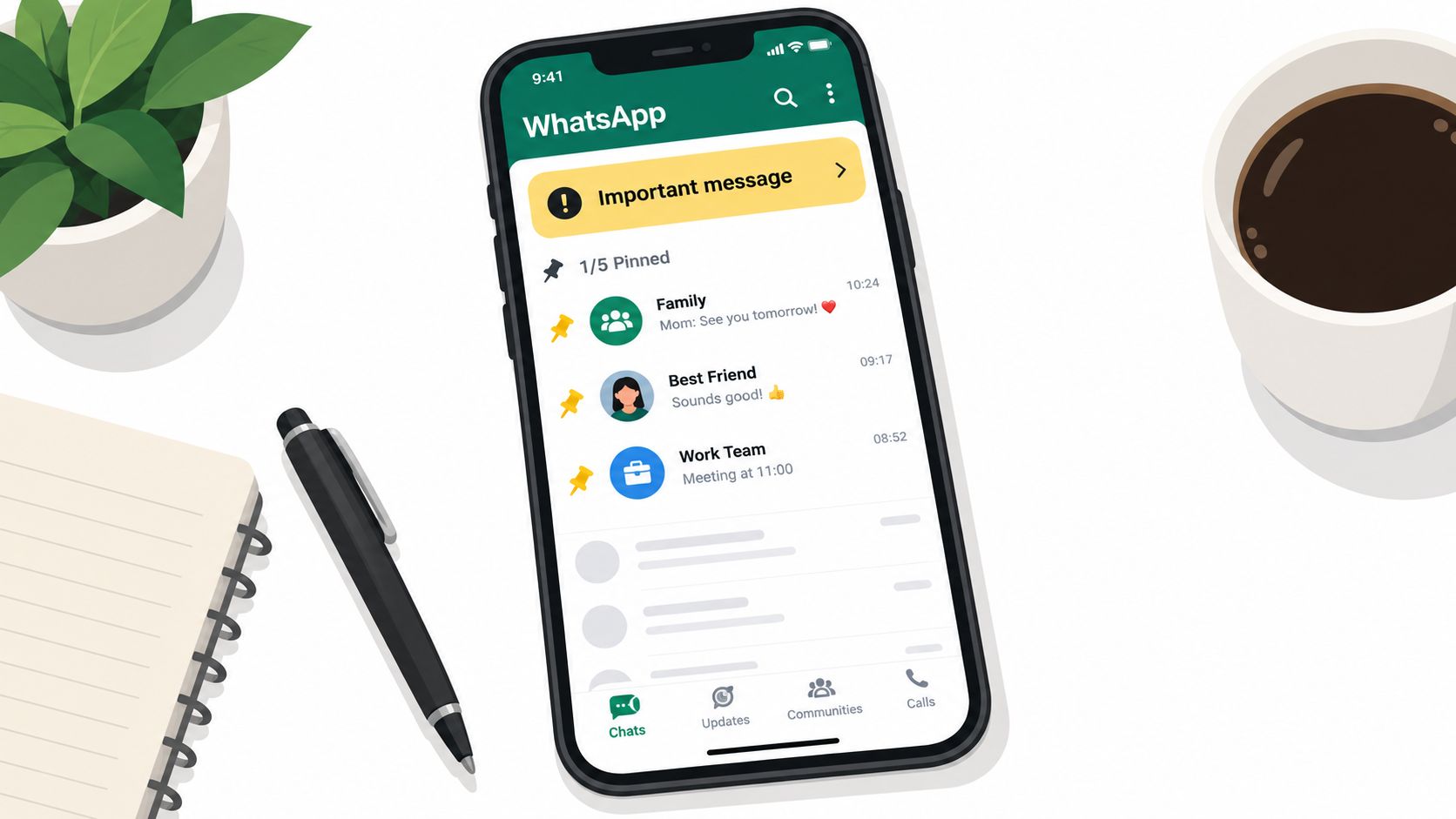
A group member taps the pin option beneath an address, instruction, or decision. The message then gains a visible place at the top of the WhatsApp chat. This is different from pinning the entire conversation in your inbox. WhatsApp promotes a specific message inside the shared chat, and selecting its banner returns you to that message in the conversation.
The pin is part of the shared chat
The pin behaves more like a shared signpost than a private bookmark. Current participants may see the pinned message, and a group chat may receive a system notice showing that a message was pinned and who performed the action, as WhatsApp explains group pin visibility and notices.
That notice adds context without changing the original text. It tells people that someone intentionally brought the message forward, making its location easier to find and the pinning action easier to notice. A private shortcut and a group-level marker have different privacy effects.
WhatsApp provides a selected duration for the pin:
- 24 hours: The banner remains temporarily and is removed when the period ends.
- 7 days: The message stays promoted through a longer working period.
- 30 days: The pin remains visible for the longest duration described in the cited guidance before it expires.
Expiry removes the pin, not automatically the message. The original text may still appear in the ordinary chat history after the banner disappears. Its continued availability depends on other chat settings and on whether someone deleted or cleared the message.
What later participants may miss
A pin does not preserve a separate copy of the message. WhatsApp states that participants may not see a pinned message if they joined after it was sent, cleared their chat history, or deleted the message before it was pinned. A person who enters the group later can therefore miss the original context as well as the earlier pin state.
The distinction matters in work groups, sensitive discussions, and fast-moving rooms. A pin can help current members retrieve an instruction, address, or decision, but it should not serve as the only record. It is a shared pointer governed by an expiry setting, not a guaranteed historical archive.
A banner can improve retrieval while making sensitive content more noticeable.
Before pinning, check who currently belongs to the chat and whether the message is suitable for all of them to see at the top. If it is not, pinning exposes the wrong information to the wrong audience.
Privacy Risks of Pinned Messages and Retention
You pin a sensitive message for quick access, then leave the chat open on a shared computer. The feature has done its job, but it may also have made that message easier for someone else to notice. Pinning is a privacy and retention choice, not a protective layer.
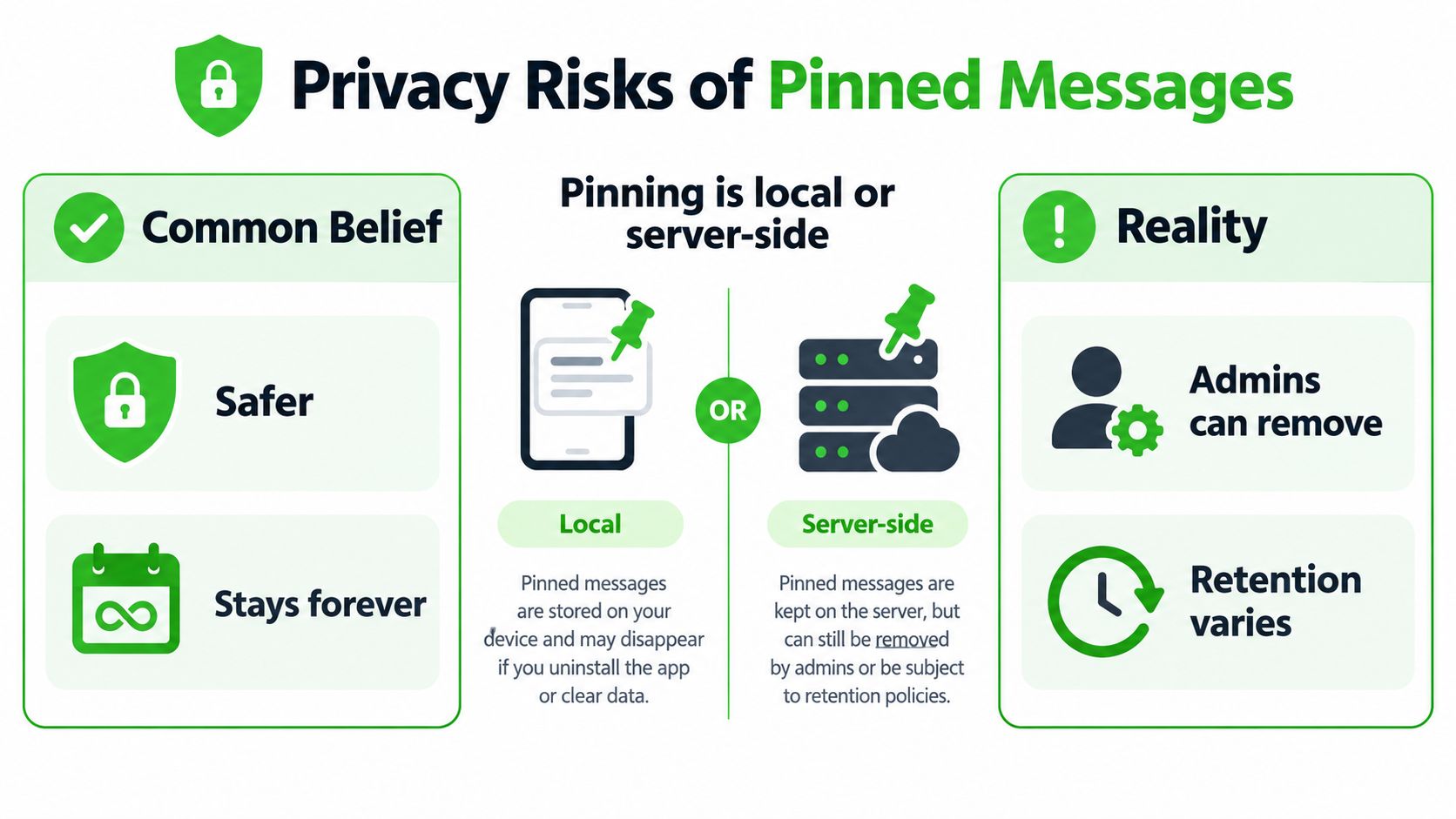
In a conversation-list design, pinning changes prominence on your device or a supported web interface. In a shared-message design, it can add visible metadata inside the chat. Neither type of pin makes the content safer, more confidential, or permanently available.
Prominence is not protection
A pinned conversation is easier to spot by design. That helps when you are the only person using the device, but it increases discoverability for anyone who can view a device left open, an active app, or a browser session. A sensitive thread that was buried among other conversations now occupies a more noticeable position.
A shared pin creates a different exposure route. Participants may see the banner, and a group may receive a system message that records the pinning action. The original message stays in its normal conversation position, while the app creates another visual path to it.
Several assumptions can lead to poor privacy decisions:
- “Pinned means backed up.” Pinning does not prove that the content was copied or preserved independently.
- “Pinned means permanent.” WhatsApp's documented durations show that a pin can expire.
- “Pinned means deleted content survives.” If the underlying message is deleted or unavailable, the pin may not restore access.
- “Pinned means private.” In a group, other participants may see the pin.
- “Pinned means secure.” Pinning does not change the underlying message's encryption or delivery status.
Retention follows the platform
A conversation pin and a message pin can have separate lifecycles. The first may be interface state tied to your conversation list. The second may be shared state tied to the chat and displayed to participants. Platform rules for deletion, expiry, synchronization, and history still determine what remains accessible.
A pin should not replace a deliberate retention policy. For sensitive content, consider who already has chat access, who may see the pinned placement, and whether the message should remain available at all. Pinning a message you later regret can help others locate it before you remove it.
Privacy check: If the message could cause harm when displayed in a banner or screenshot, do not use pinning as your filing system.
Use a modest interpretation: a pin helps a person or group find existing content. It does not change the content's legal, security, or retention status. Treat the underlying message and the pin as separate pieces of chat state, then assess both before using the feature.
Pinning in Short-Lived Encrypted Chats
Ephemeral messaging changes the meaning of retrieval. In a short-lived encrypted room, messages are designed to disappear rather than remain available as a permanent reference. A traditional permanent-looking pin can conflict with that goal because it encourages participants to treat one item as an exception to the room's limited lifetime.
The key question is simple: what would a pin preserve? If it preserves only a local visual shortcut, the shortcut may point to content that has already expired. If it creates shared state, it may add a durable-looking index to a conversation whose purpose is data minimization. Either way, the pin can't promise that the original message will outlive its configured lifecycle.
Some privacy-focused systems therefore favor temporary indicators or omit message pinning altogether. Navigation can rely on the local conversation view while the message remains available, without creating a separate long-term reference. Once the message expires or a participant removes it, the interface should not imply that retrieval is still possible.
For readers dealing with accidental deletion or device changes, a neutral guide to how to recover Android data may help explain ordinary recovery questions. Recovery tools and ephemeral messaging serve opposite purposes, though. One looks for data that still exists somewhere, while the other is designed to limit how long data remains available.
A broader explanation of what ephemeral messaging means can help separate temporary access from permanent storage. In a short-lived encrypted chat, a pin should never be treated as proof that content has escaped expiry, deletion, or a manual burn. If the system promises limited retention, that limit should govern the message even when the user wants a convenient highlight.
A Practical Rule of Thumb Before You Pin
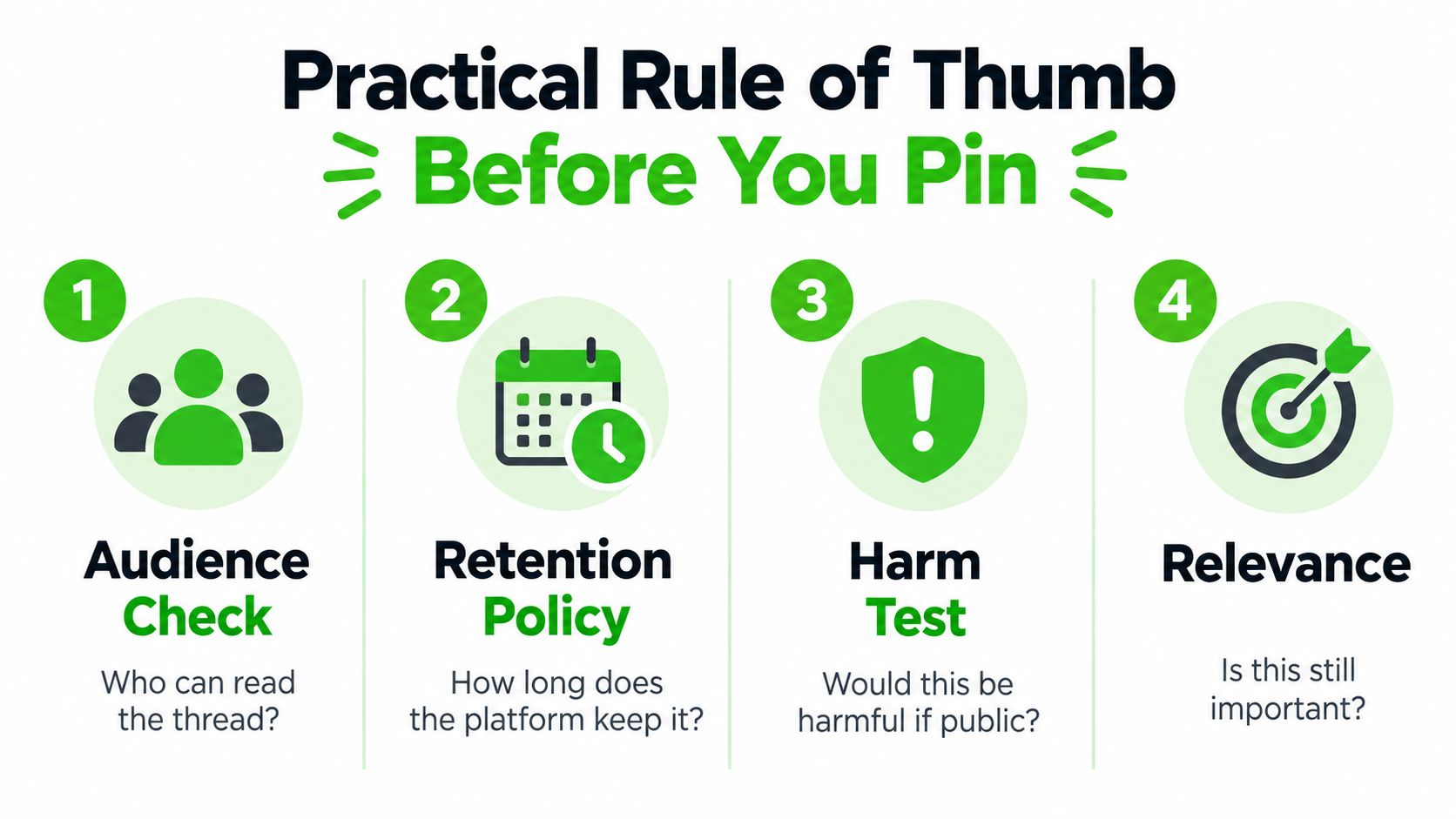
Use four questions before promoting a message or conversation:
- Who can read it? A private conversation shortcut may affect what people see on your device. A message pin in a group may be visible to current participants and may generate a system notice.
- How long is it meant to remain available? Check whether the platform treats the pin as a temporary banner, a conversation-list preference, or another form of chat state.
- Would increased visibility create harm? A pin places attention on content. If the message would be risky in a screenshot, shared screen, or workplace review, don't make it more prominent.
- Is the message still relevant? A stale pin can misdirect people, especially when the original instruction, address, or decision has changed.
Choose the least revealing option
If you only need to remember a detail, a private note may be better than changing the chat's visual hierarchy. That keeps the reminder separate from a shared conversation and avoids signaling to other participants that you've singled out a particular message.
If the whole group already needs the information, a shared pin can be appropriate. Use it for content that participants are expected to find, such as a current instruction or agreed reference, and remove or update it when it no longer applies.
For sensitive material, consider whether deleting the message or conversation is more appropriate than pinning it. A clear explanation of how to delete messages can help you choose removal instead of increased visibility when the content no longer belongs in the chat.
The simplest rule is this: pin for retrieval, never for concealment. A pin makes something easier to find. It doesn't make the message private, permanent, recoverable, or protected from ordinary platform behavior.
Ciphar provides browser-based, identity-free encrypted chat for conversations designed to disappear rather than become permanent records. If you're weighing the difference between quick retrieval and limited retention, visit Ciphar to explore a privacy-focused way to hold a short-lived conversation.